cancel
Showing results for 
Search instead for 
Did you mean: 

Next up in the FabCon + SQLCon recap series: The roadmap for Microsoft SQL and Maximizing Developer experiences in Fabric. All sessions are available on-demand after the live show. Register now

Reply
yasbos
Resolver II
Resolver II

Limit Months in x Axis to Current Month

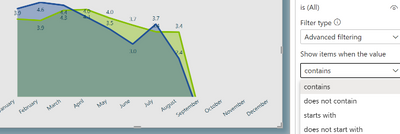
I can't figure out why the X axis shows September, to December, when I have no data for them in my table. I should see the graph from Jan to August only. I looked in the advanced filtering, but it doesn't give me useful criteria. Any help would be appreciated.


yasbos_0-1659849201773.png


1 ACCEPTED SOLUTION
Anonymous
Not applicable

Hi @yasbos 


Not sure if you generate the Calendar table by CALENDARAUTO, you can limit the Calendar to end at the Max date of your fact table if you want to. Or go to your current Calendar table, add a column like IF([Month]<=MONTH(yourFactTableMaxDate), 1,0)  -  just explaining logic, then use this column as a filter.

View solution in original post

4 REPLIES 4
Anonymous
Not applicable

@yasbos 


Is the Month in X axis coming from a dim Calendar table not your fact table? You can add a column there to limit it to the current month, then add as a visual level filter.

Thanks so much, @Anonymous . Yes, indeed, it's coming from a dim table. I'm not sure, though, that I understand your solution. Thanks so much.
P.s. I'm going to sleep  now, so I probably won't see any responses until a few hours later. 

Anonymous
Not applicable

Hi @yasbos 


Not sure if you generate the Calendar table by CALENDARAUTO, you can limit the Calendar to end at the Max date of your fact table if you want to. Or go to your current Calendar table, add a column like IF([Month]<=MONTH(yourFactTableMaxDate), 1,0)  -  just explaining logic, then use this column as a filter.

Thanks @Anonymous
That works, but, you see, what is mind boggling is that everything works fine on another graph that uses this same calendar table but with another fact table!!

Helpful resources

Announcements
New to Fabric survey Carousel

New to Fabric Survey

If you have recently started exploring Fabric, we'd love to hear how it's going. Your feedback can help with product improvements.

Power BI DataViz World Championships carousel

Power BI DataViz World Championships - June 2026

A new Power BI DataViz World Championship is coming this June! Don't miss out on submitting your entry.

Join our Fabric User Panel

Join our Fabric User Panel

Share feedback directly with Fabric product managers, participate in targeted research studies and influence the Fabric roadmap.

March Power BI Update Carousel

Power BI Community Update - March 2026

Check out the March 2026 Power BI update to learn about new features.