Don't miss your chance to take the Fabric Data Engineer (DP-600) exam for FREE! Find out how by attending the DP-600 session on April 23rd (pacific time), live or on-demand.
Learn moreNext up in the FabCon + SQLCon recap series: The roadmap for Microsoft SQL and Maximizing Developer experiences in Fabric. All sessions are available on-demand after the live show. Register now
Hello,
So far, this article is the closest I've come to trying to reach a measure that I've been working on for a while...
Measure equavalent for string similarity formula
I know it can be done in SQL through a scalar value function creation. I am wondering if it can be done in Power BI using some form of calculatetable, selected value, and and an iterator function like sumx and/or rankx. Here is an example of what I am trying to do...
I have one static column as seen below. I want to create a measure that finds the top n number of similarity percentages for a [TestColumn] selected value slicer matched with every other value within the same column.
TestColumn
| Leaf |
| Leaves |
| Trees |
| Leafly |
| Lost Lake |
| Hawaii |
| Free |
| Moist |
| posture |
| Classical |
| Classic |
| Jobe |
| Job |
| Freedom |
| Lost Music |
| rap |
| R&B |
| Rapper |
| Rapped |
| Wrap |
| Wrrap |
| Wrapper |
| Boy |
| Boys |
| Boston |
The reason for this question is to help a company do a massive clean up to a 32k vendor list.
Please let me know if this is possible in DAX.
Thanks.
Solved! Go to Solution.
Hi,
Please try to create a seperate slicer table as the same with your original table first.
Create this column:
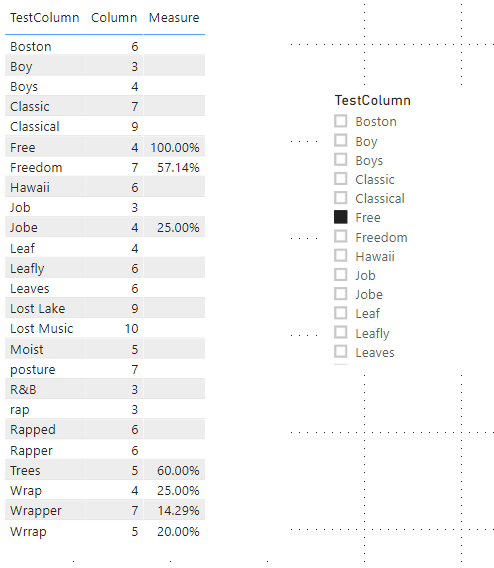
Column = LEN('Table'[TestColumn])Then try this measure:
Measure =
VAR SlicerText =
SELECTEDVALUE ( 'Slicer Table'[TestColumn] )
VAR TableText =
SELECTEDVALUE ( 'Table'[TestColumn] )
VAR length =
MAX ( LEN ( SlicerText ), LEN ( TableText ) )
VAR TestTable =
ADDCOLUMNS (
GENERATESERIES ( 1, length, 1 ),
"InSlicer", MID ( SlicerText, [Value], 1 ),
"InTable", MID ( TableText, [Value], 1 )
)
RETURN
COUNTROWS ( FILTER ( TestTable, [InSlicer] = [InTable] ) )
/ COUNTROWS ( TestTable )When you select one value in slicer, the result shows:
Here is my test pbix file:
Hope this helps.
Best Regards,
Giotto Zhi
Hi,
Please try to create a seperate slicer table as the same with your original table first.
Create this column:
Column = LEN('Table'[TestColumn])Then try this measure:
Measure =
VAR SlicerText =
SELECTEDVALUE ( 'Slicer Table'[TestColumn] )
VAR TableText =
SELECTEDVALUE ( 'Table'[TestColumn] )
VAR length =
MAX ( LEN ( SlicerText ), LEN ( TableText ) )
VAR TestTable =
ADDCOLUMNS (
GENERATESERIES ( 1, length, 1 ),
"InSlicer", MID ( SlicerText, [Value], 1 ),
"InTable", MID ( TableText, [Value], 1 )
)
RETURN
COUNTROWS ( FILTER ( TestTable, [InSlicer] = [InTable] ) )
/ COUNTROWS ( TestTable )When you select one value in slicer, the result shows:
Here is my test pbix file:
Hope this helps.
Best Regards,
Giotto Zhi
Not Found file .pbix for download
So what would be the expected output from the sample data you have provided? Are you basically trying to determine how many characters each value has in common with all of the other values in the column?
If you have recently started exploring Fabric, we'd love to hear how it's going. Your feedback can help with product improvements.
A new Power BI DataViz World Championship is coming this June! Don't miss out on submitting your entry.
Share feedback directly with Fabric product managers, participate in targeted research studies and influence the Fabric roadmap.
| User | Count |
|---|---|
| 44 | |
| 43 | |
| 38 | |
| 18 | |
| 16 |
| User | Count |
|---|---|
| 67 | |
| 63 | |
| 30 | |
| 30 | |
| 23 |