cancel
Showing results for 
Search instead for 
Did you mean: 

Get Fabric Certified for FREE during Fabric Data Days. Don't miss your chance! Request now

Reply
DouweMeer
Impactful Individual

Legend within a running total number

So I'm completely stuck at the moment and I hope someone can help me out. 


I got this table with all our cases in it. I unpivot the table on the fields created date and closed date which resulted in a single field with date and an additional field defining whether it is closed, or created date. Now I have a single datum column for all my cases. What I now want to calculated is the amount of cases that were open, at a specific date with set filter. I started by adding 2 fields for closed and created in it the expression if ( 'attribute' = 'closed' , 1 , blank () ). This field is either named Create2, or Close2. 


So far it somehow works, but as soon I put a legend in it, it just shows me the total without the filter on legend and replicates this number for each legend. I've already tried multiple things, but it seems not to be working. 


What I got in Power BI: 


See the titles in the printscreen for an expression

Net open = create - close


image.png


What I expect :


Untitled.png


4 REPLIES 4
v-frfei-msft
Community Support
Community Support

Hi @DouweMeer ,


Could you please share your sample data and excepted result to me if you don't have any Confidential Information.Please upload your files to One Drive and share the link here.


Regards,

Frank

Community Support Team _ Frank
If this post helps, then please consider Accept it as the solution to help the others find it more quickly.

@v-frfei-msft 


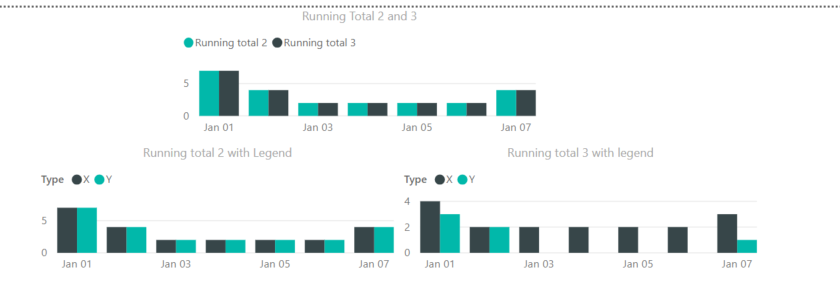
So, I'm showing here what I actually want with Running total 3 with legend. This is created by allexcept and specifying Type as exception. This is the results I want, but then without pre specifying which columns I want to use as a filter.  


My fear is that it doesn't exist yet. 


image.png

@v-frfei-msft 


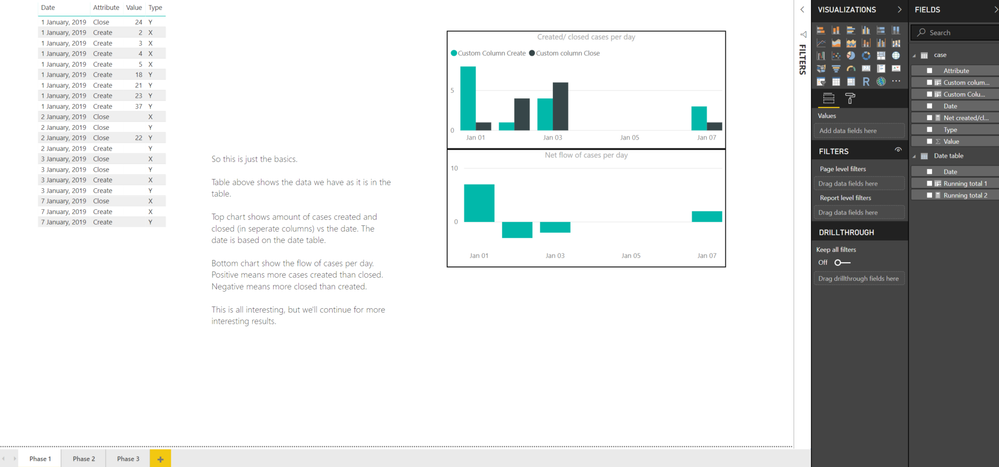
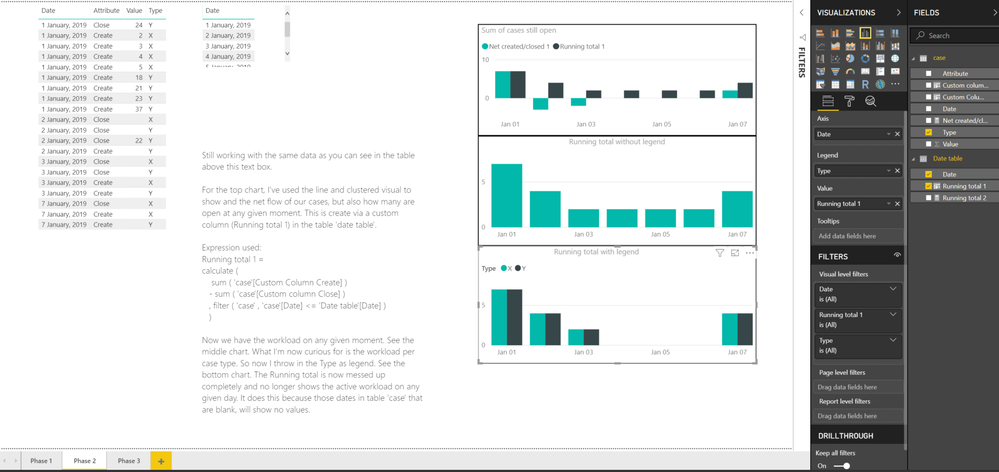
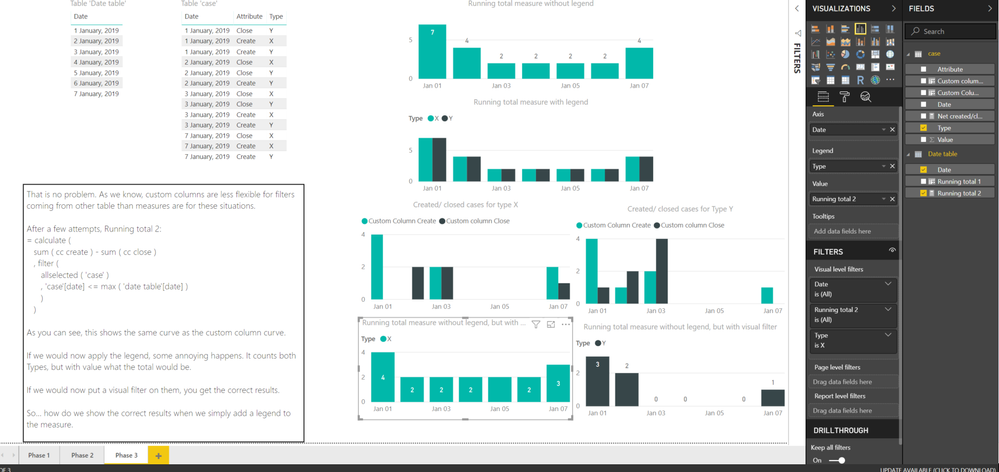
So I created yesterday this example file with some added text boxes for explanation. Now I'm having issues adding it here. Apparently the company has blocked the websites onedrive and dropbox, so I can't share the link. The best I can do at the moment is make some printscreens. If you have a better idea, pleasae share it with me. I'll give it a try. 


What I think for its current behavior is caused by allselected. As the legend will be seen as 'implicit filters', they will be removed. Therefore it will return the total number of all types, instead of the type defined by the legend. What it needs, I think, is some sort of allexcept with being different is that it will only remove the implicit filters (/or and explicit filter) on a specified column. This specified column would be the 'case'[date] column.


Do you know of a way to achieve this? 


Untitled.pngUntitled1.pngUntitled2.png


DouweMeer
Impactful Individual

A custom column in a separate date table would look like : 


Customn Column = calculate ( sum ( 'Case'[Create2] ) - sum ( 'Case'[Close2] ) , filter ( 'case' , 'Case'[date] <= 'Date table'[Date] ) )
 
For an legend, I would just create multiple columns with an additional filter behind it with , filter ( 'case' , 'case'[type] = "..." ). But that isn't really efficient and would prefer a measure for it :). 

Helpful resources

Announcements
November Power BI Update Carousel

Power BI Monthly Update - November 2025

Check out the November 2025 Power BI update to learn about new features.

Fabric Data Days Carousel

Fabric Data Days

Advance your Data & AI career with 50 days of live learning, contests, hands-on challenges, study groups & certifications and more!

FabCon Atlanta 2026 carousel

FabCon Atlanta 2026

Join us at FabCon Atlanta, March 16-20, for the ultimate Fabric, Power BI, AI and SQL community-led event. Save $200 with code FABCOMM.

Top Solution Authors
Top Kudoed Authors