cancel
Showing results for 
Search instead for 
Did you mean: 

The Power BI Data Visualization World Championships is back! Get ahead of the game and start preparing now! Learn more

Reply
dvotf
Frequent Visitor

Legend on map showing all names in all places

Hi all,


I'm trying to throw together a a simple map, but I'm having issues getting it to show the place names correctly. I'm taken a simple csv file with three headings: Name, Latitude, Longitude. Latitude and Longitude both seem to be working fine, with the dot appearing where they should. But when I add in Names (to the Legend section), Power BI shows them all in all locations in a mini pie chart form (screenshot below).


Screenshot of Power BI rendering


Here's the barebones dataset I'm using to test this out:


Name	Longitute	Latitude
Paris	2.343179	48.86206
London	-0.102216	51.51786
Berlin	13.40233	52.50141
Madrid	-3.705769	40.41792
Dublin	-6.261357	53.34379


Has anybody any ideas on why this is happening and how I can work around it?


2 ACCEPTED SOLUTIONS
ankitpatira
Community Champion
Community Champion

@dvotf make sure you also drop name field onto size section of the map visual and set it as Count of Name, it should then appear back as normal.

View solution in original post

Anonymous
Not applicable

Hi @dvotf,

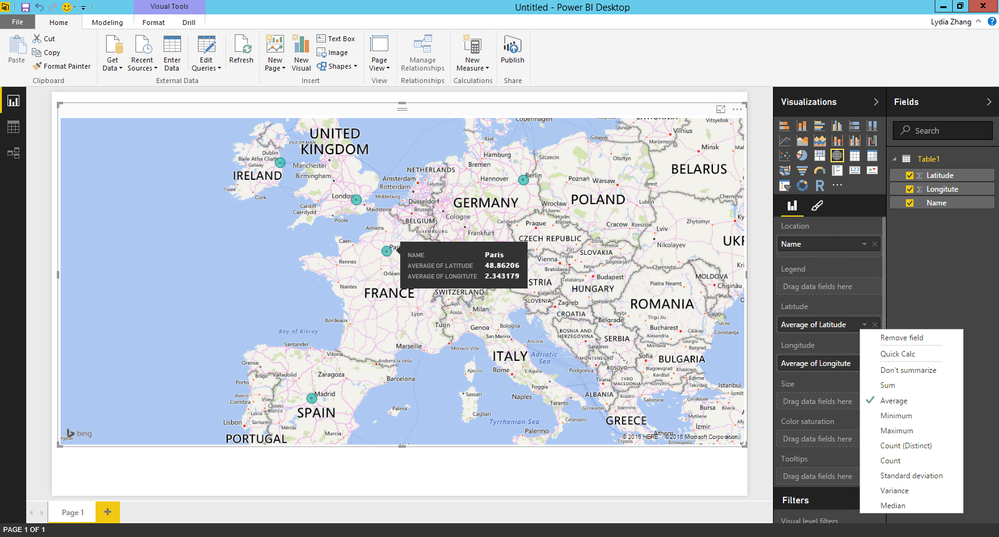
Alternatively, you can drag Name to Location, set the aggregate for Latitude and Longitude to Average in your scenario. Below is the relevant screenshot.
111.png


There is also an article about tips for creating Map in Power BI for your reference.
https://powerbi.microsoft.com/en-us/documentation/powerbi-service-tips-and-tricks-for-power-bi-map-v...

Thanks,
Lydia Zhang

View solution in original post

2 REPLIES 2
Anonymous
Not applicable

Hi @dvotf,

Alternatively, you can drag Name to Location, set the aggregate for Latitude and Longitude to Average in your scenario. Below is the relevant screenshot.
111.png


There is also an article about tips for creating Map in Power BI for your reference.
https://powerbi.microsoft.com/en-us/documentation/powerbi-service-tips-and-tricks-for-power-bi-map-v...

Thanks,
Lydia Zhang

ankitpatira
Community Champion
Community Champion

@dvotf make sure you also drop name field onto size section of the map visual and set it as Count of Name, it should then appear back as normal.

Helpful resources

Announcements
Power BI DataViz World Championships

Power BI Dataviz World Championships

The Power BI Data Visualization World Championships is back! Get ahead of the game and start preparing now!

December 2025 Power BI Update Carousel

Power BI Monthly Update - December 2025

Check out the December 2025 Power BI Holiday Recap!

FabCon Atlanta 2026 carousel

FabCon Atlanta 2026

Join us at FabCon Atlanta, March 16-20, for the ultimate Fabric, Power BI, AI and SQL community-led event. Save $200 with code FABCOMM.