cancel
Showing results for 
Search instead for 
Did you mean: 

Get Fabric Certified for FREE during Fabric Data Days. Don't miss your chance! Request now

Reply
rachel65
Regular Visitor

Latitude and Longitude not plotting on MAP

Hello!


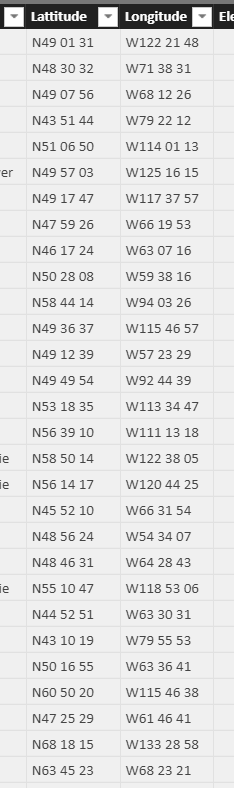
I have columns for latitude and longitude4 in my data for a power bi report but when i drag it to the long and lat section for maps it does not work and just plots 0,0


My coordinates are in this fornat: (see below) but i dont think that is the problem seeing how there is no way to fix this anywas (n o way to convert it)


I attached a picture of the data.


ThanksCapture.PNG

1 ACCEPTED SOLUTION
v-cherch-msft
Microsoft Employee
Microsoft Employee

Hi @rachel65


Latitude and Longitude fields must be in Decimal Number format. Latitude values should be between -90 and 90, and longitude values should be between -180 and 180. You may try to replace your data as correct value format. Here are the articles for your reference.


https://docs.microsoft.com/en-us/power-bi/power-bi-map-tips-and-tricks

http://radacad.com/how-to-do-power-bi-mapping-with-latitude-and-longitude-only


Regards,

Cherie

Community Support Team _ Cherie Chen
If this post helps, then please consider Accept it as the solution to help the other members find it more quickly.

View solution in original post

2 REPLIES 2
atlrican2019
New Member

I am having issues getting Power BI to plot the correct Lat and Long for Guam and Mexico.  My spreadsheet has the correct Lat and Long for the locations; however, when it plots it on the map the numbers change and plot it incorrectly.  I do not have any issues with other locations.  Don't know why it is not using the data that I have on my spreadsheet.  Can someone please help me figure out a solution?  Thank you!

v-cherch-msft
Microsoft Employee
Microsoft Employee

Hi @rachel65


Latitude and Longitude fields must be in Decimal Number format. Latitude values should be between -90 and 90, and longitude values should be between -180 and 180. You may try to replace your data as correct value format. Here are the articles for your reference.


https://docs.microsoft.com/en-us/power-bi/power-bi-map-tips-and-tricks

http://radacad.com/how-to-do-power-bi-mapping-with-latitude-and-longitude-only


Regards,

Cherie

Community Support Team _ Cherie Chen
If this post helps, then please consider Accept it as the solution to help the other members find it more quickly.

Helpful resources

Announcements
November Power BI Update Carousel

Power BI Monthly Update - November 2025

Check out the November 2025 Power BI update to learn about new features.

Fabric Data Days Carousel

Fabric Data Days

Advance your Data & AI career with 50 days of live learning, contests, hands-on challenges, study groups & certifications and more!

FabCon Atlanta 2026 carousel

FabCon Atlanta 2026

Join us at FabCon Atlanta, March 16-20, for the ultimate Fabric, Power BI, AI and SQL community-led event. Save $200 with code FABCOMM.

Top Solution Authors
Top Kudoed Authors