FabCon is coming to Atlanta
Join us at FabCon Atlanta from March 16 - 20, 2026, for the ultimate Fabric, Power BI, AI and SQL community-led event. Save $200 with code FABCOMM.
Register now!- Power BI forums
- Get Help with Power BI
- Desktop
- Service
- Report Server
- Power Query
- Mobile Apps
- Developer
- DAX Commands and Tips
- Custom Visuals Development Discussion
- Health and Life Sciences
- Power BI Spanish forums
- Translated Spanish Desktop
- Training and Consulting
- Instructor Led Training
- Dashboard in a Day for Women, by Women
- Galleries
- Data Stories Gallery
- Themes Gallery
- Contests Gallery
- QuickViz Gallery
- Quick Measures Gallery
- Visual Calculations Gallery
- Notebook Gallery
- Translytical Task Flow Gallery
- TMDL Gallery
- R Script Showcase
- Webinars and Video Gallery
- Ideas
- Custom Visuals Ideas (read-only)
- Issues
- Issues
- Events
- Upcoming Events
The Power BI Data Visualization World Championships is back! Get ahead of the game and start preparing now! Learn more
- Power BI forums
- Forums
- Get Help with Power BI
- Desktop
- Re: Latest value in sub groups
- Subscribe to RSS Feed
- Mark Topic as New
- Mark Topic as Read
- Float this Topic for Current User
- Bookmark
- Subscribe
- Printer Friendly Page

- Mark as New
- Bookmark
- Subscribe
- Mute
- Subscribe to RSS Feed
- Permalink
- Report Inappropriate Content
Latest value in sub groups
Hi,
I am trying to get the most recent record (based on "Created on" column) for each sub group (based on "Opportunity ID") in Power Query.
I would greatly appreceate any help! Thanks
Sample Data:
| Opportunity ID | Advisor Name | Prospect Name | Account Value | Stage | Created On |
| 1 | Tony Stark | Hulk | $100 | Proposal Sent | 1/1/2020 |
| 1 | Tony Stark | Hulk | $100 | Proposal Reviewed with Advisor | 1/10/2020 |
| 2 | Tony Stark | Thor | $500 | Proposal Sent | 1/1/2020 |
| 2 | Tony Stark | Thor | $500 | Proposal Reviewed with Advisor | 1/20/2020 |
| 2 | Tony Stark | Thor | $500 | Case Lost | 2/1/2020 |
| 3 | Tony Stark | Batman | $800 | Proposal Sent | 2/1/2020 |
| 3 | Tony Stark | Batman | $800 | Proposal Reviewed with Advisor | 3/1/2020 |
| 3 | Tony Stark | Batman | $800 | Case Won | 3/2/2020 |
Solved! Go to Solution.


- Mark as New
- Bookmark
- Subscribe
- Mute
- Subscribe to RSS Feed
- Permalink
- Report Inappropriate Content
@Anonymous -
Using https://excelgorilla.com/power-bi/power-query/reach-underlying-rows-using-table-max/ as a template.
let
    Source = Table.FromRows(Json.Document(Binary.Decompress(Binary.FromText("i45WMlTSUQrJz6tUCC5JLMoGcjxKc0CUiqGBAZAKKMovyC9OzFEITs0rAfIN9Q31jQyMDJRidYjXG5RalplanpqiUJ5ZkqHgmFKWWZxfpAAxzQBhnBG6cSEZ+UUg40wJO4VYvXicYkS8U5wTi1MVfPKLQc4wQnaGMbo+p8SS3MQ8kE4LrJ4gUzdObxiTZB7YH+H5eWCNRlCNsQA=", BinaryEncoding.Base64), Compression.Deflate)), let _t = ((type text) meta [Serialized.Text = true]) in type table [#"Opportunity ID" = _t, #"Advisor Name" = _t, #"Prospect Name" = _t, #"Account Value" = _t, Stage = _t, #"Created On" = _t]),
    #"Changed Type" = Table.TransformColumnTypes(Source,{{"Opportunity ID", Int64.Type}, {"Advisor Name", type text}, {"Prospect Name", type text}, {"Account Value", Currency.Type}, {"Stage", type text}, {"Created On", type date}}),
    #"Grouped Rows" = Table.Group(#"Changed Type", {"Opportunity ID"}, {{"Grouped", each _, type table [Opportunity ID=number, Advisor Name=text, Prospect Name=text, Account Value=number, Stage=text, Created On=date]}}),
    #"Added Custom" = Table.AddColumn(#"Grouped Rows", "Custom", each Table.Max([Grouped],"Created On")),
    #"Expanded Custom" = Table.ExpandRecordColumn(#"Added Custom", "Custom", {"Advisor Name", "Prospect Name", "Account Value", "Stage", "Created On"}, {"Advisor Name", "Prospect Name", "Account Value", "Stage", "Created On"}),
    #"Removed Columns" = Table.RemoveColumns(#"Expanded Custom",{"Grouped"})
in
    #"Removed Columns"
Did I answer your question? Mark my post as a solution!
Did my answers help arrive at a solution? Give it a kudos by clicking the Thumbs Up!
Proud to be a Super User!


- Mark as New
- Bookmark
- Subscribe
- Mute
- Subscribe to RSS Feed
- Permalink
- Report Inappropriate Content
Hi @Anonymous
I've completed this in Power Query as follows:
let
    Source = Table.FromRows(Json.Document(Binary.Decompress(Binary.FromText("i45WMlTSUQrJz6tUCC5JLMoGcjxKc0CUiqGBAZAKKMovyC9OzFEITs0rAfIN9Q31jQyMDJRidYjXG5RalplanpqiUJ5ZkqHgmFKWWZxfpAAxzQBhnBG6cSEZ+UUg40wJO4VYvXicYkS8U5wTi1MVfPKLQc4wQnaGMbo+p8SS3MQ8kE4LrJ4gUzdObxiTZB7YH+H5eWCNRlCNsQA=", BinaryEncoding.Base64), Compression.Deflate)), let _t = ((type text) meta [Serialized.Text = true]) in type table [#"Opportunity ID" = _t, #"Advisor Name" = _t, #"Prospect Name" = _t, #"Account Value" = _t, Stage = _t, #"Created On" = _t]),
    #"Replaced Value" = Table.ReplaceValue(Source,"$","",Replacer.ReplaceText,{"Account Value"}),
    chgTypeUSDate = Table.TransformColumnTypes(#"Replaced Value", {{"Created On", type date}}, "en-US"),
    chgTypeAll = Table.TransformColumnTypes(chgTypeUSDate,{{"Opportunity ID", type text}, {"Advisor Name", type text}, {"Prospect Name", type text}, {"Account Value", Currency.Type}, {"Stage", type text}, {"Created On", type date}}),
    groupByOppID = Table.Group(chgTypeAll, {"Opportunity ID"}, {{"data", each _, type table [Opportunity ID=text, Advisor Name=text, Prospect Name=text, Account Value=number, Stage=text, Created On=date]}}),
    addMaxDateCol = Table.AddColumn(groupByOppID, "maxDate", each Table.Max([data], "Created On")),
    expandMaxDateCol = Table.ExpandRecordColumn(addMaxDateCol, "maxDate", {"Advisor Name", "Prospect Name", "Account Value", "Stage", "Created On"}, {"Advisor Name", "Prospect Name", "Account Value", "Stage", "Created On"}),
    remDataCol = Table.RemoveColumns(expandMaxDateCol,{"data"}),
    chgTypAll2 = Table.TransformColumnTypes(remDataCol,{{"Advisor Name", type text}, {"Prospect Name", type text}, {"Account Value", Currency.Type}, {"Stage", type text}, {"Created On", type date}})
in
    chgTypAll2
Paste this into a blank query using Advanced Editor to follow the steps I took.
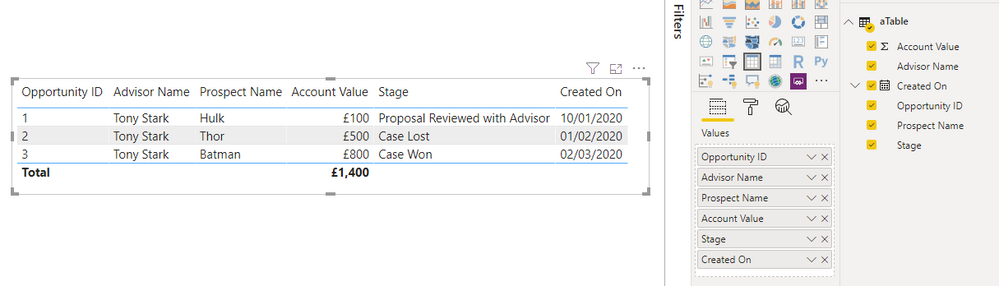
I get the following output (NB, UK date format!)
Pete
Now accepting Kudos! If my post helped you, why not give it a thumbs-up?
Proud to be a Datanaut!
- Mark as New
- Bookmark
- Subscribe
- Mute
- Subscribe to RSS Feed
- Permalink
- Report Inappropriate Content
Hi @Anonymous
I've completed this in Power Query as follows:
let
    Source = Table.FromRows(Json.Document(Binary.Decompress(Binary.FromText("i45WMlTSUQrJz6tUCC5JLMoGcjxKc0CUiqGBAZAKKMovyC9OzFEITs0rAfIN9Q31jQyMDJRidYjXG5RalplanpqiUJ5ZkqHgmFKWWZxfpAAxzQBhnBG6cSEZ+UUg40wJO4VYvXicYkS8U5wTi1MVfPKLQc4wQnaGMbo+p8SS3MQ8kE4LrJ4gUzdObxiTZB7YH+H5eWCNRlCNsQA=", BinaryEncoding.Base64), Compression.Deflate)), let _t = ((type text) meta [Serialized.Text = true]) in type table [#"Opportunity ID" = _t, #"Advisor Name" = _t, #"Prospect Name" = _t, #"Account Value" = _t, Stage = _t, #"Created On" = _t]),
    #"Replaced Value" = Table.ReplaceValue(Source,"$","",Replacer.ReplaceText,{"Account Value"}),
    chgTypeUSDate = Table.TransformColumnTypes(#"Replaced Value", {{"Created On", type date}}, "en-US"),
    chgTypeAll = Table.TransformColumnTypes(chgTypeUSDate,{{"Opportunity ID", type text}, {"Advisor Name", type text}, {"Prospect Name", type text}, {"Account Value", Currency.Type}, {"Stage", type text}, {"Created On", type date}}),
    groupByOppID = Table.Group(chgTypeAll, {"Opportunity ID"}, {{"data", each _, type table [Opportunity ID=text, Advisor Name=text, Prospect Name=text, Account Value=number, Stage=text, Created On=date]}}),
    addMaxDateCol = Table.AddColumn(groupByOppID, "maxDate", each Table.Max([data], "Created On")),
    expandMaxDateCol = Table.ExpandRecordColumn(addMaxDateCol, "maxDate", {"Advisor Name", "Prospect Name", "Account Value", "Stage", "Created On"}, {"Advisor Name", "Prospect Name", "Account Value", "Stage", "Created On"}),
    remDataCol = Table.RemoveColumns(expandMaxDateCol,{"data"}),
    chgTypAll2 = Table.TransformColumnTypes(remDataCol,{{"Advisor Name", type text}, {"Prospect Name", type text}, {"Account Value", Currency.Type}, {"Stage", type text}, {"Created On", type date}})
in
    chgTypAll2
Paste this into a blank query using Advanced Editor to follow the steps I took.
I get the following output (NB, UK date format!)
Pete
Now accepting Kudos! If my post helped you, why not give it a thumbs-up?
Proud to be a Datanaut!
- Mark as New
- Bookmark
- Subscribe
- Mute
- Subscribe to RSS Feed
- Permalink
- Report Inappropriate Content
@Anonymous -
Using https://excelgorilla.com/power-bi/power-query/reach-underlying-rows-using-table-max/ as a template.
let
    Source = Table.FromRows(Json.Document(Binary.Decompress(Binary.FromText("i45WMlTSUQrJz6tUCC5JLMoGcjxKc0CUiqGBAZAKKMovyC9OzFEITs0rAfIN9Q31jQyMDJRidYjXG5RalplanpqiUJ5ZkqHgmFKWWZxfpAAxzQBhnBG6cSEZ+UUg40wJO4VYvXicYkS8U5wTi1MVfPKLQc4wQnaGMbo+p8SS3MQ8kE4LrJ4gUzdObxiTZB7YH+H5eWCNRlCNsQA=", BinaryEncoding.Base64), Compression.Deflate)), let _t = ((type text) meta [Serialized.Text = true]) in type table [#"Opportunity ID" = _t, #"Advisor Name" = _t, #"Prospect Name" = _t, #"Account Value" = _t, Stage = _t, #"Created On" = _t]),
    #"Changed Type" = Table.TransformColumnTypes(Source,{{"Opportunity ID", Int64.Type}, {"Advisor Name", type text}, {"Prospect Name", type text}, {"Account Value", Currency.Type}, {"Stage", type text}, {"Created On", type date}}),
    #"Grouped Rows" = Table.Group(#"Changed Type", {"Opportunity ID"}, {{"Grouped", each _, type table [Opportunity ID=number, Advisor Name=text, Prospect Name=text, Account Value=number, Stage=text, Created On=date]}}),
    #"Added Custom" = Table.AddColumn(#"Grouped Rows", "Custom", each Table.Max([Grouped],"Created On")),
    #"Expanded Custom" = Table.ExpandRecordColumn(#"Added Custom", "Custom", {"Advisor Name", "Prospect Name", "Account Value", "Stage", "Created On"}, {"Advisor Name", "Prospect Name", "Account Value", "Stage", "Created On"}),
    #"Removed Columns" = Table.RemoveColumns(#"Expanded Custom",{"Grouped"})
in
    #"Removed Columns"
Did I answer your question? Mark my post as a solution!
Did my answers help arrive at a solution? Give it a kudos by clicking the Thumbs Up!
Proud to be a Super User!
Helpful resources

Power BI Dataviz World Championships
The Power BI Data Visualization World Championships is back! Get ahead of the game and start preparing now!

Power BI Monthly Update - December 2025
Check out the December 2025 Power BI Holiday Recap!

FabCon Atlanta 2026
Join us at FabCon Atlanta, March 16-20, for the ultimate Fabric, Power BI, AI and SQL community-led event. Save $200 with code FABCOMM.

| User | Count |
|---|---|
| 38 | |
| 37 | |
| 33 | |
| 32 | |
| 29 |


| User | Count |
|---|---|
| 132 | |
| 88 | |
| 82 | |
| 68 | |
| 64 |


