Join us at FabCon Atlanta from March 16 - 20, 2026, for the ultimate Fabric, Power BI, AI and SQL community-led event. Save $200 with code FABCOMM.
Register now!The Power BI Data Visualization World Championships is back! Get ahead of the game and start preparing now! Learn more
Hi all
I have gone through several threads trying to find what I want but I did not get a solution for my case (sorry if the solution has already been given to someone else).
I have a table like the below.
Product Inital Date End Date Value
AAAAA 01/01/2022 31/01/2022 60
AAAAA 01/02/2022 28/02/2022 50
AAAAA 01/03/2022 31/03/2022 70
Also, I have a Dates table whose relations with the Initial Date and End Date columns of this Table are inactive (otherwise I mess other stuff).
I want to create a matrix which shows the values for any given date. Like the one below.
Product 15/01/2022 31/01/2022 08/02/2022
AAAAAA 60 60 50
Thanks for your assistance
Solved! Go to Solution.
@jtemes , try a measure like this with date table
calculate(sumx(filter(Table, Table[End Date] <= Max('Date'[Date])), Table[Value]), crossfilter(Table, Date, none))
@jtemes , try a measure like this with date table
calculate(sumx(filter(Table, Table[End Date] <= Max('Date'[Date])), Table[Value]), crossfilter(Table, Date, none))
The issue is that the table has more columns with other data and, if I do that, these data would be inaccurate.
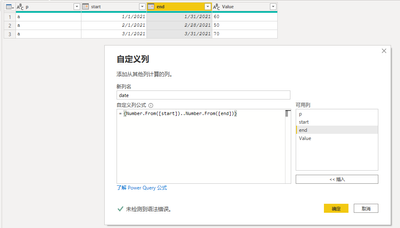
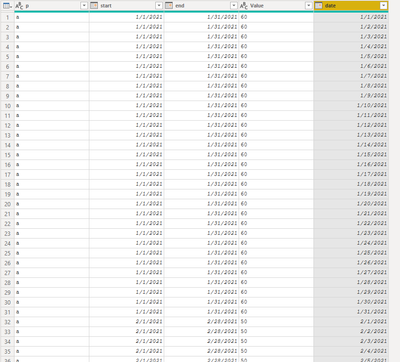
in power query add colum {Number.From(Inital Date) ..Number.From(End Date)} and expand
The Power BI Data Visualization World Championships is back! Get ahead of the game and start preparing now!
| User | Count |
|---|---|
| 38 | |
| 36 | |
| 33 | |
| 32 | |
| 29 |
| User | Count |
|---|---|
| 129 | |
| 88 | |
| 79 | |
| 68 | |
| 63 |