cancel
Showing results for 
Search instead for 
Did you mean: 

The Power BI Data Visualization World Championships is back! Get ahead of the game and start preparing now! Learn more

Reply
Juerg
Regular Visitor

Last three digits of phone numbers masked after import

Hi,


I downloaded the Teams Call statistics from the teams admin portal and try to build a report on call history. 
In the .csv file, the caller numbers are visible in clear text. After the import to the PowerBI query editor (same also applies to Power Query Editor), the last three digits of the phone number are replaced by ***.


I need the full number in the report. Is there a way how I can stop PowerBI/PowerQuery from replacing the last three digits?


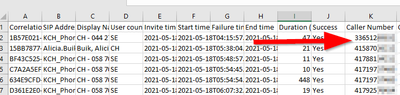
Before the import, full number is stored in the CSV

Juerg_0-1624008154664.png


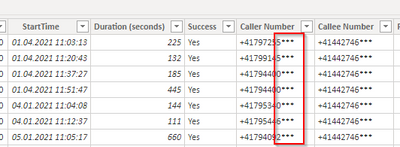
After the import, last three digits are replaced

Juerg_2-1624008283325.png


Thanks for your help!

Jürg

1 REPLY 1
amitchandak
Super User
Super User

@Juerg , check there might some steps added in power query to do that. I so remove that step.


Or Advance editor in power query for table and check for all steps

Share with Power BI Enthusiasts: Full Power BI Video (20 Hours) YouTube
Microsoft Fabric Series 60+ Videos YouTube
Microsoft Fabric Hindi End to End YouTube

Helpful resources

Announcements
Power BI DataViz World Championships

Power BI Dataviz World Championships

The Power BI Data Visualization World Championships is back! Get ahead of the game and start preparing now!

December 2025 Power BI Update Carousel

Power BI Monthly Update - December 2025

Check out the December 2025 Power BI Holiday Recap!

FabCon Atlanta 2026 carousel

FabCon Atlanta 2026

Join us at FabCon Atlanta, March 16-20, for the ultimate Fabric, Power BI, AI and SQL community-led event. Save $200 with code FABCOMM.