- Power BI forums
- Get Help with Power BI
- Desktop
- Service
- Report Server
- Power Query
- Mobile Apps
- Developer
- DAX Commands and Tips
- Custom Visuals Development Discussion
- Health and Life Sciences
- Power BI Spanish forums
- Translated Spanish Desktop
- Training and Consulting
- Instructor Led Training
- Dashboard in a Day for Women, by Women
- Galleries
- Data Stories Gallery
- Themes Gallery
- Contests Gallery
- QuickViz Gallery
- Quick Measures Gallery
- Visual Calculations Gallery
- Notebook Gallery
- Translytical Task Flow Gallery
- TMDL Gallery
- R Script Showcase
- Webinars and Video Gallery
- Ideas
- Custom Visuals Ideas (read-only)
- Issues
- Issues
- Events
- Upcoming Events
Learn from the best! Meet the four finalists headed to the FINALS of the Power BI Dataviz World Championships! Register now
- Power BI forums
- Forums
- Get Help with Power BI
- Desktop
- Last date value
- Subscribe to RSS Feed
- Mark Topic as New
- Mark Topic as Read
- Float this Topic for Current User
- Bookmark
- Subscribe
- Printer Friendly Page


- Mark as New
- Bookmark
- Subscribe
- Mute
- Subscribe to RSS Feed
- Permalink
- Report Inappropriate Content
Last date value
Hi everybody !
I want to show a last date value without a slicer, so I try function like firstnonblank and lastnonblank but nothing worked..
Is it possible or should I put a date slicer in order to forecast a last date value ?
Thanks
Best regards
David
Solved! Go to Solution.


- Mark as New
- Bookmark
- Subscribe
- Mute
- Subscribe to RSS Feed
- Permalink
- Report Inappropriate Content
That is why it is important to post sample data to clarify. Try this:
Measure =
VAR maxDate = MAX('Table'[Date])

RETURN
MAXX(FILTER('Table',[Date]=maxDate),[Column])
Something like that.
Follow on LinkedIn
@ me in replies or I'll lose your thread!!!
Instead of a Kudo, please vote for this idea
Become an expert!: Enterprise DNA
External Tools: MSHGQM
YouTube Channel!: Microsoft Hates Greg
Latest book!: DAX For Humans
DAX is easy, CALCULATE makes DAX hard...
- Mark as New
- Bookmark
- Subscribe
- Mute
- Subscribe to RSS Feed
- Permalink
- Report Inappropriate Content
Hello.
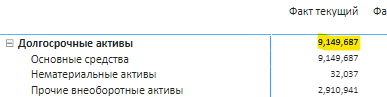
Yes, that formula works for 1 level items. But when I add the one level above which is supposed to summarize the calculated level 1 numbers, it works exactly the same as level 1. It doesn't add but returns 1 biggest value. Can you solve that?

- Mark as New
- Bookmark
- Subscribe
- Mute
- Subscribe to RSS Feed
- Permalink
- Report Inappropriate Content
@DavidB023 I didn't understand what you want, but have you tried to use the function LASTDATE()?
- Mark as New
- Bookmark
- Subscribe
- Mute
- Subscribe to RSS Feed
- Permalink
- Report Inappropriate Content
@Anonymous
I would like to display a value which correspond to my last date value. So for exemple, my date are in month, today I want to see May value. (all of this without a slicer to choose date)


- Mark as New
- Bookmark
- Subscribe
- Mute
- Subscribe to RSS Feed
- Permalink
- Report Inappropriate Content
Hi @DavidB023
I think the simplest thing to do is to create a new measure
Last_Month = MAX(YourTable[Date].[Month])
- Quentin
- Mark as New
- Bookmark
- Subscribe
- Mute
- Subscribe to RSS Feed
- Permalink
- Report Inappropriate Content
@DavidB023 ok, maybe try = FORMAT(LASTDATE(TableName[Date].[Date]),"MMMM"), this formula returns the name of the month of the last date of the "Date" column you have.
- Mark as New
- Bookmark
- Subscribe
- Mute
- Subscribe to RSS Feed
- Permalink
- Report Inappropriate Content
You should just be able to use MAX.
Follow on LinkedIn
@ me in replies or I'll lose your thread!!!
Instead of a Kudo, please vote for this idea
Become an expert!: Enterprise DNA
External Tools: MSHGQM
YouTube Channel!: Microsoft Hates Greg
Latest book!: DAX For Humans
DAX is easy, CALCULATE makes DAX hard...
- Mark as New
- Bookmark
- Subscribe
- Mute
- Subscribe to RSS Feed
- Permalink
- Report Inappropriate Content
@quentin_vigne@Anonymous@Greg_Deckler thanks for your answer !
In fact it concern squad data, so it would be easy like MAX if my enterprise just hire month after month ^^ but it is like :
may 2018 500
avril 2018 450
march 2018 503
So, today I want to display 500 on my repport..
- Mark as New
- Bookmark
- Subscribe
- Mute
- Subscribe to RSS Feed
- Permalink
- Report Inappropriate Content
That is why it is important to post sample data to clarify. Try this:
Measure =
VAR maxDate = MAX('Table'[Date])

RETURN
MAXX(FILTER('Table',[Date]=maxDate),[Column])
Something like that.
Follow on LinkedIn
@ me in replies or I'll lose your thread!!!
Instead of a Kudo, please vote for this idea
Become an expert!: Enterprise DNA
External Tools: MSHGQM
YouTube Channel!: Microsoft Hates Greg
Latest book!: DAX For Humans
DAX is easy, CALCULATE makes DAX hard...
Helpful resources

Join our Fabric User Panel
Share feedback directly with Fabric product managers, participate in targeted research studies and influence the Fabric roadmap.

Power BI Community Update - March 2026
Check out the March 2026 Power BI update to learn about new features.

| User | Count |
|---|---|
| 58 | |
| 45 | |
| 31 | |
| 17 | |
| 16 |


| User | Count |
|---|---|
| 73 | |
| 63 | |
| 44 | |
| 23 | |
| 22 |


