cancel
Showing results for 
Search instead for 
Did you mean: 

Get Fabric Certified for FREE during Fabric Data Days. Don't miss your chance! Request now

Reply
Anonymous
Not applicable

Last X days in a Matrix using a slicer Date

Good morning everyone.

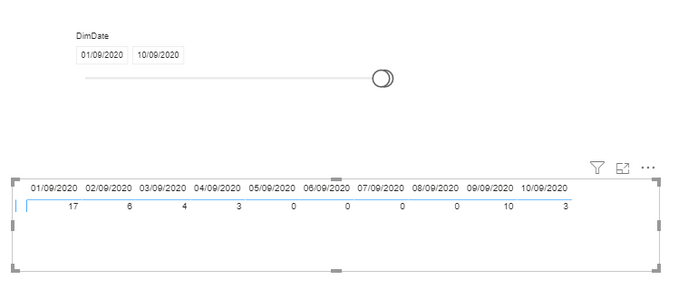
I have a report with a Slicer Date and a Matrix, in the Matrix I´m using the Date field like a column and one metric in the values:

ruz_lee_0-1599808013385.png

I would like to see in the matrix the last 5 days using like max date the slicer date, for example, if in the last day in the slicer is 10/09/2020, the matrix should show the days from 06/09/2020 to 10/09/2020. I could do easly using a filter Top N in the matrix, but I can´t do it because in the matrix Im using another TOP N filter and in PowerBI isn´t possible to use more than one TOP N filter in one object, this my TOP N filter that Im using now:

ruz_lee_1-1599808294299.png


Could you help me? Thanks a lot

1 ACCEPTED SOLUTION
Fowmy
Super User
Super User

Hi @Anonymous 

You create a measure for  "Count of Total inc" as below with a condition to show last five days 

Measure = 

IF( 
    MAX('DATE'[Date]) > CALCULATE( MAX('DATE'[Date]), ALLSELECTED('DATE'[Date])) - 5, 
    Count(Table[Total Inc])
)


________________________

If my answer was helpful, please consider Accept it as the solution to help the other members find it

Click on the Thumbs-Up icon if you like this reply 🙂

YouTube  LinkedIn

Did I answer your question? Mark my post as a solution! and hit thumbs up


Subscribe and learn Power BI from these videos

Website LinkedIn PBI User Group

View solution in original post

3 REPLIES 3
Fowmy
Super User
Super User

Hi @Anonymous 

You create a measure for  "Count of Total inc" as below with a condition to show last five days 

Measure = 

IF( 
    MAX('DATE'[Date]) > CALCULATE( MAX('DATE'[Date]), ALLSELECTED('DATE'[Date])) - 5, 
    Count(Table[Total Inc])
)


________________________

If my answer was helpful, please consider Accept it as the solution to help the other members find it

Click on the Thumbs-Up icon if you like this reply 🙂

YouTube  LinkedIn

Did I answer your question? Mark my post as a solution! and hit thumbs up


Subscribe and learn Power BI from these videos

Website LinkedIn PBI User Group

Anonymous
Not applicable

Using your metric I get the result that I hope, thanks!

amitchandak
Super User
Super User

@Anonymous , the best way is relative date slicer.  If that can work.


Another way is suggested in this video if this can help

https://www.youtube.com/watch?v=duMSovyosXE

Share with Power BI Enthusiasts: Full Power BI Video (20 Hours) YouTube
Microsoft Fabric Series 60+ Videos YouTube
Microsoft Fabric Hindi End to End YouTube

Helpful resources

Announcements
November Power BI Update Carousel

Power BI Monthly Update - November 2025

Check out the November 2025 Power BI update to learn about new features.

Fabric Data Days Carousel

Fabric Data Days

Advance your Data & AI career with 50 days of live learning, contests, hands-on challenges, study groups & certifications and more!

FabCon Atlanta 2026 carousel

FabCon Atlanta 2026

Join us at FabCon Atlanta, March 16-20, for the ultimate Fabric, Power BI, AI and SQL community-led event. Save $200 with code FABCOMM.

Top Solution Authors
Top Kudoed Authors