Don't miss your chance to take the Fabric Data Engineer (DP-600) exam for FREE! Find out how by watching the DP-600 session on-demand now through April 28th.
Learn moreJoin the FabCon + SQLCon recap series. Up next: Power BI, Real-Time Intelligence, IQ and AI, and Data Factory take center stage. All sessions are available on-demand after the live show. Register now
Hello!
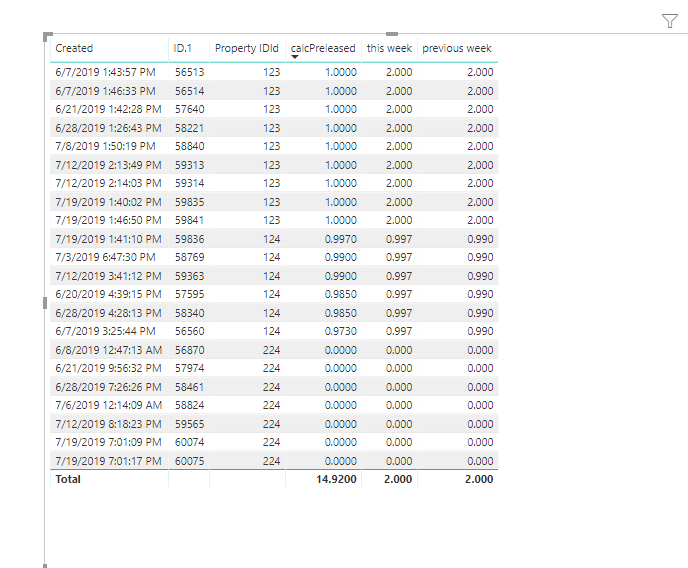
I am trying to display the current week's Leasing % as well as the Previous Week's in the same table.
I created the following measure that captures the current week's Preleasing:
| Property IDId | Modified | Created | calcOccupied | calcPreleased | ID.1 |
| 123 | 7/8/2019 1:50:19 PM | 7/8/2019 1:50:19 PM | 99.05% | 100.00% | 58840 |
| 224 | 7/6/2019 12:14:09 AM | 7/6/2019 12:14:09 AM | 100.00% | 0.00% | 58824 |
| 124 | 7/3/2019 6:47:30 PM | 7/3/2019 6:47:30 PM | 98.50% | 99.00% | 58769 |
| 224 | 7/19/2019 7:01:17 PM | 7/19/2019 7:01:17 PM | 100.00% | 0.00% | 60075 |
| 224 | 7/19/2019 7:01:09 PM | 7/19/2019 7:01:09 PM | 100.00% | 0.00% | 60074 |
| 123 | 7/19/2019 1:46:50 PM | 7/19/2019 1:46:50 PM | 99.05% | 100.00% | 59841 |
| 124 | 7/19/2019 1:41:10 PM | 7/19/2019 1:41:10 PM | 97.13% | 99.70% | 59836 |
| 123 | 7/19/2019 1:40:02 PM | 7/19/2019 1:40:02 PM | 99.05% | 100.00% | 59835 |
| 224 | 7/12/2019 8:18:23 PM | 7/12/2019 8:18:23 PM | 100.00% | 0.00% | 59565 |
| 124 | 7/12/2019 3:41:12 PM | 7/12/2019 3:41:12 PM | 98.50% | 99.00% | 59363 |
| 123 | 7/12/2019 2:14:03 PM | 7/12/2019 2:14:03 PM | 99.05% | 100.00% | 59314 |
| 123 | 7/12/2019 2:13:49 PM | 7/12/2019 2:13:49 PM | 99.05% | 100.00% | 59313 |
| 224 | 6/8/2019 12:47:13 AM | 6/8/2019 12:47:13 AM | 100.00% | 0.00% | 56870 |
| 124 | 6/7/2019 3:25:44 PM | 6/7/2019 3:25:44 PM | 98.50% | 97.30% | 56560 |
| 123 | 6/7/2019 1:46:33 PM | 6/7/2019 1:46:33 PM | 99.05% | 100.00% | 56514 |
| 123 | 6/7/2019 1:43:57 PM | 6/7/2019 1:43:57 PM | 99.05% | 100.00% | 56513 |
| 224 | 6/28/2019 7:26:26 PM | 6/28/2019 7:26:26 PM | 100.00% | 0.00% | 58461 |
| 124 | 6/28/2019 4:28:13 PM | 6/28/2019 4:28:13 PM | 98.50% | 98.50% | 58340 |
| 123 | 6/28/2019 1:26:43 PM | 6/28/2019 1:26:43 PM | 99.05% | 100.00% | 58221 |
| 224 | 6/21/2019 9:56:32 PM | 6/21/2019 9:56:32 PM | 100.00% | 0.00% | 57974 |
| 123 | 6/21/2019 1:42:28 PM | 6/21/2019 1:42:28 PM | 99.05% | 100.00% | 57640 |
| 124 | 6/20/2019 4:39:15 PM | 6/20/2019 4:39:15 PM | 98.50% | 98.50% | 57595 |
Solved! Go to Solution.
Hi bkirshenbaum,
You could use below measures to get current week and previous week’s value
previous week =
CALCULATE (
SUM ( 'Property Info'[calcPreleased] ),
FILTER (
ALL ( 'Property Info' ),
'Property Info'[Property IDId] = MIN ( 'Property Info'[Property IDId] )
&& 'Property Info'[Created]
> TODAY () - 14
&& 'Property Info'[Created]
<= TODAY () - 7
)
)this week =
CALCULATE (
SUM ( 'Property Info'[calcPreleased] ),
FILTER (
ALL ( 'Property Info' ),
'Property Info'[Property IDId] = MIN ( 'Property Info'[Property IDId] )
&& 'Property Info'[Created]
> TODAY () - 7
&& 'Property Info'[Created] <= TODAY ()
)
)Best Regards,
Zoe Zhi
If this post helps, then please consider Accept it as the solution to help the other members find it more quickly.
Hi bkirshenbaum,
You could use below measures to get current week and previous week’s value
previous week =
CALCULATE (
SUM ( 'Property Info'[calcPreleased] ),
FILTER (
ALL ( 'Property Info' ),
'Property Info'[Property IDId] = MIN ( 'Property Info'[Property IDId] )
&& 'Property Info'[Created]
> TODAY () - 14
&& 'Property Info'[Created]
<= TODAY () - 7
)
)this week =
CALCULATE (
SUM ( 'Property Info'[calcPreleased] ),
FILTER (
ALL ( 'Property Info' ),
'Property Info'[Property IDId] = MIN ( 'Property Info'[Property IDId] )
&& 'Property Info'[Created]
> TODAY () - 7
&& 'Property Info'[Created] <= TODAY ()
)
)Best Regards,
Zoe Zhi
If this post helps, then please consider Accept it as the solution to help the other members find it more quickly.
@dax This works great with one exception.
Sometimes we have data that gets entered twice in a week to correct an error. How can I make these not aggregate the totals and instead just show the more recent of the two?
Thank you!
Hi @Anonymous
Please check the following post, depends on the date table created this measure can be created in different ways.
https://community.powerbi.com/t5/Desktop/Measure-displaying-last-week-sum/td-p/495437
https://community.powerbi.com/t5/Desktop/Previous-Week-and-Previous-Month-DAX/td-p/550431
Thanks
Check out the April 2026 Power BI update to learn about new features.
If you have recently started exploring Fabric, we'd love to hear how it's going. Your feedback can help with product improvements.
A new Power BI DataViz World Championship is coming this June! Don't miss out on submitting your entry.
| User | Count |
|---|---|
| 48 | |
| 40 | |
| 38 | |
| 20 | |
| 17 |
| User | Count |
|---|---|
| 68 | |
| 65 | |
| 30 | |
| 26 | |
| 25 |