
Join us at FabCon Atlanta from March 16 - 20, 2026, for the ultimate Fabric, Power BI, AI and SQL community-led event. Save $200 with code FABCOMM.
Register now!Learn from the best! Meet the four finalists headed to the FINALS of the Power BI Dataviz World Championships! Register now
Hi
I want to show the last refresh date and time from Power BI service on my Power BI report. Is it possible to do.
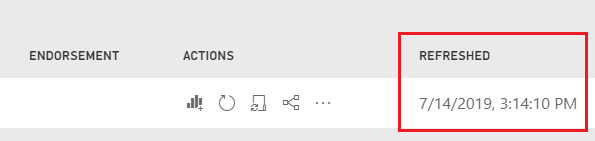
I am scheduling auto refresh of report at 9 am and 1 pm, this field "Refreshed" is changing after refresh. I want to pick this value and show on report. I am planning to use CARD visual in Power bi desktop and want to show "REFRESHED" value from Power bi service so after Publishing report, Power BI service can show refreshed value.
@Anonymous
Hi,
tiles pinned in your dashboard could display the last refresh.
You will find the option selecting the three dots menu, at right top (if I remember well... at the moment I do not have access on Pro version)
Regards
I want to set up on report not on dashboard.
@Anonymous
Hi
In a desktop version the following solution works.
Please check how it works in PBI Pro
let
Source = #table(type table[LastRefresh=datetime], {{DateTime.LocalNow()}})
in
Source
Sorry but I am not able to check since I haven't any Pro licence available.
Regards
Share feedback directly with Fabric product managers, participate in targeted research studies and influence the Fabric roadmap.
Check out the February 2026 Power BI update to learn about new features.
| User | Count |
|---|---|
| 68 | |
| 61 | |
| 45 | |
| 19 | |
| 15 |
| User | Count |
|---|---|
| 108 | |
| 107 | |
| 39 | |
| 30 | |
| 26 |