Don't miss your chance to take the Fabric Data Engineer (DP-700) exam on us!
Learn moreNext up in the FabCon + SQLCon recap series: The roadmap for Microsoft SQL and Maximizing Developer experiences in Fabric. All sessions are available on-demand after the live show. Register now
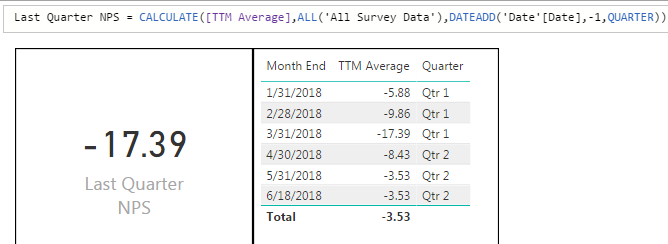
I have this data:
I was attempting to get the average of the first quarter, however it is only returning the last month of the first quarter. Doing the math by hand, the number should be returning -9.42 if I'm averaging -5.88,-9.86 and -17.39. How can I appropriately calculate this? The Month End column is column is coming from a date table.
Hi @Anonymous,
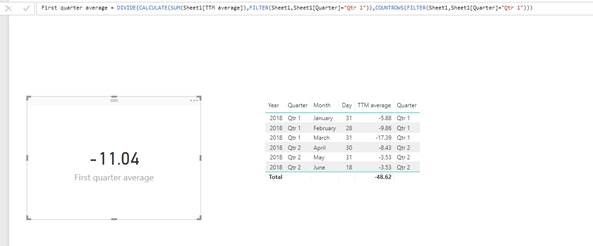
In your scenario, the [TTM Average] is a measure. As I don’t know the raw data and logic of this measure, I treat the measure as a column in my test. Also the average of -5.88, -9.86, -17.39 should be (-5.88-9.86-17.39)/3=-11.04. Not sure why you would like to return it as -9.42.
Based on my test, you can create a measure to calculate the average of the first quarter below, and use your own measure "TTM average" to replace the "SUM(sheet 1[TTM average])" in my function on your side. You can also download the PBIX file to have a view.
First quarter average = DIVIDE(CALCULATE(SUM(Sheet1[TTM average]),FILTER(Sheet1,Sheet1[Quarter]="Qtr 1")),COUNTROWS(FILTER(Sheet1,Sheet1[Quarter]="Qtr 1")))
If above measure doesn’t meet your requirement. Please share some sample data for us to test it. It would be better if you could share the pbix file.
Best Regards,
Qiuyun Yu
If you have recently started exploring Fabric, we'd love to hear how it's going. Your feedback can help with product improvements.
A new Power BI DataViz World Championship is coming this June! Don't miss out on submitting your entry.
Share feedback directly with Fabric product managers, participate in targeted research studies and influence the Fabric roadmap.
| User | Count |
|---|---|
| 48 | |
| 44 | |
| 42 | |
| 19 | |
| 18 |
| User | Count |
|---|---|
| 74 | |
| 71 | |
| 34 | |
| 33 | |
| 31 |