Join us at FabCon Atlanta from March 16 - 20, 2026, for the ultimate Fabric, Power BI, AI and SQL community-led event. Save $200 with code FABCOMM.
Register now!The Power BI Data Visualization World Championships is back! Get ahead of the game and start preparing now! Learn more
I'm aware of the pivot functionality in the query editor, but the results from that are pretty static.
What I wish BI had was a more dynamic ability to pivot.
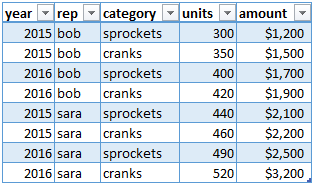
Imagine a table,
I can get a time series of total sales out of that.
But if I want a stacked bar chart, breaking down the time series of sales by rep or category, I would have to pivot on rep and category. Ok fine, so now I have 4 more columns, 'bob', 'sara', 'cranks', 'sprockets'. But what if I want a time series of stacked bar charts for both units and amounts? Ok, so I insert a custom column, prepending 'units' to the original value and then pivoting on that, so now I've added 'units_bob' and 'units_sara', 'units_cranks' and 'units_sprockets'.
Kinda unwieldy. Now think about that in the context of a table with 20 columns and 140k rows. It just gets silly. It's all because the charting functions can't dynamically pivot.
Am I wrong? Am I missing something? Is there a better way to do it? Or should I stick with Excel for generating reports?
Hey @Anonymous,
Check out the idea page for "Pivot Table funcitionality" here.
You can vote, suggest other ideas, and take the survey to help the development process move forward.
Thanks,
Alan
Check out the November 2025 Power BI update to learn about new features.
Advance your Data & AI career with 50 days of live learning, contests, hands-on challenges, study groups & certifications and more!
| User | Count |
|---|---|
| 57 | |
| 43 | |
| 41 | |
| 22 | |
| 17 |
| User | Count |
|---|---|
| 183 | |
| 114 | |
| 93 | |
| 62 | |
| 45 |