Join us at FabCon Atlanta from March 16 - 20, 2026, for the ultimate Fabric, Power BI, AI and SQL community-led event. Save $200 with code FABCOMM.
Register now!Get Fabric Certified for FREE during Fabric Data Days. Don't miss your chance! Request now
Hi ,
Trying LOOKUP value but running into issues. Table 1 has distinct empid.Table two can have multiple rows. I have sorted Table2 DESC so it picks value by latest date - matchs and returns the score but its throwing an error - "A Table of Multiple Values was supplied'. Wondering how we can fix this.
Column = LOOKUPVALUE(Table2[Score],Table1[EmpID],Table2[EmpID])
Table 1
| EmpID |
| 111 |
| 112 |
| 113 |
Table2
| EmpID | Score | Date | Output |
| 111 | 10 | 12/5/19 | 10 |
| 111 | 9 | 12/4/19 | |
| 111 | 8 | 12/3/19 | |
| 112 | 3 | 12/5/19 | 3 |
| 112 | 4 | 12/4/19 | |
| 113 | 4 | 12/6/19 | 4 |
Thanks
Solved! Go to Solution.
Hi @Anonymous ,
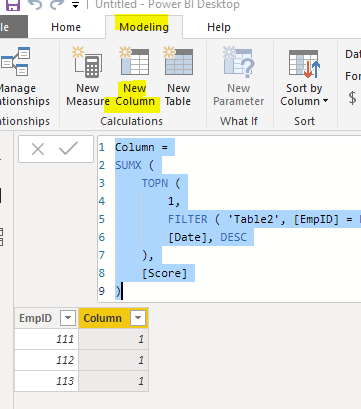
We can create a calculated column to meet your requirement:
Column =
SUMX (
TOPN (
1,
FILTER ( 'Table2', [EmpID] = EARLIER ( Table1[EmpID] ) ),
[Date], DESC
),
[Score]
)
Best regards,
Table 2 actually is this . It has similar values on different rows. But we need to pick the first using lookup
| EmpID | Score | Date | Output |
| 111 | 1 | 12/5/19 | 1 |
| 111 | 1 | 12/4/19 | |
| 111 | 1 | 12/3/19 | |
| 112 | 1 | 12/5/19 | 1 |
| 112 | 1 | 12/4/19 | |
| 113 | 1 | 12/6/19 | 1 |
Hi @Anonymous ,
How about the result after you follow the suggestions mentioned in my original post?Could you please provide more details about it If it doesn't meet your requirement?
Best regards,
Hi @Anonymous ,
We can create a calculated column to meet your requirement:
Column =
SUMX (
TOPN (
1,
FILTER ( 'Table2', [EmpID] = EARLIER ( Table1[EmpID] ) ),
[Date], DESC
),
[Score]
)
Best regards,
Check out the November 2025 Power BI update to learn about new features.
Advance your Data & AI career with 50 days of live learning, contests, hands-on challenges, study groups & certifications and more!