cancel
Showing results for 
Search instead for 
Did you mean: 

Try your skills in the Power BI Dataviz World Championship! Round one ends June 26. Join now

Reply
Anonymous
Not applicable

LOOKUPVALUE returns error

Hi ,


Trying LOOKUP value but running into issues. Table 1 has distinct empid.Table two can have multiple rows.  I have sorted Table2 DESC so it picks value by latest date -  matchs and returns the score but its throwing an error - "A Table of Multiple Values was supplied'. Wondering how we can fix this.


Column  = LOOKUPVALUE(Table2[Score],Table1[EmpID],Table2[EmpID])


Table 1

 
EmpID
111
112
113


Table2


EmpIDScoreDateOutput
1111012/5/1910
111912/4/19 
111812/3/19 
112312/5/193
112412/4/19 
113412/6/194


Thanks

1 ACCEPTED SOLUTION

Hi @Anonymous ,


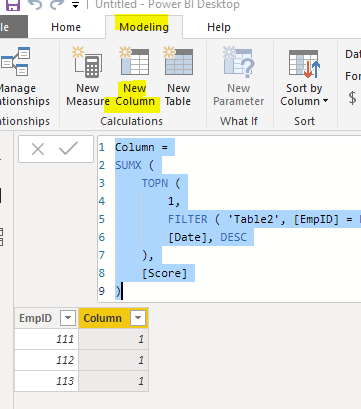
We can create a calculated column to meet your requirement:


Column =
SUMX (
    TOPN (
        1,
        FILTER ( 'Table2', [EmpID] = EARLIER ( Table1[EmpID] ) ),
        [Date], DESC
    ),
    [Score]
)


3.PNG


Best regards,


Community Support Team _ Dong Li
If this post helps, then please consider Accept it as the solution to help the other members find it more quickly.

View solution in original post

3 REPLIES 3
Anonymous
Not applicable

Table 2 actually is this . It has similar values on different rows. But we need to pick the first using lookup

EmpIDScoreDateOutput
111112/5/191
111112/4/19 
111112/3/19 
112112/5/191
112112/4/19 
113112/6/191

Hi @Anonymous ,


How about the result after you follow the suggestions mentioned in my original post?Could you please provide more details about it If it doesn't meet your requirement?


Best regards,


Community Support Team _ Dong Li
If this post helps, then please consider Accept it as the solution to help the other members find it more quickly.

Hi @Anonymous ,


We can create a calculated column to meet your requirement:


Column =
SUMX (
    TOPN (
        1,
        FILTER ( 'Table2', [EmpID] = EARLIER ( Table1[EmpID] ) ),
        [Date], DESC
    ),
    [Score]
)


3.PNG


Best regards,


Community Support Team _ Dong Li
If this post helps, then please consider Accept it as the solution to help the other members find it more quickly.

Helpful resources

Announcements
Fabric Data Days is here Carousel

Fabric Data Days 2026

Don't miss out on Data Days, June 15 through August 7. Learn Fabric, Power BI, SQL, AI and more.

May Power BI Update Carousel

Power BI Monthly Update - May 2026

Check out the May 2026 Power BI update to learn about new features.

Power BI DataViz World Championships carousel

Power BI DataViz World Championships - June 2026

A new Power BI DataViz World Championship is coming this June! Don't miss out on submitting your entry.