
Join us at FabCon Atlanta from March 16 - 20, 2026, for the ultimate Fabric, Power BI, AI and SQL community-led event. Save $200 with code FABCOMM.
Register now!The Power BI Data Visualization World Championships is back! Get ahead of the game and start preparing now! Learn more
Hi All,
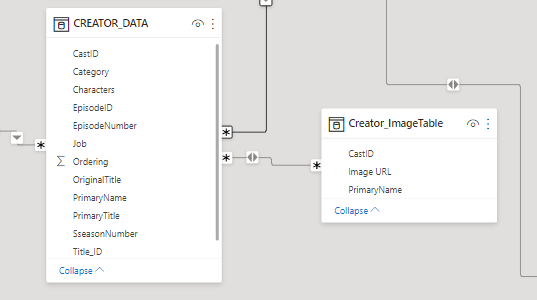
I want to retrive ImageURL column from creators image table to creator data table using LOOKUPVALUE() Dax
and tables are connected many to many relationship with CastID column.
Any Help would be Appeciated...
Solved! Go to Solution.
Hey @community_pinki ,
when you have a many to many relationship a lookup will not give you a clear answer.
It's like I ask you "It's January, what year is it?".
But you can for example do a MAX of the URL:
ImageURL Column =
VAR vCastID = Creator_Data[CastID]
RETURN
CALCULATE(
MAX( Creator_ImageTable[Image URL] ),
Creator_ImageTable[CastID] = vCastID
)
Hey @community_pinki ,
when you have a many to many relationship a lookup will not give you a clear answer.
It's like I ask you "It's January, what year is it?".
But you can for example do a MAX of the URL:
ImageURL Column =
VAR vCastID = Creator_Data[CastID]
RETURN
CALCULATE(
MAX( Creator_ImageTable[Image URL] ),
Creator_ImageTable[CastID] = vCastID
)
Hi @selimovd ,
Thanks in advance.
Hey @SUMESHKUMAR22,
you can use USERELATIONSHIP within the calculate function in addition to change the active relationship.
If you have further questions it's better to open a new topic as it's a new case.
Best regards
Denis
Hi @selimovd ,
Perfect I got your point. But it would be very helpful if you could mention the change in the required in this case w.r.t to the above calculated column that you mentioned.
In my case its the same many to many (active) but if I take one more many-many (inactive) based on caste name. So for this where exactly in the userrelationship function should be used in the below measure:
CALCULATE( MAX( Creator_ImageTable[Image URL] ), Creator_ImageTable[CastID] = vcastID
Thanks in advance
The Power BI Data Visualization World Championships is back! Get ahead of the game and start preparing now!
Check out the November 2025 Power BI update to learn about new features.
| User | Count |
|---|---|
| 59 | |
| 43 | |
| 42 | |
| 23 | |
| 17 |
| User | Count |
|---|---|
| 190 | |
| 122 | |
| 96 | |
| 66 | |
| 47 |