Join us at FabCon Atlanta from March 16 - 20, 2026, for the ultimate Fabric, Power BI, AI and SQL community-led event. Save $200 with code FABCOMM.
Register now!The Power BI Data Visualization World Championships is back! Get ahead of the game and start preparing now! Learn more
Hi,
My date is in 2 tables as:
TABLE1:
STATE MONTH ACTUAL
NJ APR 2
NY APR 4
KY APR 3
NJ MAY 1
NY MAY 2
KY MAY 1
NJ APR 2
NY APR 2
KY APR 2
TABLE2:
MONTH TARGET
APR 10
MAY 12
JUN 15
WHEN I JOIN 2 TABLES :
MONTH ACTUAL TARGET
APR 9 10
MAY 4 12
JUN 6 15
BUT WHEN I CHANGE ABOVE TABLE TO LINE AND CLUSTER GRAPH. TARGET COLUMN IS ASKING FOR AGGREGATION.
MONTH ACTUAL TARGET
APR 9 37
MAY 4 37
JUN 6 37
HOW CAN I JOIN MY FIRST 2 TABLES TO GET TABLE3 AS RESULT.
tHANKS
Hi @revansh,
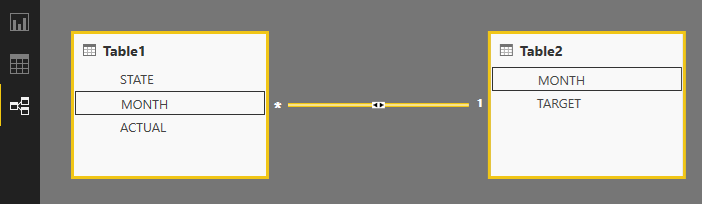
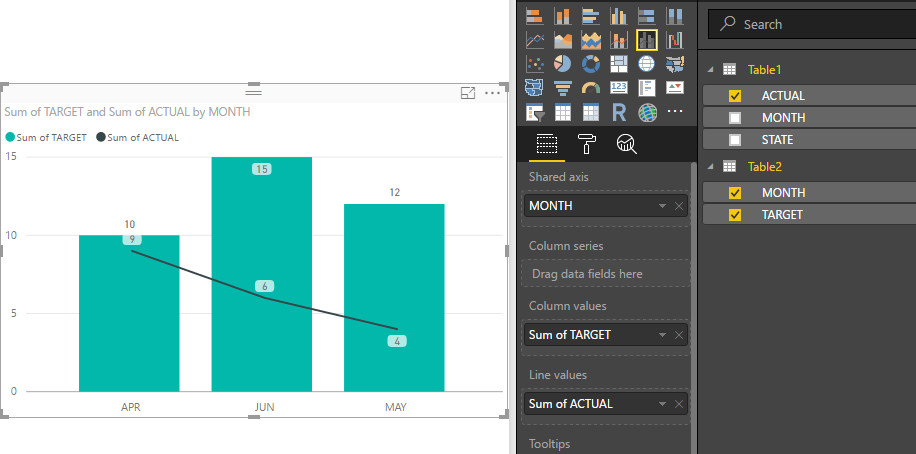
In your scenario, you needn't to join those two tables. You can just create a relationship between those two tables based on Month, then you can drag the Month from Table2 to x-axis of the chart, Actual and Target with Sum aggregate function as chart values.
For details, you can download attached pbix file to have a look.
Best Regards,
Qiuyun Yu
Hi v-qiuyu,
I will have future dates in Table2. if i pull date from TABLE2, graph is shoiwing future months even though there are no records in table1.
Thanks
@revansh wrote:
Hi v-qiuyu,
I will have future dates in Table2. if i pull date from TABLE2, graph is shoiwing future months even though there are no records in table1.
Thanks
Hi @revansh,
This should be a different issue from the original one, as your first post doesn't mention the future date column.
So I think the sample data should be changed now. Please share the new sample data and show us the example to clarify the issue.
Best Regards,
Qiuyun Yu
Hi @revansh,
If the original issue is fixed now, would you please close this thread?
Regarding your second issue, please create a new thread and share corresponding data and expected results.
Best Regards,
Qiuyun Yu
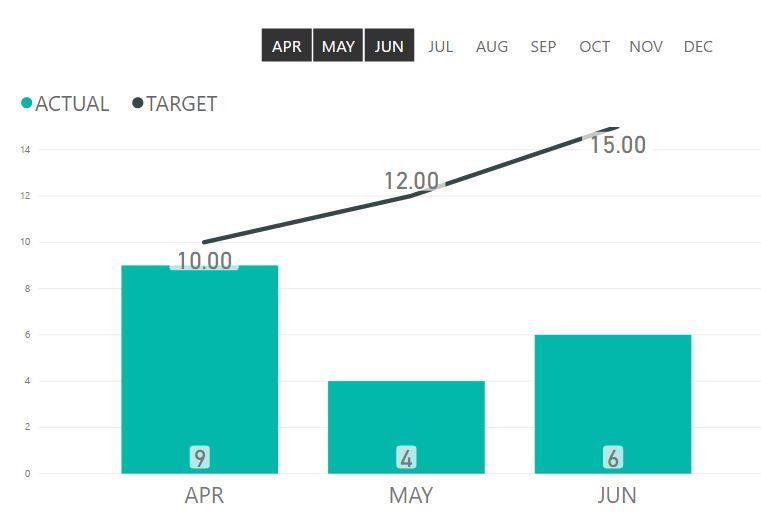
I would use a slicer to filter to actual months only
The Power BI Data Visualization World Championships is back! Get ahead of the game and start preparing now!
Check out the November 2025 Power BI update to learn about new features.
| User | Count |
|---|---|
| 59 | |
| 43 | |
| 42 | |
| 23 | |
| 17 |
| User | Count |
|---|---|
| 190 | |
| 122 | |
| 96 | |
| 66 | |
| 47 |