This time we’re going bigger than ever. Fabric, Power BI, SQL, AI and more. We're covering it all. You won't want to miss it.
Learn moreLevel up your Power BI skills this month - build one visual each week and tell better stories with data! Get started
Hi guys,
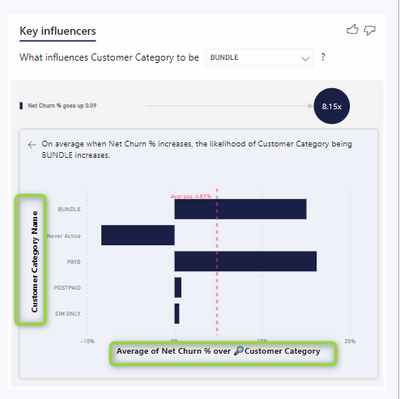
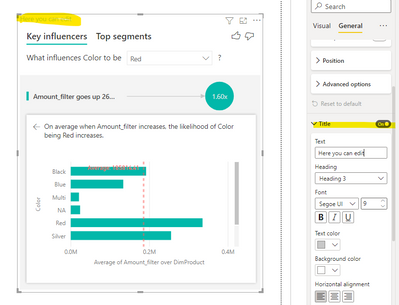
Can you please tell me how to remove or edit the title on the chart below?
This is the Key Influencer visual.
Many thanks!
Hi @ROG ,
For key influencers visual, the label content of the horizontal and vertical axes cannot be changed because it is an explanatory description of the axes (there is no guarantee that the custom label content will meet this requirement). However, if you want to change the title of this visual, you can do so in the following area:
For more details, you can read below document:
Key influencers visualizations tutorial - Power BI | Microsoft Docs
If the problem is still not resolved, please provide detailed error information and let me know immediately. Looking forward to your reply.
Best Regards,
Henry
If this post helps, then please consider Accept it as the solution to help the other members find it more quickly.
@ROG
Unfortunately, it's not possible to make changes to those labels in the Key Influencer visual.
⭕ Subscribe and learn Power BI from these videos
⚪ Website ⚪ LinkedIn ⚪ PBI User Group
Check out the April 2026 Power BI update to learn about new features.
Sign up to receive a private message when registration opens and key events begin.
If you have recently started exploring Fabric, we'd love to hear how it's going. Your feedback can help with product improvements.
| User | Count |
|---|---|
| 37 | |
| 28 | |
| 28 | |
| 19 | |
| 17 |
| User | Count |
|---|---|
| 68 | |
| 37 | |
| 32 | |
| 28 | |
| 24 |