Join us at FabCon Atlanta from March 16 - 20, 2026, for the ultimate Fabric, Power BI, AI and SQL community-led event. Save $200 with code FABCOMM.
Register now!Get Fabric Certified for FREE during Fabric Data Days. Don't miss your chance! Request now
I'm trying to create a new column in power query that will hold some descriptive value metrics of our products.
if [SKUCostPerText] = "perbag"
then "£" & Text.From([Price per Bag]) & " /bag"
else if [SKUCostPerText] = "perm3"
then "£" & Text.From([Price per m3]) & " /m3"
else "£" & Text.From([Price Per Tonne]) & " /Tonne"
The above works, but it removes the trailing 0's in the Price fields. I.E. 2.20 becomes 2.2.
Any idea's of an easy way to solve?
Thanks
Solved! Go to Solution.
You will need to mess with it a bit. This works in the scenario below:
if Text.Contains([Custom], ".")
then Text.BeforeDelimiter([Custom],".") & "." & Text.Start(Text.AfterDelimiter([Custom],".") & "00", 2)
else [Custom] & ".00"
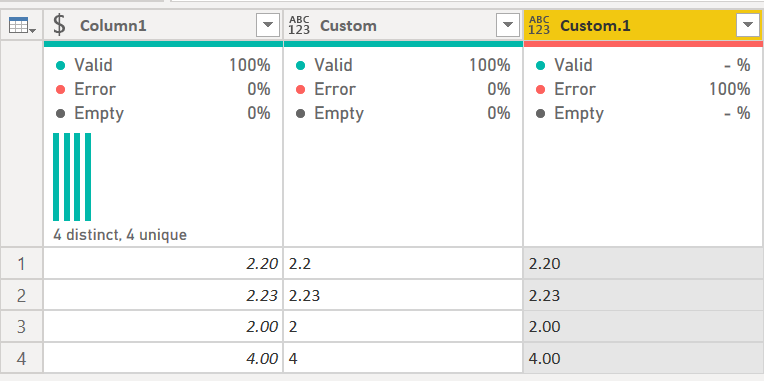
Column 1 is a real number. Custom is converted to text with Text.From. Custom.1 makes sure it always has two decimal places, and is the formula above.
DAX is for Analysis. Power Query is for Data Modeling
Proud to be a Super User!
MCSA: BI ReportingYou will need to mess with it a bit. This works in the scenario below:
if Text.Contains([Custom], ".")
then Text.BeforeDelimiter([Custom],".") & "." & Text.Start(Text.AfterDelimiter([Custom],".") & "00", 2)
else [Custom] & ".00"
Column 1 is a real number. Custom is converted to text with Text.From. Custom.1 makes sure it always has two decimal places, and is the formula above.
DAX is for Analysis. Power Query is for Data Modeling
Proud to be a Super User!
MCSA: BI ReportingI think I may need more help than that I'm afraid 🙂
Don't suppose I could bug you for an example of text.format for my use case?
Check out the November 2025 Power BI update to learn about new features.
Advance your Data & AI career with 50 days of live learning, contests, hands-on challenges, study groups & certifications and more!