cancel
Showing results for 
Search instead for 
Did you mean: 

We've captured the moments from FabCon & SQLCon that everyone is talking about, and we are bringing them to the community, live and on-demand. Starts on April 14th. Register now

Reply
Retriever
Frequent Visitor

Keeping Filled Map Colors Consistent when filtering

Hi there! 


I'm hoping that you can help me with what may be an obvious solution, I just can't find how. I have a dataset of states (United States) and corresponding dates, and have created a dashboard that has a filled map for the United States and a bar graph counting by Month. I've changed the data colors for the map to a color scale, such that the earlier -> later dates are the minimum and maximum.


I currently have graph interactions on, such that clicking on a month filters the map to show only the states that relate to that month. But -- here's the problem. Clicking on a given month filters the map correctly and shows the related states, but then it redoes the color scale for the graph. For example, if I select May which is on the left side of the overall color scale, it redoes the color scale and treats late May as the right side of the scale. It changes the colors related to what's in the current filter.


Is there any way to keep the map colors consistent, but allow the bar graph to still filter the graph such that the related states still show? Thanks!

1 ACCEPTED SOLUTION
amitchandak
Super User
Super User

@Retriever , if you are using min Max range, then it is possible that it changes Month over month based on values

Try Color measure of Hex color

https://community.powerbi.com/t5/Desktop/How-to-keep-data-colors-consistent-and-not-changing/m-p/963...

https://radacad.com/dax-and-conditional-formatting-better-together-find-the-biggest-and-smallest-num...

Share with Power BI Enthusiasts: Full Power BI Video (20 Hours) YouTube
Microsoft Fabric Series 60+ Videos YouTube
Microsoft Fabric Hindi End to End YouTube

View solution in original post

2 REPLIES 2
v-xicai
Community Support
Community Support

Hi @Retriever ,


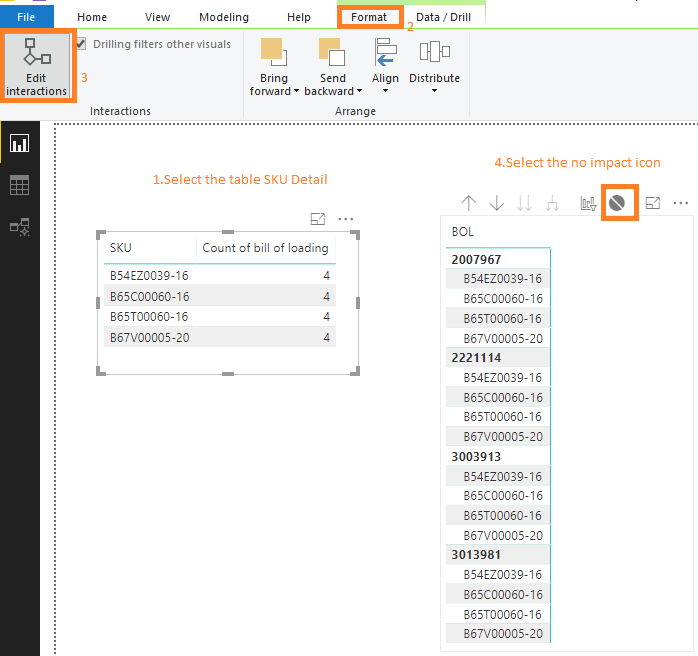
You may use "Edit interactions" feature to choose which visuals to be filtered by one special visual. See more details: https://docs.microsoft.com/en-us/power-bi/service-reports-visual-interactions.

edit interactions.png


For reference:

https://community.powerbi.com/t5/Desktop/Table-Filter-Interactions/m-p/669088#M321878


Best Regards,

Amy 


Community Support Team _ Amy

If this post helps, then please consider Accept it as the solution to help the other members find it more quickly.

amitchandak
Super User
Super User

@Retriever , if you are using min Max range, then it is possible that it changes Month over month based on values

Try Color measure of Hex color

https://community.powerbi.com/t5/Desktop/How-to-keep-data-colors-consistent-and-not-changing/m-p/963...

https://radacad.com/dax-and-conditional-formatting-better-together-find-the-biggest-and-smallest-num...

Share with Power BI Enthusiasts: Full Power BI Video (20 Hours) YouTube
Microsoft Fabric Series 60+ Videos YouTube
Microsoft Fabric Hindi End to End YouTube

Helpful resources

Announcements
New to Fabric survey Carousel

New to Fabric Survey

If you have recently started exploring Fabric, we'd love to hear how it's going. Your feedback can help with product improvements.

Power BI DataViz World Championships carousel

Power BI DataViz World Championships - June 2026

A new Power BI DataViz World Championship is coming this June! Don't miss out on submitting your entry.

Join our Fabric User Panel

Join our Fabric User Panel

Share feedback directly with Fabric product managers, participate in targeted research studies and influence the Fabric roadmap.

March Power BI Update Carousel

Power BI Community Update - March 2026

Check out the March 2026 Power BI update to learn about new features.