FabCon is coming to Atlanta
Join us at FabCon Atlanta from March 16 - 20, 2026, for the ultimate Fabric, Power BI, AI and SQL community-led event. Save $200 with code FABCOMM.
Register now!- Power BI forums
- Get Help with Power BI
- Desktop
- Service
- Report Server
- Power Query
- Mobile Apps
- Developer
- DAX Commands and Tips
- Custom Visuals Development Discussion
- Health and Life Sciences
- Power BI Spanish forums
- Translated Spanish Desktop
- Training and Consulting
- Instructor Led Training
- Dashboard in a Day for Women, by Women
- Galleries
- Data Stories Gallery
- Themes Gallery
- Contests Gallery
- QuickViz Gallery
- Quick Measures Gallery
- Visual Calculations Gallery
- Notebook Gallery
- Translytical Task Flow Gallery
- TMDL Gallery
- R Script Showcase
- Webinars and Video Gallery
- Ideas
- Custom Visuals Ideas (read-only)
- Issues
- Issues
- Events
- Upcoming Events
Get Fabric Certified for FREE during Fabric Data Days. Don't miss your chance! Request now
- Power BI forums
- Forums
- Get Help with Power BI
- Desktop
- Re: KPI with category slicer not working as intend...
- Subscribe to RSS Feed
- Mark Topic as New
- Mark Topic as Read
- Float this Topic for Current User
- Bookmark
- Subscribe
- Printer Friendly Page


- Mark as New
- Bookmark
- Subscribe
- Mute
- Subscribe to RSS Feed
- Permalink
- Report Inappropriate Content
KPI with category slicer not working as intended
Hi guys,
I have a dataset with the following columns: Category, Question Number Percentage. I want the KPI to show me the percentage score within that category for the given month (I have a month filter on the page already). My problem is that the question number percentage is made up of a formula (see below) since the data is a bunch of yes/no responses. I had to convert the yeses and no's to 1's and 0's in two columns "QuestionNumYes" and "QuestionNumNo". I am thinking that I need a measure or column to get this to work with the KPI. My original plan was to use the average of "QuestionNumPerc" as the indicator and then place the category as the filter (see screenshot). This does populate the 94%, but it does not change when I select any of the categories which I think means the category filter isn't working as intended. this is where I need help, because it seems like I need a different indicator that is filtered by category already i.e. category="call handling". Any help is appreciated. ***When I change the indicator to sum rather than average, the filter works for the number in the KPI. I need the average though.

This is the switch to create the categories: Call Handling, Email Handling, etc...
Category = var num = 'Records'[QuestionNum] Return Switch ( True (), num <=8, "Call Handling", num <=12, "Email Handling", num <=16, "Professional Skills", num <=24, "Issue Assessment and Resolution", num <=37, "Ticket Handling", num<=38, "Red Flag", num =39, "Kudos" )
QuestionNumPerc = sum('Records'[QuestionNumYes]) / (sum('Records'[QuestionNumYes])+sum('Records'[QuestionNumNo]))
Solved! Go to Solution.

- Mark as New
- Bookmark
- Subscribe
- Mute
- Subscribe to RSS Feed
- Permalink
- Report Inappropriate Content
@joshcomputer1,
Thanks for your sharing. When I open the new PBIX file, all the KPI visuals show Blank, and I don't think that the QuestionNumPerc calculated column could return your expected result.
Based on your description, you need average instead of sum. In this case, why not directly create a average measure based on the QuestionNumPerc measure? Please check if the following measure returns your desired result, if not, please describe the login that you use to calculate the average.
AverageQuestionNumPerc = (sum('DataSet'[QuestionNumYes]) / (sum('DataSet'[QuestionNumYes])+sum('DataSet'[QuestionNumNo])))/DISTINCTCOUNT('DataSet'[Analyst])
Regards,
Lydia
- Mark as New
- Bookmark
- Subscribe
- Mute
- Subscribe to RSS Feed
- Permalink
- Report Inappropriate Content
@joshcomputer1,
Thanks for your sharing. When I open the new PBIX file, all the KPI visuals show Blank, and I don't think that the QuestionNumPerc calculated column could return your expected result.
Based on your description, you need average instead of sum. In this case, why not directly create a average measure based on the QuestionNumPerc measure? Please check if the following measure returns your desired result, if not, please describe the login that you use to calculate the average.
AverageQuestionNumPerc = (sum('DataSet'[QuestionNumYes]) / (sum('DataSet'[QuestionNumYes])+sum('DataSet'[QuestionNumNo])))/DISTINCTCOUNT('DataSet'[Analyst])
Regards,
Lydia
- Mark as New
- Bookmark
- Subscribe
- Mute
- Subscribe to RSS Feed
- Permalink
- Report Inappropriate Content
To get the cards to show data, I have to click in the month in the column chart. It will display the sun for the month
- Mark as New
- Bookmark
- Subscribe
- Mute
- Subscribe to RSS Feed
- Permalink
- Report Inappropriate Content
@joshcomputer1,
Could you please share sample data of your table and post the expected result when selecting values in the category slicer? Do mask sensitive data before uploading sample data.
Regards,
Lydia
- Mark as New
- Bookmark
- Subscribe
- Mute
- Subscribe to RSS Feed
- Permalink
- Report Inappropriate Content
https://www.dropbox.com/s/dwspo6v9rczzqje/QA%20Reporting%20Template.pbix?dl=0
The four KPIs that I need help with are the four on the right hand side. They are labeled "Call Handling", "Issue Assessment", "Email Handling", "Professional Skills". What I want to be able to do is select the agent on the left slicer. This should update all of the KPIs to show the cumulative average for each category for that agent. Then when I select a month column from the chart, they should cross filter to just that month's average. They are working right now because they are a sum and not average in the indicator field.
Example: Call Handling
I select Christy, then September in the chart. I want to see Christy's Call Handling average score. The Goal is set at 90% and has no issues. The field we are using is 'Records'[QuestionNumPerc] which gives an average score for questions. The questions are grouped into categories by the 'Records'[Category] calculated column.
- Mark as New
- Bookmark
- Subscribe
- Mute
- Subscribe to RSS Feed
- Permalink
- Report Inappropriate Content
@joshcomputer1,
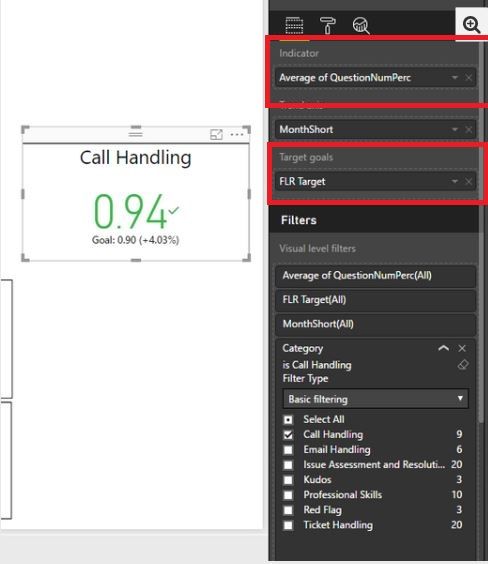
In your sceanrio, what formula do you use to create the Average of QuestionNumPerc as shown in the screenshot below? And I don't find FLR target field in your PBIX file.
Regards,
Lydia
- Mark as New
- Bookmark
- Subscribe
- Mute
- Subscribe to RSS Feed
- Permalink
- Report Inappropriate Content
Hi Lydia,
Question Number Percentage adds up the Yes responses then divides by the total. Here is the formula:
QuestionNumPerc = sum('Records'[QuestionNumYes]) / (sum('Records'[QuestionNumYes])+sum('Records'[QuestionNumNo]))
QuestionNumYes and QuestionNumNo are counts. Here is the formula
QuestionNumNo = if('Records'[Value]="No",1,0)
QuestionNumYes = if ('Records'[Value] = "Yes", 1,0)
The FLR Target is just a static number. That target won't change.
FLR Target = .9
Let me know if that helps
thanks!
- Mark as New
- Bookmark
- Subscribe
- Mute
- Subscribe to RSS Feed
- Permalink
- Report Inappropriate Content
@joshcomputer1,
I know the formula you create. Could you please tell us how you get Average of QuestionNumPerc in the KPI visual? I don't see Average calculation for QuestionNumPerc.
Regards,
Lydia
- Mark as New
- Bookmark
- Subscribe
- Mute
- Subscribe to RSS Feed
- Permalink
- Report Inappropriate Content
I am clicking in the fields section where it shows questionnumperc. There is a dropdown that allows you to switch to average there.
- Mark as New
- Bookmark
- Subscribe
- Mute
- Subscribe to RSS Feed
- Permalink
- Report Inappropriate Content
@joshcomputer1 ,
In the PBIX file you shares to me, I note that questionnumperc is a measure, when you drag it to KPI visual, there is no option to allow you to switch to average.
Do you create another calculated column named questionnumperc ?
Regards,
Lydia
- Mark as New
- Bookmark
- Subscribe
- Mute
- Subscribe to RSS Feed
- Permalink
- Report Inappropriate Content
I uploaded a slightly different file with less data so we can isolate this. The four KPIs allow you to switch to average or sum. It looks like when it is summed, it will filter by month. When average, it doesn't change. Also, I have a visual filter on issue assessment so that we are filtering just that category. It shows the same number as the next one. It's like the category visual filter doesn't work with this measure.
- Mark as New
- Bookmark
- Subscribe
- Mute
- Subscribe to RSS Feed
- Permalink
- Report Inappropriate Content
@joshcomputer1,
When I download the PBIX file from your previous reply, it is still an old file. Could you please update the shared link?
Regards,
Lydia
- Mark as New
- Bookmark
- Subscribe
- Mute
- Subscribe to RSS Feed
- Permalink
- Report Inappropriate Content
Same file name...different link this time.
https://www.dropbox.com/s/u8hwpcsd49xxf7v/KPI%20Example.pbix?dl=0
Helpful resources

Power BI Monthly Update - November 2025
Check out the November 2025 Power BI update to learn about new features.

Fabric Data Days
Advance your Data & AI career with 50 days of live learning, contests, hands-on challenges, study groups & certifications and more!

FabCon Atlanta 2026
Join us at FabCon Atlanta, March 16-20, for the ultimate Fabric, Power BI, AI and SQL community-led event. Save $200 with code FABCOMM.


