cancel
Showing results for 
Search instead for 
Did you mean: 

The FabCon + SQLCon recap series starts April 14th at 8am Pacific. If you’re tracking where AI is going inside Fabric, this first session is a can't miss. Register now

Reply
franorio
Helper III
Helper III

KPI question

Hello everybody,
first of all my PowerBI knowledge is very basic, so i guess this should be piece of cake for you.
 
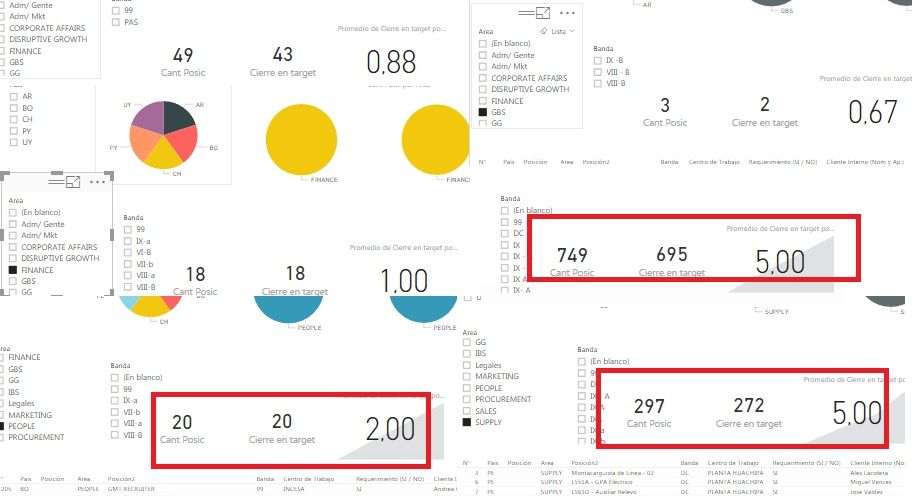
I need to create a KPI able to show the vacancy fulfillment, this should be the% of Quantity of closed position in target / Quantity of position.
I have done that, and it looks like this ... in some cases does the job, in others (when apllying a filter, it doesn't)

43/49 = 0.88 -> great
2/3 = 0.67 -> great
18/18 = 1 -> great
695/749 = 5 -> ???
20/20 = 2 -> ???
271/297 = 5 -> ???

Don't understand why it works in some cases and in some other don't.

Appreciate your help and input on this matter.


Best regards!


KPI.jpg


3 REPLIES 3
parry2k
Super User
Super User

Seems like you are using value in Trend Axis in KPI's which have the issue. Once you have added column in Trend Axis, your KPI calculation will be based on that field, without knowing the data and your values, very hard to tell what could be the other reason. I would recommend try without trend axis and see if you get the results.


Thanks,

P


Subscribe to the @PowerBIHowTo YT channel for an upcoming video on List and Record functions in Power Query!!

Learn Power BI and Fabric - subscribe to our YT channel - Click here: @PowerBIHowTo

If my solution proved useful, I'd be delighted to receive Kudos. When you put effort into asking a question, it's equally thoughtful to acknowledge and give Kudos to the individual who helped you solve the problem. It's a small gesture that shows appreciation and encouragement! ❤


Did I answer your question? Mark my post as a solution. Proud to be a Super User! Appreciate your Kudos 🙂
Feel free to email me with any of your BI needs.

Thanks for your reply P!!

What i need is to create a KPI that shows the vacancy fulfillment of the company. This means i need to calculate 


Quantity of positions closed in time divided quantity of total positions


for example the company is looking to fulfill 300 positions in certain frame of time (60 days is the target established), of those 300 position, only 290 were fulfill in time, so the kpi should be 290/300 = 97%


tried out with the gauge but don't know how to show it on %, without changing all my values on the columns.


Any advice? Really appreciate your help

Thanks!


Hi @franorio,


tried out with the gauge but don't know how to show it on %, without changing all my values on the columns.


There is a DiaGague custom visual on Power BI Visual Gallery. Could you go to check if it helps in your scenario?Smiley Happy


Regards

Helpful resources

Announcements
New to Fabric survey Carousel

New to Fabric Survey

If you have recently started exploring Fabric, we'd love to hear how it's going. Your feedback can help with product improvements.

Power BI DataViz World Championships carousel

Power BI DataViz World Championships - June 2026

A new Power BI DataViz World Championship is coming this June! Don't miss out on submitting your entry.

Join our Fabric User Panel

Join our Fabric User Panel

Share feedback directly with Fabric product managers, participate in targeted research studies and influence the Fabric roadmap.

March Power BI Update Carousel

Power BI Community Update - March 2026

Check out the March 2026 Power BI update to learn about new features.