Join us at FabCon Atlanta from March 16 - 20, 2026, for the ultimate Fabric, Power BI, AI and SQL community-led event. Save $200 with code FABCOMM.
Register now!Get Fabric Certified for FREE during Fabric Data Days. Don't miss your chance! Request now
Hi,
I just have an issue with a Dax formula for the WTW development. The KPI indicator tends to go blank and I can't see the data. Our clients want this visual. Could you help me to improve my DAX?
Last Week Orders = CALCULATE(SUM('Orders'[NOrders]),FILTER('Datetable', 'Datetable'[Weeknumber] = WEEKNUM(MAX('Datetable'[Date]),2)-1 && YEAR('Datetable'[Date]) = Year(MAX('Datetable'[Date]))),VALUES(Datetable[Date]))
Previous Week Orders =
CALCULATE(SUM('Orders'[NOrders]),
FILTER('Datetable', 'Datetable'[Weeknumber] = WEEKNUM(MAX('Datetable'[Date]),2)-2 && YEAR('Datetable'[Date]) = Year(MAX('Datetable'[Date]))),VALUES(Datetable[Date]))
My data looks like this:
The problem is that I have to use a trend line if I use the date table date (table relationships are working). Also the KPI visual is not so helpful.
Thanks in advance,
J.
Solved! Go to Solution.
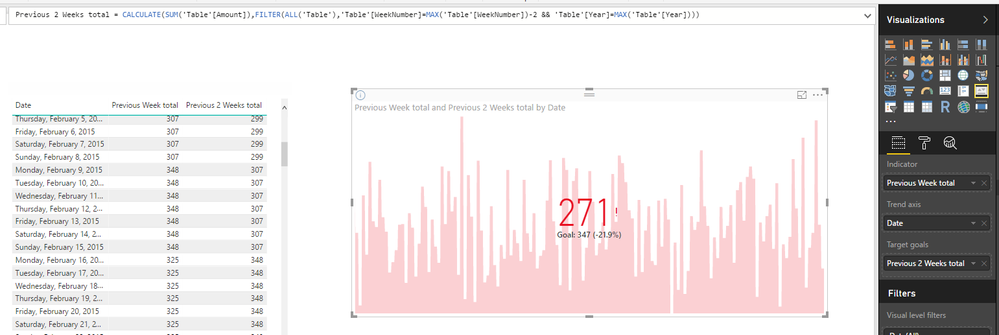
I tried similar DAX formula as yours (just remove VALUES('Datatable'[Date]) part in CALCULATE). But I haven't encountered your issue.
Previous Week total =
CALCULATE (
SUM ( 'Table'[Amount] ),
FILTER (
ALL ( 'Table' ),
'Table'[WeekNumber]
= MAX ( 'Table'[WeekNumber] ) - 1
&& 'Table'[Year] = MAX ( 'Table'[Year] )
)
)
Previous 2 Weeks total =
CALCULATE (
SUM ( 'Table'[Amount] ),
FILTER (
ALL ( 'Table' ),
'Table'[WeekNumber]
= MAX ( 'Table'[WeekNumber] ) - 2
&& 'Table'[Year] = MAX ( 'Table'[Year] )
)
)
Regards,
I tried similar DAX formula as yours (just remove VALUES('Datatable'[Date]) part in CALCULATE). But I haven't encountered your issue.
Previous Week total =
CALCULATE (
SUM ( 'Table'[Amount] ),
FILTER (
ALL ( 'Table' ),
'Table'[WeekNumber]
= MAX ( 'Table'[WeekNumber] ) - 1
&& 'Table'[Year] = MAX ( 'Table'[Year] )
)
)
Previous 2 Weeks total =
CALCULATE (
SUM ( 'Table'[Amount] ),
FILTER (
ALL ( 'Table' ),
'Table'[WeekNumber]
= MAX ( 'Table'[WeekNumber] ) - 2
&& 'Table'[Year] = MAX ( 'Table'[Year] )
)
)
Regards,
Thank you. This way it seems to work. I had the values for the slicer.
Check out the November 2025 Power BI update to learn about new features.
Advance your Data & AI career with 50 days of live learning, contests, hands-on challenges, study groups & certifications and more!