Don't miss your chance to take the Fabric Data Engineer (DP-600) exam for FREE! Find out how by attending the DP-600 session on April 23rd (pacific time), live or on-demand.
Learn moreNext up in the FabCon + SQLCon recap series: The roadmap for Microsoft SQL and Maximizing Developer experiences in Fabric. All sessions are available on-demand after the live show. Register now
Hi, Guys have a problem,
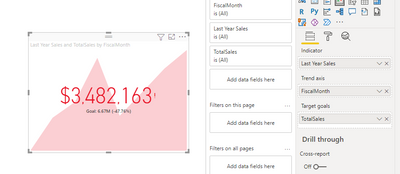
I want use KPI chart and set a reverse order a mean min value 100(put it manually) target 36(measure) max value 22(measure).
It's ok for Min and Max values but then I set Target 36 its don't appear in visualization.
when I use it in normal order from Min 0 Max 100 its ok, any ideas?
Hi @AndrejZevzikov ,
According to my tests, the two measures created are displayed correctly when placed in Indicator and Target goals respectively. Can you provide the relevant screenshot information and the expected results so that I can further answer for you.
Looking forward to your reply.
Best Regards,
Henry
If this post helps, then please consider Accept it as the solution to help the other members find it more quickly.
I
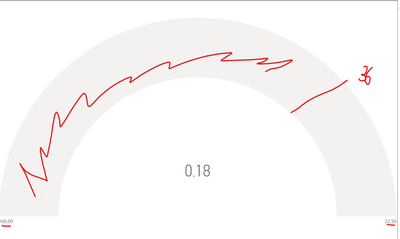
I hope will be useful in second screen show the result I want (but how can you see data increase in that chart from 0 to -1,22 and target is 0,9). In first screen I show that a have at the moment I want to start form 100 and go to 22 whit target at 36. But target line didnt appea.
If you have recently started exploring Fabric, we'd love to hear how it's going. Your feedback can help with product improvements.
A new Power BI DataViz World Championship is coming this June! Don't miss out on submitting your entry.
Share feedback directly with Fabric product managers, participate in targeted research studies and influence the Fabric roadmap.
| User | Count |
|---|---|
| 48 | |
| 45 | |
| 41 | |
| 20 | |
| 17 |
| User | Count |
|---|---|
| 69 | |
| 63 | |
| 32 | |
| 31 | |
| 23 |