cancel
Showing results for 
Search instead for 
Did you mean: 

Learn from the best! Meet the four finalists headed to the FINALS of the Power BI Dataviz World Championships! Register now

Reply
sakamotothais
Helper III
Helper III

KPI Visualization


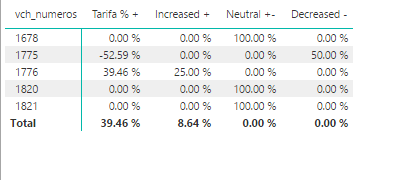
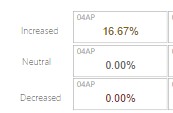
Hi, please I need help, How can I display values ​​in my KPI as an indicator?

I have an example below but the indicator shows value 0 and I want it to show the ratio between value yesterday and value today.


capture 2.PNG

Capture2.PNG

Increased = IF([Tarifa % +] > 0, [Count D-1]/ [Count D0],0)/COUNT(Consulta1[flt_base_min])

Decreased = IF([Tarifa % +] < 0, [Count D-1]/ [Count D0],0)/COUNT(Consulta1[flt_base_min])

Neutral = IF([Tarifa % +] = 0, [Count D-1]/ [Count D0],0)/COUNT(Consulta1[flt_base_min])


Count D-1 = CALCULATE(COUNT(Consulta1[flt_base_min]),DATEADD(Consulta1[dtt_data_captura],-1,DAY))

Count D0 = CALCULATE(COUNT(Consulta1[flt_base_min]),DAY(Consulta1[dtt_data_captura]),FILTER(Consulta1, Consulta1[dtt_data_captura]))


Tarifa % + =
VAR __BASELINE_VALUE = 'Consulta1'[TarOntem]
VAR __VALUE_TO_COMPARE = 'Consulta1'[TarHoje]
RETURN
IF(
NOT ISBLANK(__VALUE_TO_COMPARE),
DIVIDE(__VALUE_TO_COMPARE - __BASELINE_VALUE, __BASELINE_VALUE)
)

Thanks

1 REPLY 1
Twilla
Helper I
Helper I

Hi Sakamotothais, 


You should try to explain your question in a clear way so that it is possible for us to understand your problem.


Use "insert code" when writing code:

Tarifa % + =
VAR __BASELINE_VALUE = 'Consulta1'[TarOntem]
VAR __VALUE_TO_COMPARE = 'Consulta1'[TarHoje]
RETURN
IF(
NOT ISBLANK(__VALUE_TO_COMPARE),
DIVIDE(__VALUE_TO_COMPARE - __BASELINE_VALUE, __BASELINE_VALUE)
)

And don't put all the code in one block but explain for each part what it is does (or what you expected it to do). 


Ready to help when you explain your problem in a structured way,


Cheers,

Twilla

Helpful resources

Announcements
Join our Fabric User Panel

Join our Fabric User Panel

Share feedback directly with Fabric product managers, participate in targeted research studies and influence the Fabric roadmap.

February Power BI Update Carousel

Power BI Monthly Update - February 2026

Check out the February 2026 Power BI update to learn about new features.