Hello,
I am looking for a quick help here.
I have survey data where the survey's are conducted after every few months. There is no fix timeline.
So here is the scenario.
For IT Survey Area, 3 surveys were conducted in (June 2021, October 2021, February 2022)
I have 2 measures that calculates net score for a category of questions.
1st Measure (Current Netscore) with Dax
IT Bench1 Netscore Current % =
var max_date = [Max IT survey date]
var top_2_boxes = CALCULATE(DISTINCTCOUNT('Survey fact'[Response ID]),FILTER('Survey fact', 'Survey fact'[Survey date] = max_date && 'Survey fact'[Question ID] = "Bench1" && 'Survey fact'[Answer] in {"4", "5"}))
var bottom_2_boxes = CALCULATE(DISTINCTCOUNT('Survey fact'[Response ID]),FILTER('Survey fact', 'Survey fact'[Survey date] = max_date && 'Survey fact'[Question ID] = "Bench1" && 'Survey fact'[Answer] in {"1", "2"}))
var denominator = CALCULATE(DISTINCTCOUNT('Survey fact'[Response ID]),FILTER('Survey fact', 'Survey fact'[Survey date] = max_date && 'Survey fact'[Question ID] = "Bench1" && 'Survey fact'[Answer] in {"1", "2", "3", "4", "5"}))
return DIVIDE(top_2_boxes - bottom_2_boxes, denominator, 0) *100
2nd Measure (Previous Survey) with Dax
IT bench1 Netscore LP % =
var max_date = [Max IT survey date]
var area = [Survey Area IT]
var last_period_date = CALCULATE(MAX('Survey attribute'[Survey date]), 'Survey attribute'[Survey area] = area, 'Survey attribute'[Survey date] < max_date)
var top_2_boxes = CALCULATE(DISTINCTCOUNT('Survey fact'[Response ID]),FILTER('Survey fact', 'Survey fact'[Survey date] = last_period_date && 'Survey fact'[Question ID] = "Bench1" && 'Survey fact'[Answer] in {"4", "5"}))
var bottom_2_boxes = CALCULATE(DISTINCTCOUNT('Survey fact'[Response ID]),FILTER('Survey fact', 'Survey fact'[Survey date] = last_period_date && 'Survey fact'[Question ID] = "Bench1" && 'Survey fact'[Answer] in {"1", "2"}))
var denominator = CALCULATE(DISTINCTCOUNT('Survey fact'[Response ID]),FILTER('Survey fact', 'Survey fact'[Survey date] = last_period_date && 'Survey fact'[Question ID] = "Bench1" && 'Survey fact'[Answer] in {"1", "2", "3", "4", "5"}))
return DIVIDE((top_2_boxes - bottom_2_boxes),denominator, 0)*100
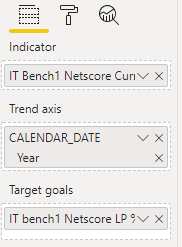
I am using KPI Visual to show Current Value vs Previous Value. This was working perfectly okay until last survey (as both the surveys were in 2021).
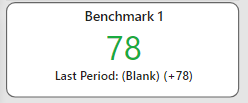
Now with this new survey being in 2022, the KPI visual is not showing me the previous survey value as goal. Since the KPI visual doesn't support multilevel date hierarchy I am not sure how to fix this issue. Below is the screenshot of what I am getting as output.
I would really appreciate any help here to fix this issue.
Thank you


