cancel
Showing results for 
Search instead for 
Did you mean: 

Vote for your favorite vizzies from the Power BI Dataviz World Championship submissions. Vote now!

Reply
moesteez
Helper I
Helper I

Joining two different database systems

Hi guys,


I have two databases that Ive linked up and reporting on. One is a point of sale system and the other is an accounting system (xero). Both systems have multiple, but identical, stores.


I want to be able to choose one store for a given date range and see both the sales (point of sale database) and the purchases (accounting database). Im able to do this quite easily by linking each of the databases fact tables to a calendar table if both databases are only limitted to one store.


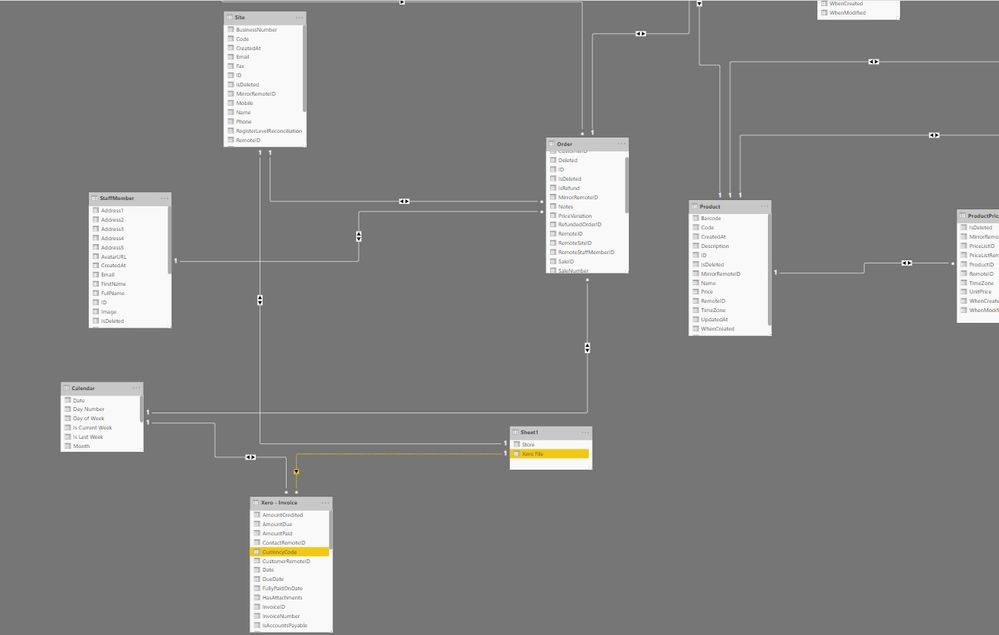
In order to join both databases to have multiple stores, Ive created a spreadsheet with two columns that links both account IDs from the accounting system and the point of sale system. Power BI wont let me create this extra join on top of the calendar table join because it will "create ambiguity between my tables". But if I drop the join between the calendar table and the accounting system and make this new one active, the report works, except my date slicer no longer works.


I hope this makes sense. 


I have all my filter directions set to "both". Does anyone know how I can get around this so that I can both select a store from both databases as well as filter my reports through the calendar table?


Here is a small part of what my tables look like including the joins between the calendar table and my spreadsheet (sheet 1)
 

power bi.jpg

1 ACCEPTED SOLUTION
Mariusz
Community Champion
Community Champion

Hi @moesteez 


Try to avoid Bidirectional relationships as they create a lot of problems with data, review all your relationships ( switch from Both to Single direction where possible ) this should remove ambiguity.

Create a Store dimension ( if you haven't yet ) and create relationships ( one to many ) with all the fact tables.

Use dimensions ( like calendar and store ) to propagate the filter.


Best Regards,
Mariusz

If this post helps, then please consider Accepting it as the solution.

Please feel free to connect with me.
Mariusz Repczynski


View solution in original post

2 REPLIES 2
Mariusz
Community Champion
Community Champion

Hi @moesteez 


Try to avoid Bidirectional relationships as they create a lot of problems with data, review all your relationships ( switch from Both to Single direction where possible ) this should remove ambiguity.

Create a Store dimension ( if you haven't yet ) and create relationships ( one to many ) with all the fact tables.

Use dimensions ( like calendar and store ) to propagate the filter.


Best Regards,
Mariusz

If this post helps, then please consider Accepting it as the solution.

Please feel free to connect with me.
Mariusz Repczynski


Thanks @Mariusz 


That was the problem. Works great now!

Helpful resources

Announcements
Power BI DataViz World Championships

Power BI Dataviz World Championships

Vote for your favorite vizzies from the Power BI World Championship submissions!

Sticker Challenge 2026 Carousel

Join our Community Sticker Challenge 2026

If you love stickers, then you will definitely want to check out our Community Sticker Challenge!

January Power BI Update Carousel

Power BI Monthly Update - January 2026

Check out the January 2026 Power BI update to learn about new features.

FabCon Atlanta 2026 carousel

FabCon Atlanta 2026

Join us at FabCon Atlanta, March 16-20, for the ultimate Fabric, Power BI, AI and SQL community-led event. Save $200 with code FABCOMM.