cancel
Showing results for 
Search instead for 
Did you mean: 

The Power BI Data Visualization World Championships is back! Get ahead of the game and start preparing now! Learn more

Reply
Syndicate_Admin
Administrator
Administrator

Join a letter to a column in Power Query

Community

Please ask for your help with knowing how to write the formula in Power Query if I want to generate a new column with the one letter along with the value of a current column.

Example:

"S" [Center], where S is the letter and [Center] is the column of a current table.

Currently I enter it like this but it generates error.

Stay tuned

Saludso

1 ACCEPTED SOLUTION
v-luwang-msft
Community Support
Community Support

Hi @Syndicate_Admin ,

Pls refer the below:

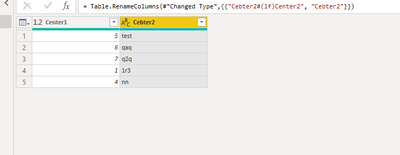
vluwangmsft_0-1652862073293.png

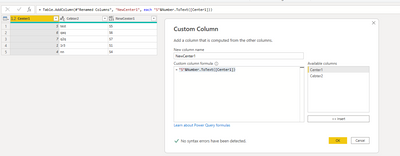
If the column is number ,use the below to create a new column ,then delete before column and rename new column:

"S"&Number.ToText([Center1])

vluwangmsft_1-1652862336695.png

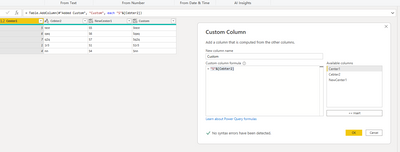
If the column is text,use the below to create a new column ,then delete before column and rename new column:

"S"&[Cebter2]

vluwangmsft_2-1652862381927.png

Did I answer your question? Mark my post as a solution!


Best Regards

Lucien

View solution in original post

5 REPLIES 5
v-luwang-msft
Community Support
Community Support

Hi @Syndicate_Admin ,

Pls refer the below:

vluwangmsft_0-1652862073293.png

If the column is number ,use the below to create a new column ,then delete before column and rename new column:

"S"&Number.ToText([Center1])

vluwangmsft_1-1652862336695.png

If the column is text,use the below to create a new column ,then delete before column and rename new column:

"S"&[Cebter2]

vluwangmsft_2-1652862381927.png

Did I answer your question? Mark my post as a solution!


Best Regards

Lucien

Syndicate_Admin
Administrator
Administrator

I finally discovered the error.

To be able to create a concatenated column in PQ, it must only be text, IT CANNOT BE NUMBER

Syndicate_Admin
Administrator
Administrator

What I need is to join "S" & (Center)

But it gives me error as seen in the following image:

csalinas23_0-1652376364481.png

ribisht17
Super User
Super User

@Syndicate_Admin 


StepName = Table.TransformColumns(
  Source,
  {
    {
      "name", 
      each 
        Text.Combine({"ABC",(_)}),
      type text
    }
  }
)

>>>REFER >>> Add Text to an Existing Column in Power Query | jaykilleen.com


Regards,

Ritesh 

I still get an error "Eof token expected"

csalinas23_0-1652375818512.png

Helpful resources

Announcements
Power BI DataViz World Championships

Power BI Dataviz World Championships

The Power BI Data Visualization World Championships is back! Get ahead of the game and start preparing now!

December 2025 Power BI Update Carousel

Power BI Monthly Update - December 2025

Check out the December 2025 Power BI Holiday Recap!

FabCon Atlanta 2026 carousel

FabCon Atlanta 2026

Join us at FabCon Atlanta, March 16-20, for the ultimate Fabric, Power BI, AI and SQL community-led event. Save $200 with code FABCOMM.