Join us at FabCon Atlanta from March 16 - 20, 2026, for the ultimate Fabric, Power BI, AI and SQL community-led event. Save $200 with code FABCOMM.
Register now!Get Fabric Certified for FREE during Fabric Data Days. Don't miss your chance! Request now
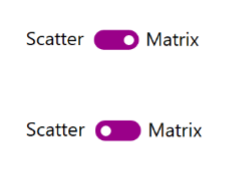
In the January 2018 update release video, there's an item that I don't recognize. The purple button (presumably connected to bookmarks to toggle different visuals) would be really helpful in a lot of my reports, rather than using images as links. Any idea how to find it?

Second question: when using relative date slicers, how can I set the anchor date to just "Today," so I can get a constant 6 month-forward view? When I choose today's date in the field (e.g the 24th), the next day it still anchors on the 24th.
Thanks!
For the first question, I believe this is still just two different images, which have been set as links for the two different bookmarks. The selection pane is used to show/hide the images in the different bookmark reports.
The images would be something like this:
Thanks,
Sam Lester (MSFT)
Check out the November 2025 Power BI update to learn about new features.
Advance your Data & AI career with 50 days of live learning, contests, hands-on challenges, study groups & certifications and more!