Join us at FabCon Atlanta from March 16 - 20, 2026, for the ultimate Fabric, Power BI, AI and SQL community-led event. Save $200 with code FABCOMM.
Register now!The Power BI Data Visualization World Championships is back! It's time to submit your entry. Live now!
Hi,
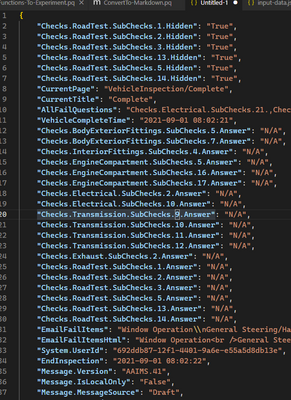
I want to report on some key value pair JSON data, example below...
"ReportDetail": "{{\"Checks.RoadTest.SubChecks.1.Hidden\":\"True\",\"Checks.RoadTest.SubChecks.2.Hidden\":\"True\",\"Checks.RoadTest.SubChecks.3.Hidden\":\"True\",\"Checks.RoadTest.SubChecks.13.Hidden\":\"True\",\"Checks.RoadTest.SubChecks.5.Hidden\":\"True\",\"Checks.RoadTest.SubChecks.14.Hidden\":\"True\",\"CurrentPage\":\"VehicleInspection/Complete\",\"CurrentTitle\":\"Complete\",\"AllFailQuestions\":\"Checks.Electrical.SubChecks.21.,Checks.RoadTest.SubChecks.9.\",\"VehicleCompleteTime\":\"2021-09-01 08:02:21\",\"Checks.BodyExteriorFittings.SubChecks.5.Answer\":\"N/A\",\"Checks.BodyExteriorFittings.SubChecks.7.Answer\":\"N/A\",\"Checks.InteriorFittings.SubChecks.4.Answer\":\"N/A\",\"Checks.EngineCompartment.SubChecks.5.Answer\":\"N/A\",\"Checks.EngineCompartment.SubChecks.16.Answer\":\"N/A\",\"Checks.EngineCompartment.SubChecks.17.Answer\":\"N/A\",\"Checks.Electrical.SubChecks.2.Answer\":\"N/A\",\"Checks.Electrical.SubChecks.10.Answer\":\"N/A\",\"Checks.Transmission.SubChecks.9.Answer\":\"N/A\",\"Checks.Transmission.SubChecks.10.Answer\":\"N/A\",\"Checks.Transmission.SubChecks.11.Answer\":\"N/A\",\"Checks.Transmission.SubChecks.12.Answer\":\"N/A\",\"Checks.Exhaust.SubChecks.2.Answer\":\"N/A\",\"Checks.RoadTest.SubChecks.1.Answer\":\"N/A\",\"Checks.RoadTest.SubChecks.2.Answer\":\"N/A\",\"Checks.RoadTest.SubChecks.3.Answer\":\"N/A\",\"Checks.RoadTest.SubChecks.5.Answer\":\"N/A\",\"Checks.RoadTest.SubChecks.13.Answer\":\"N/A\",\"Checks.RoadTest.SubChecks.14.Answer\":\"N/A\",\"EmailFailItems\":\"Window Operation\\nGeneral Steering/Handling\",\"EmailFailItemsHtml\":\"Window Operation<br />General Steering/Handling\",\"System.UserId\":\"692ddb87-12f1-4401-9a6e-e55a5d8db13e\",\"EndInspection\":\"2021-09-01 08:02:22\",\"Message.Version\":\"AAIMS.41\",\"Message.IsLocalOnly\":\"False\",\"Message.MessageSource\":\"Draft\",\"Message.Opened\":\"True\",\"Message.DataPending\":\"False\",\"VehicleLookup\":\"Wm14cwa\",\"AdHocLookup.Success\":\"true\",\"AdHocLookup.Error\":\"\",\"HPI.Lookup.Registration\":\"Wm14cwa\",\"HPI.Status\":\"Vehicle found\".....
All other fields are fine, i.e. "VehicleMOT": "Expires: 29 June 2022", but I want to report on the above string which is huge. How can I do this please? There are sub-key value pairs in there, i.e. Checks.RoadTest.SubChecks.2.Answer = N/A etc...
Thanks!
Solved! Go to Solution.
Hi @SachinC
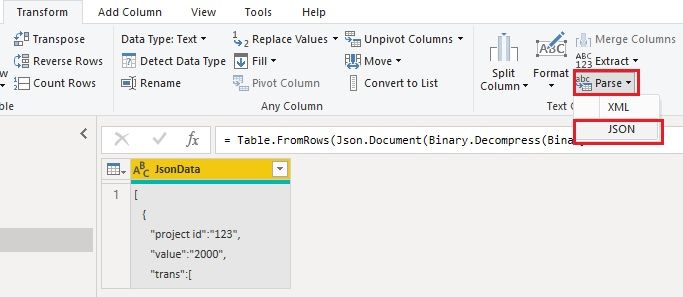
If you have JSON strings in a column, you can parse that column to JSON format. One way is via Transform / Add Column > Parse > JSON.
The other is to right click on column header, then Transform > JSON.
After that, you will get record or list values, you can expand them then and transform them to get the format you want.
Reference:
Parse text as JSON or XML | Microsoft Docs
Videos:
Parse JSON data in a column using Power Query in Power BI - YouTube
Convert JSON strings to tables in Power Query/ Power BI - YouTube
Best Regards,
Community Support Team _ Jing
If this post helps, please Accept it as Solution to help other members find it.
Hi @SachinC
If you have JSON strings in a column, you can parse that column to JSON format. One way is via Transform / Add Column > Parse > JSON.
The other is to right click on column header, then Transform > JSON.
After that, you will get record or list values, you can expand them then and transform them to get the format you want.
Reference:
Parse text as JSON or XML | Microsoft Docs
Videos:
Parse JSON data in a column using Power Query in Power BI - YouTube
Convert JSON strings to tables in Power Query/ Power BI - YouTube
Best Regards,
Community Support Team _ Jing
If this post helps, please Accept it as Solution to help other members find it.
Hi @NINO
Many thanks for your response.
May I ask how you got it into a meaningful format please?
This is my issue - I want to get the data into a format which I can report on.
I don't want to drill into, I want to parse the JSON.
If you can give me some steps I would appreciate.
Thanks for your efforts!
Is the problem how to drill down through json? Or parsing after you have the data?
Yours was a single record, I used multiple in case yours does.
you can tell because "{}" in JSON is equivalent to a a power query Record. It's the reverse of Power Query.
| JSON | Power Query |
| { "name": "bob" } | [ name = "bob" ] |
| [ "something ] | { "something" } |
JSON and Power Query side by side

Final Expanded Table
The original JSON
let
// ignore this step, it's the escaped json document. This happens when you paste into the editor.
source = "[#(cr)#(lf) {#(cr)#(lf) ""Species"": ""Cat"",#(cr)#(lf) ""Name"": ""Ted"",#(cr)#(lf) ""Lives"": 9,#(cr)#(lf) ""Kittens"": [#(cr)#(lf) { ""Name"": ""Jane"", ""Status"": ""Sleeping"" },#(cr)#(lf) { ""Name"": ""Frederick"", ""Status"": ""Chasing yarn"" }#(cr)#(lf) ]#(cr)#(lf) },#(cr)#(lf) {#(cr)#(lf) ""Species"": ""Turtle"",#(cr)#(lf) ""Name"": ""Elena""#(cr)#(lf) }#(cr)#(lf)]",
json = Json.Document(source),
toTable = Table.FromRecords(
json, null, MissingField.UseNull
),
#"Changed Type" = Table.TransformColumnTypes(
toTable,
{ {"Species", type text}, {"Name", type text}, {"Lives", Int64.Type}, {"Kittens", type any} }
),
// expand nested values
#"Expanded Kittens" = Table.ExpandListColumn(
#"Changed Type", "Kittens"),
#"Expanded Kittens2" = Table.ExpandRecordColumn(
#"Expanded Kittens",
"Kittens",
{"Name", "Status"}, {"Kitten.Name", "Kitten.Status"}
),
#"Changed Type1" = Table.TransformColumnTypes(
#"Expanded Kittens2",
{ {"Kitten.Name", type text}, {"Kitten.Status", type text} }
)
in
#"Changed Type1"
Hi, I posted a response above. If you could answer that would be grand. Thanks
The Power BI Data Visualization World Championships is back! It's time to submit your entry.
Check out the January 2026 Power BI update to learn about new features.
| User | Count |
|---|---|
| 66 | |
| 44 | |
| 34 | |
| 26 | |
| 23 |
| User | Count |
|---|---|
| 137 | |
| 118 | |
| 58 | |
| 40 | |
| 35 |