Join us in Barcelona for FabCon and SQLCon, September 28 - October 1, 2026.
This is best Fabric, Power BI, SQL and AI community event. How do we know? The last event sold out! Save €200 with code FABCMTY200.
Register now- Power BI forums
- Get Help with Power BI
- Desktop
- Service
- Report Server
- Power Query
- Mobile Apps
- Developer
- DAX Commands and Tips
- Custom Visuals Development Discussion
- Health and Life Sciences
- Power BI Spanish forums
- Translated Spanish Desktop
- Training and Consulting
- Instructor Led Training
- Dashboard in a Day for Women, by Women
- Galleries
- Data Stories Gallery
- Themes Gallery
- Contests Gallery
- QuickViz Gallery
- Quick Measures Gallery
- Visual Calculations Gallery
- Fabric Apps Gallery
- Notebook Gallery
- Translytical Task Flow Gallery
- TMDL Gallery
- R Script Showcase
- Webinars and Video Gallery
- Ideas
- Custom Visuals Ideas (read-only)
- Issues
- Issues
- Events
- Upcoming Events
July 28 - August 9 | Final Round of the Power BI Dataviz World Championships. This is your chance. Learn more
- Power BI forums
- Forums
- Get Help with Power BI
- Desktop
- Iterating and comparing rows
- Subscribe to RSS Feed
- Mark Topic as New
- Mark Topic as Read
- Float this Topic for Current User
- Bookmark
- Subscribe
- Printer Friendly Page


- Mark as New
- Bookmark
- Subscribe
- Mute
- Subscribe to RSS Feed
- Permalink
- Report Inappropriate Content
Iterating and comparing rows
I have a table of tasks assigned to different people, with set due dates, hours and priorities. I have previously processed these (in Visual Studio) to determine an order of works. This was done by
- Grouping tasks by person
- Ranking by due date
- Determining projected completion dates, based on the sum of the hours of tasks ranked above them, then
- Iterating the rankings from first to last and checking whether the due date was being met
- If yes no action was taken
- If no it was checked whether this task was a higher priority than the task ranked above, if so its rank was switched with the one above and projected end dates recalculated until it was either meeting due date or was not a higher priority than the task above (essentially moving it up the rankings).
I am new to PowerBI and am trying to follow the same logic but can't figure out how to iterate, with reference to other rows. Can anyone assist with the best way to approach this?
Sample data
| AssignedToID | Due Date | Priority (999 = highest) | WorkingDaysRemaining |
| 5 | 1/08/2022 | 200 | 5 |
| 6 | 1/08/2022 | 100 | 5 |
| 7 | 5/08/2022 | 100 | 7 |
| 7 | 10/08/2022 | 100 | 4 |
| 6 | 13/08/2022 | 500 | 5 |
| 5 | 15/08/2022 | 900 | 10 |
| 6 | 15/08/2022 | 500 | 5 |
| 5 | 20/08/2022 | 500 | 5 |
| 7 | 30/08/2022 | 900 | 2 |
Desired result
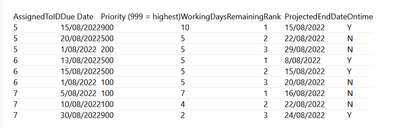
| AssignedToID | Due Date | Priority (999 = highest) | WorkingDaysRemaining | Rank | ProjectedEndDate | Ontime |
| 5 | 15/08/2022 | 900 | 10 | 1 | 15/08/2022 | Y |
| 5 | 20/08/2022 | 500 | 5 | 2 | 22/08/2022 | N |
| 5 | 1/08/2022 | 200 | 5 | 3 | 29/08/2022 | N |
| 6 | 13/08/2022 | 500 | 5 | 1 | 8/08/2022 | Y |
| 6 | 15/08/2022 | 500 | 5 | 2 | 15/08/2022 | Y |
| 6 | 1/08/2022 | 100 | 5 | 3 | 20/08/2022 | N |
| 7 | 5/08/2022 | 100 | 7 | 1 | 16/08/2022 | N |
| 7 | 10/08/2022 | 100 | 4 | 2 | 22/08/2022 | N |
| 7 | 30/08/2022 | 900 | 2 | 3 | 24/08/2022 | Y |


- Mark as New
- Bookmark
- Subscribe
- Mute
- Subscribe to RSS Feed
- Permalink
- Report Inappropriate Content
Hi @DebbieK ,
I am honestly confused with the sample and expected results provided. The due dates don't match as well as the priorities. For ID5, the dates are all 1/8 in the sample data but they're different in the expected result except for one. The priority numbers are also different - {900,500,100} vs {900,500,200}

Dane Belarmino | Microsoft MVP | Proud to be a Super User!
Did I answer your question? Mark my post as a solution!
"Tell me and I’ll forget; show me and I may remember; involve me and I’ll understand."
Need Power BI consultation, get in touch with me on LinkedIn or hire me on UpWork.
Learn with me on YouTube @DAXJutsu or follow my page on Facebook @DAXJutsuPBI.
- Mark as New
- Bookmark
- Subscribe
- Mute
- Subscribe to RSS Feed
- Permalink
- Report Inappropriate Content
Hi Danextian - thank you, and sorry for the mistake in the sample data, one of the due dates were wrong. I have now corrected this.
Note in the sample data it is sorted by due date, in the output data it is grouped by ID and then sorted by rank.
- Mark as New
- Bookmark
- Subscribe
- Mute
- Subscribe to RSS Feed
- Permalink
- Report Inappropriate Content
Hello,
Where can I find the hours?
Determining projected completion dates, based on the sum of the hours of tasks ranked above them
Also, how is the projected end date computed? I am assuming that it is 7 (x rank-1) days from rank1 project.
Dane Belarmino | Microsoft MVP | Proud to be a Super User!
Did I answer your question? Mark my post as a solution!
"Tell me and I’ll forget; show me and I may remember; involve me and I’ll understand."
Need Power BI consultation, get in touch with me on LinkedIn or hire me on UpWork.
Learn with me on YouTube @DAXJutsu or follow my page on Facebook @DAXJutsuPBI.
- Mark as New
- Bookmark
- Subscribe
- Mute
- Subscribe to RSS Feed
- Permalink
- Report Inappropriate Content
Hi danextian - thanks for your help.
The hours = 8 hours x number of working days.
The projected completion date is the end of the previously ranked project + working days. For example ID 5, top ranked project finishes on 15/08/22. ID 5 second ranked project then has a completion date of 15/8/22 + 5 working days being 22/8/22 (due to weekend days).
- Mark as New
- Bookmark
- Subscribe
- Mute
- Subscribe to RSS Feed
- Permalink
- Report Inappropriate Content
I am confused how the rank is calculated. For ID5, it appears that they're ranked by priority. For 7, they are ranked by Due Date.
Dane Belarmino | Microsoft MVP | Proud to be a Super User!
Did I answer your question? Mark my post as a solution!
"Tell me and I’ll forget; show me and I may remember; involve me and I’ll understand."
Need Power BI consultation, get in touch with me on LinkedIn or hire me on UpWork.
Learn with me on YouTube @DAXJutsu or follow my page on Facebook @DAXJutsuPBI.
- Mark as New
- Bookmark
- Subscribe
- Mute
- Subscribe to RSS Feed
- Permalink
- Report Inappropriate Content
Hi danextian,
The logic is to rank by due date, then check if a higher prioirity task is not ontime and if so promote it up the ranks.
For ID 7 they are ranked by due date, and the higher priority task is on time, so no changes are needed.
I've played out the example process for ID 5 below.
STEP 1 - Sort by due date
| AssignedToID | Due Date | Priority (999 = highest) | WorkingDaysRemaining |
| 5 | 1/08/2022 | 200 | 5 |
| 5 | 15/08/2022 | 900 | 10 |
| 5 | 20/08/2022 | 500 | 5 |
| 6 | 1/08/2022 | 100 | 5 |
| 6 | 13/08/2022 | 500 | 5 |
| 6 | 15/08/2022 | 500 | 5 |
| 7 | 5/08/2022 | 100 | 7 |
| 7 | 10/08/2022 | 100 | 4 |
| 7 | 30/08/2022 | 900 | 2 |
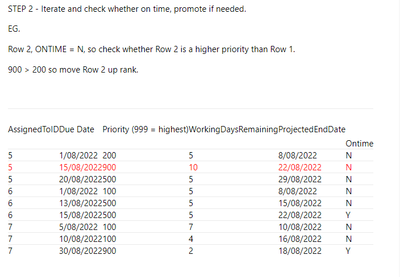
STEP 2 - Iterate and check whether on time, promote if needed.
EG.
Row 2, ONTIME = N, so check whether Row 2 is a higher priority than Row 1.
900 > 200 so move Row 2 up rank.
| AssignedToID | Due Date | Priority (999 = highest) | WorkingDaysRemaining | ProjectedEndDate |
| |
| 5 | 1/08/2022 | 200 | 5 | 8/08/2022 | N | |
| 5 | 15/08/2022 | 900 | 10 | 22/08/2022 | N | |
| 5 | 20/08/2022 | 500 | 5 | 29/08/2022 | N | |
| 6 | 1/08/2022 | 100 | 5 | 8/08/2022 | N | |
| 6 | 13/08/2022 | 500 | 5 | 15/08/2022 | N | |
| 6 | 15/08/2022 | 500 | 5 | 22/08/2022 | Y | |
| 7 | 5/08/2022 | 100 | 7 | 10/08/2022 | N | |
| 7 | 10/08/2022 | 100 | 4 | 16/08/2022 | N | |
| 7 | 30/08/2022 | 900 | 2 | 18/08/2022 | Y |
Then EG
Row 3, ONTIME = N, so check whether Row 3 is higher priority than Row 2.
Priority 500> 200, so move Row 3 up rank
ONTIME still = No
Check whether higher priority than Row 1
Priority 500 < 900 so do not move higher.
| AssignedToID | Due Date | Priority (999 = highest) | WorkingDaysRemaining | ProjectedEndDate | Ontime | |
| 5 | 15/08/2022 | 900 | 10 | 15/08/2022 | Y | |
| 5 | 1/08/2022 | 200 | 5 | 22/08/2022 |
| |
| 5 | 20/08/2022 | 500 | 5 | 29/08/2022 | N | |
| 6 | 1/08/2022 | 100 | 5 | 8/08/2022 | N | |
| 6 | 13/08/2022 | 500 | 5 | 15/08/2022 | N | |
| 6 | 15/08/2022 | 500 | 5 | 22/08/2022 | Y | |
| 7 | 5/08/2022 | 100 | 7 | 10/08/2022 | N | |
| 7 | 10/08/2022 | 100 | 4 | 16/08/2022 | N | |
| 7 | 30/08/2022 | 900 | 2 | 18/08/2022 | Y |
Finished iteration of ID5
| AssignedToID | Due Date | Priority (999 = highest) | WorkingDaysRemaining | Rank | ProjectedEndDate | Ontime |
| 5 | 15/08/2022 | 900 | 10 | 1 | 15/08/2022 | Y |
| 5 | 20/08/2022 | 500 | 5 | 2 | 22/08/2022 | N |
| 5 | 1/08/2022 | 200 | 5 | 3 | 29/08/2022 | N |
| 6 | 1/08/2022 | 100 | 5 | 8/08/2022 | N | |
| 6 | 13/08/2022 | 500 | 5 | 15/08/2022 | N | |
| 6 | 15/08/2022 | 500 | 5 | 22/08/2022 | Y | |
| 7 | 5/08/2022 | 100 | 7 | 10/08/2022 | N | |
| 7 | 10/08/2022 | 100 | 4 | 16/08/2022 | N | |
| 7 | 30/08/2022 | 900 | 2 | 18/08/2022 | Y |
- Mark as New
- Bookmark
- Subscribe
- Mute
- Subscribe to RSS Feed
- Permalink
- Report Inappropriate Content
In step 2, how would one know whether a project is on-time or not? Also in row 2, 15/8 + 10 workdays shouldn't that be 29/8?
Dane Belarmino | Microsoft MVP | Proud to be a Super User!
Did I answer your question? Mark my post as a solution!
"Tell me and I’ll forget; show me and I may remember; involve me and I’ll understand."
Need Power BI consultation, get in touch with me on LinkedIn or hire me on UpWork.
Learn with me on YouTube @DAXJutsu or follow my page on Facebook @DAXJutsuPBI.
- Mark as New
- Bookmark
- Subscribe
- Mute
- Subscribe to RSS Feed
- Permalink
- Report Inappropriate Content
If ProjectedEndDate is on or before DueDate than the project is ontime
Take "TODAY" as 1 August. For example in Step 2 (screenshot below)
- Row one is 5 days and so ProjectedEndDate is 8 August
- Row two is 10 days and so ProjectedEndDate is 10 working days AFTER the end date of Row 1 (so 8 August + 10wd = 22 August)

Helpful resources

FabCon & SQLCon – Barcelona 2026
Join us in Barcelona for FabCon and SQLCon, the Fabric, Power BI, SQL, and AI community event. Save €200 with code FABCMTY200.

Power BI Monthly Update - July 2026
Check out the July 2026 Power BI update to learn about new features.

Power BI DataViz World Championships - June 2026
A new Power BI DataViz World Championship is coming this June! Don't miss out on submitting your entry.

| User | Count |
|---|---|
| 25 | |
| 23 | |
| 20 | |
| 18 | |
| 14 |


| User | Count |
|---|---|
| 22 | |
| 20 | |
| 20 | |
| 20 | |
| 20 |


