cancel
Showing results for 
Search instead for 
Did you mean: 

Get Fabric Certified for FREE during Fabric Data Days. Don't miss your chance! Request now

Reply
DrewZain2345
New Member

Iterate % Complete Over Days


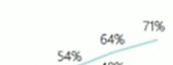
I'm trying to create a line graph that shows the "calendar percent complete" between two dates. (Iterate a percent complete calculation over days between two dates)

DrewZain2345_0-1696350706341.png


I have my calendar percent complete measure:

Calendar Percent Complete =
VAR _DaysSinceStart = DATEDIFF ( MIN ( 'Contract'[Start Date] ), TODAY (), DAY )
VAR _Duration = DATEDIFF ( MIN ( 'Contract'[Start Date] ), MAX ( 'Portfolio'[Completion] ), DAY )
RETURN
DIVIDE (
    _DaysSinceStart, _Duration
)

And I started with this:

IterativeMeasure =
CALCULATE(
    [Calendar Percent Complete],
    FILTER(
        ALL('Date'[Date]),
        'Date'[Date] >= MIN('Contract'[Start Date]) &&
        'Date'[Date] <= MAX('Portfolio'[Completion])
    )
)

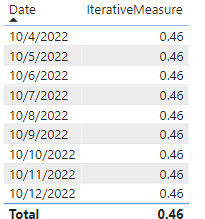
Getting these results:

DrewZain2345_1-1696351107245.png


Relationship issues?

1 REPLY 1
amitchandak
Super User
Super User

@DrewZain2345 , Can you share sample data and sample output in table format? Or a sample pbix after removing sensitive data.

Share with Power BI Enthusiasts: Full Power BI Video (20 Hours) YouTube
Microsoft Fabric Series 60+ Videos YouTube
Microsoft Fabric Hindi End to End YouTube

Helpful resources

Announcements
November Power BI Update Carousel

Power BI Monthly Update - November 2025

Check out the November 2025 Power BI update to learn about new features.

Fabric Data Days Carousel

Fabric Data Days

Advance your Data & AI career with 50 days of live learning, contests, hands-on challenges, study groups & certifications and more!

FabCon Atlanta 2026 carousel

FabCon Atlanta 2026

Join us at FabCon Atlanta, March 16-20, for the ultimate Fabric, Power BI, AI and SQL community-led event. Save $200 with code FABCOMM.

Top Solution Authors
Top Kudoed Authors