cancel
Showing results for 
Search instead for 
Did you mean: 

The Power BI Data Visualization World Championships is back! Get ahead of the game and start preparing now! Learn more

Reply
chq
Helper II
Helper II

Items won't group correctly

Hey Everyone,

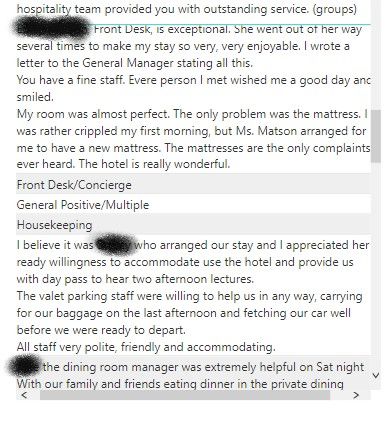
I am going through our written survey resposes and grouping them based on what topic they are related to. They all appear to be correctly group, using the grouping feature on the Fields tab, but when I drag these items onto the report page they are not all grouped. It looks like any of the responses that contain a return or are long in length have been exluded from the grouping. Any ideas what is going on or if there is a workaround for this? Screenshots are attached.


Annotation 2019-07-31 140701.jpg
Items are GroupedItems are Grouped

3 REPLIES 3
vanessafvg
Super User
Super User

@chq  are you able to share some data at all?


If I took the time to answer your question and I came up with a solution, please mark my post as a solution and /or give kudos freely for the effort 🙂 Thank you!

Proud to be a Super User!


Unfortunately just the screenshots that I have already shared. What appears odd to me is it shows everything as being grouped and then for some reason is not actually grouping all of them. I think it has to do with character length or having returns in the text.

I have tracked this down to being an issue anytime that there is a return in a line of text. If the returns are manually removed they will group just fine. This is a very frustrating bug. 

Helpful resources

Announcements
Power BI DataViz World Championships

Power BI Dataviz World Championships

The Power BI Data Visualization World Championships is back! Get ahead of the game and start preparing now!

December 2025 Power BI Update Carousel

Power BI Monthly Update - December 2025

Check out the December 2025 Power BI Holiday Recap!

FabCon Atlanta 2026 carousel

FabCon Atlanta 2026

Join us at FabCon Atlanta, March 16-20, for the ultimate Fabric, Power BI, AI and SQL community-led event. Save $200 with code FABCOMM.