Get Fabric or SQL Certified for Free.
Get certified for free when you join Fabric Data Days 2026 and dive into Fabric, Power BI, SQL, AI, and other essential data skills.
Join now- Power BI forums
- Get Help with Power BI
- Desktop
- Service
- Report Server
- Power Query
- Mobile Apps
- Developer
- DAX Commands and Tips
- Custom Visuals Development Discussion
- Health and Life Sciences
- Power BI Spanish forums
- Translated Spanish Desktop
- Training and Consulting
- Instructor Led Training
- Dashboard in a Day for Women, by Women
- Galleries
- Data Stories Gallery
- Themes Gallery
- Contests Gallery
- QuickViz Gallery
- Quick Measures Gallery
- Visual Calculations Gallery
- Fabric Apps Gallery
- Notebook Gallery
- Translytical Task Flow Gallery
- TMDL Gallery
- R Script Showcase
- Webinars and Video Gallery
- Ideas
- Custom Visuals Ideas (read-only)
- Issues
- Issues
- Events
- Upcoming Events
July 7 - July 17 | Round 2 of the Power BI Dataviz World Championships. Don't miss your chance! Learn more
- Power BI forums
- Forums
- Get Help with Power BI
- Desktop
- Re: Item Mix Visualization
- Subscribe to RSS Feed
- Mark Topic as New
- Mark Topic as Read
- Float this Topic for Current User
- Bookmark
- Subscribe
- Printer Friendly Page

- Mark as New
- Bookmark
- Subscribe
- Mute
- Subscribe to RSS Feed
- Permalink
- Report Inappropriate Content
Item Mix Visualization
so i have 4 columns of binary data
i want to be able to filter through the combinations of the 4 how can i do that?
ie if i have product 1 and product 2 vs having all 4 products?
when i try to them into a treemap with their counts in values i just get a total count and selecting each combination does nothing


- Mark as New
- Bookmark
- Subscribe
- Mute
- Subscribe to RSS Feed
- Permalink
- Report Inappropriate Content
Hi @Anonymous
Any chance you can post a small example set of data? That might make it easier to understand what you are after. 🙂
- Mark as New
- Bookmark
- Subscribe
- Mute
- Subscribe to RSS Feed
- Permalink
- Report Inappropriate Content

1 meaning they have that item and 0 meaning the dont
i want to be able to see the different combinations of items customers buy and how it affects my total revenue
- Mark as New
- Bookmark
- Subscribe
- Mute
- Subscribe to RSS Feed
- Permalink
- Report Inappropriate Content
Hi @Anonymous
So for the above example, what is your ideal result? Can you also mock that up in Excel?
- Mark as New
- Bookmark
- Subscribe
- Mute
- Subscribe to RSS Feed
- Permalink
- Report Inappropriate Content
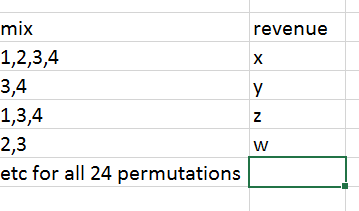
i guess something like this where i am able to see the different impacts of item combination on this particular KPI
- Mark as New
- Bookmark
- Subscribe
- Mute
- Subscribe to RSS Feed
- Permalink
- Report Inappropriate Content
If you only have 4 columns as per your example you could just create a new calculated column like this
mix = 'Table1'[Item 1] & "," &
		 'Table1'[Item 2] & "," &
		 'Table1'[Item 3] & "," &
		 'Table1'[Item 4]
and then drag that to a Grid and sum your Revenue column. I suspect your real example isn't so straight forward??
- Mark as New
- Bookmark
- Subscribe
- Mute
- Subscribe to RSS Feed
- Permalink
- Report Inappropriate Content
i have 4 items i need combinations of it sounds like this would be listing out all 24 combinations for separate revenue
i was hoping to be able to use a treemap so you could select the combinations better and accounting for these different combinations would happen behind the scenes automatically like when im selecting different regions for sales data across the states

- Mark as New
- Bookmark
- Subscribe
- Mute
- Subscribe to RSS Feed
- Permalink
- Report Inappropriate Content
Hi @Anonymous,
i was hoping to be able to use a treemap so you could select the combinations better and accounting for these different combinations would happen behind the scenes automatically like when im selecting different regions for sales data across the states
Is your expected result similar like below?
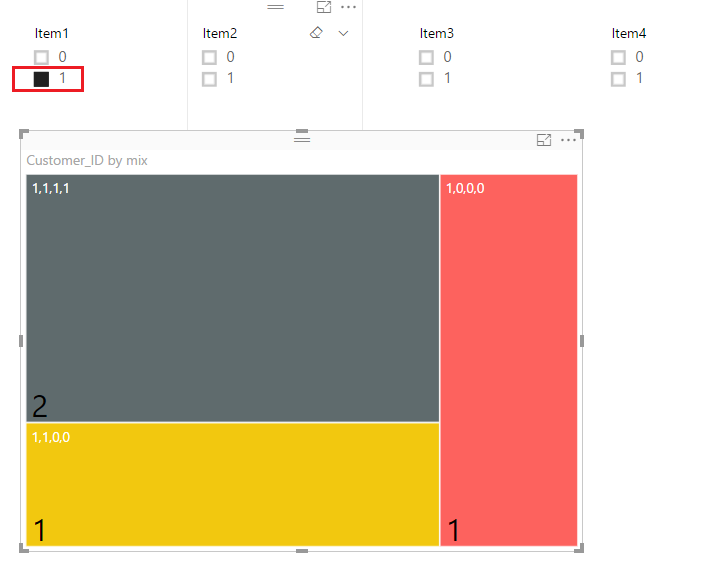
If so, you can firstly use the formula provided by @Phil_Seamark above to add a calculate column to your table.
mix = 'Table1'[Item1] & "," &
		 'Table1'[Item2] & "," &
		 'Table1'[Item3] & "," &
		 'Table1'[Item4]
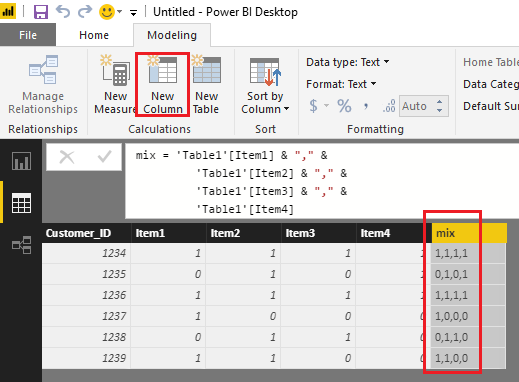
Then, you can use the new create calculate column as Group on the Treemap, and use the four Item column as Slicers to get your expected result on the report.

Here is the sample pbix file for your reference. 
Regards
- Mark as New
- Bookmark
- Subscribe
- Mute
- Subscribe to RSS Feed
- Permalink
- Report Inappropriate Content
thats the thing if you write out all the combinations like that it doesnt scale
this treemap for combinations should be very simple
perhaps its my set up


- Mark as New
- Bookmark
- Subscribe
- Mute
- Subscribe to RSS Feed
- Permalink
- Report Inappropriate Content
Hey @Anonymous
maybe you are looking for something like this, taken from this little example
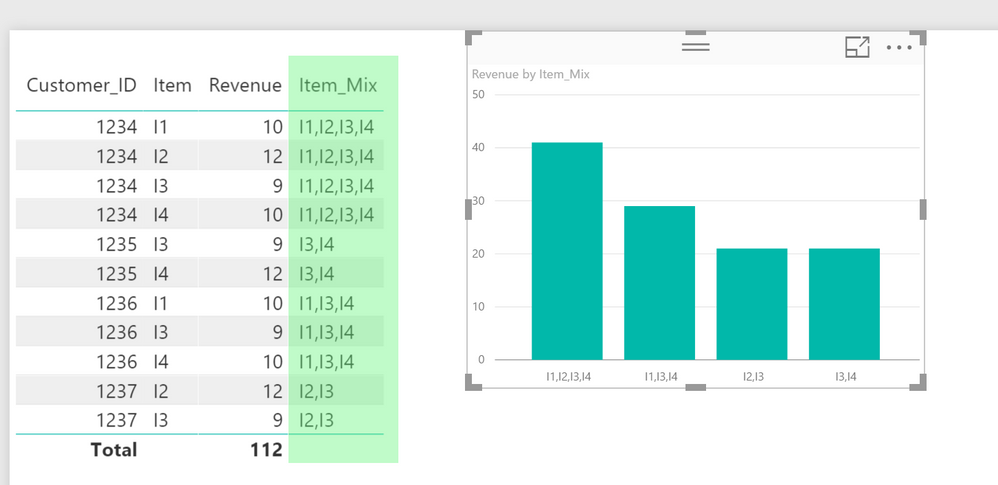
The table showh a normal sales table, I created a calculated column "Item_Mix" that concatenates the items purchased by each customer, this is the dax statement:
Item_Mix = CALCULATE(
    CONCATENATEX(VALUES(Sales[Item]),'Sales'[Item],","),
    ALLEXCEPT('Sales',Sales[Customer_ID])
)
Using a calculated column enables you to use this column in visuals or as a slicer.
The problem here is the underlying assumption, that the concatenation can be performed as a calculated column. Meaning that the calculation can become much more complex if it has to consider more columns.
A calculated column is necessary due to the effect, that measures currently can not be used on axis or as content for a slicer - this is for a couple of reasons and i would assume that this will not change in the near future.
Hope this helps
Tom
Did I answer your question? Mark my post as a solution, this will help others!
Proud to be a Super User!
I accept Kudos 😉
Hamburg, Germany
- Mark as New
- Bookmark
- Subscribe
- Mute
- Subscribe to RSS Feed
- Permalink
- Report Inappropriate Content
Hi @Anonymous
I'm keen to understand more about what you mean about selecting combinations.
Feel free to DM me with a PBIX file with more detail so I can help more.
- Mark as New
- Bookmark
- Subscribe
- Mute
- Subscribe to RSS Feed
- Permalink
- Report Inappropriate Content
and are those rows individual transactions or purchases over time?
- Mark as New
- Bookmark
- Subscribe
- Mute
- Subscribe to RSS Feed
- Permalink
- Report Inappropriate Content
their purchases over time, not transactions
Helpful resources

FabCon & SQLCon – Barcelona 2026
Join us in Barcelona for FabCon and SQLCon, the Fabric, Power BI, SQL, and AI community event. Save €200 with code FABCMTY200.

Fabric Community Sticker Challenge - Barcelona 2026
If you love stickers, then you will definitely want to check out our community sticker challenge, Barcelona edition!

Power BI Monthly Update - July 2026
Check out the July 2026 Power BI update to learn about new features.

Power BI DataViz World Championships - June 2026
A new Power BI DataViz World Championship is coming this June! Don't miss out on submitting your entry.

| User | Count |
|---|---|
| 29 | |
| 23 | |
| 23 | |
| 22 | |
| 14 |


| User | Count |
|---|---|
| 48 | |
| 33 | |
| 20 | |
| 18 | |
| 16 |


