Join us in Barcelona for FabCon and SQLCon, September 28 - October 1, 2026.
This is best Fabric, Power BI, SQL and AI community event. How do we know? The last event sold out! Save €200 with code FABCMTY200.
Register now- Power BI forums
- Get Help with Power BI
- Desktop
- Service
- Report Server
- Power Query
- Mobile Apps
- Developer
- DAX Commands and Tips
- Custom Visuals Development Discussion
- Health and Life Sciences
- Power BI Spanish forums
- Translated Spanish Desktop
- Training and Consulting
- Instructor Led Training
- Dashboard in a Day for Women, by Women
- Galleries
- Data Stories Gallery
- Themes Gallery
- Contests Gallery
- QuickViz Gallery
- Quick Measures Gallery
- Visual Calculations Gallery
- Notebook Gallery
- Translytical Task Flow Gallery
- TMDL Gallery
- R Script Showcase
- Webinars and Video Gallery
- Ideas
- Custom Visuals Ideas (read-only)
- Issues
- Issues
- Events
- Upcoming Events
A new Data Days event is coming soon! This time we’re going bigger than ever. Fabric, Power BI, SQL, AI and more. Don't miss out.
- Power BI forums
- Forums
- Get Help with Power BI
- Desktop
- Re: Issues with multiple Databases
- Subscribe to RSS Feed
- Mark Topic as New
- Mark Topic as Read
- Float this Topic for Current User
- Bookmark
- Subscribe
- Printer Friendly Page


- Mark as New
- Bookmark
- Subscribe
- Mute
- Subscribe to RSS Feed
- Permalink
- Report Inappropriate Content
Issues with multiple Databases
Hi,
We are having an issue where when I try to access new Views from our database power BI prompt us with a warning "Power BI Service Live Connection: The connect live option for this file is disabled because it already contains data from another data source....."
We are connecting to our DB thorugh ODBC. Recently an excel file was added as a new DB but it was inmediately removed (erasing all its tables and as a data source). Is there something i might be missing? Where can i check if there are any remnants of this last source we added?
Thanks in advance
Solved! Go to Solution.

- Mark as New
- Bookmark
- Subscribe
- Mute
- Subscribe to RSS Feed
- Permalink
- Report Inappropriate Content
Hi @GuidoMS
The problem is that you could not use Import and Live Connection in one report at the same time.
For Excel, you could use Import model in this report, then you could import another datasource or DirectQuery a data, then you could shape data and modeling, etc. But when you use live connection model, you use live connection mode to connect a complete data model, for this case, you couldn't modeling anymore. So you couldn’t use Live connection with Import/DirectQuery at the same time.
Here is a blog, please refer to it:
As for the feature you discussed above, it only applies to connecting to a dataset or Azure Analysis Services , it does not support other data sources . This blog introduces the new features you mentioned above in detail, you can refer to it .
Therefore, for your problem this time, after you have used ODBC to connect to your DB, you cannot connect to other data sources .
Best Regards
Community Support Team _ Ailsa Tao
If this post helps, then please consider Accept it as the solution to help the other members find it more quickly.
- Mark as New
- Bookmark
- Subscribe
- Mute
- Subscribe to RSS Feed
- Permalink
- Report Inappropriate Content
Hi @GuidoMS
The problem is that you could not use Import and Live Connection in one report at the same time.
For Excel, you could use Import model in this report, then you could import another datasource or DirectQuery a data, then you could shape data and modeling, etc. But when you use live connection model, you use live connection mode to connect a complete data model, for this case, you couldn't modeling anymore. So you couldn’t use Live connection with Import/DirectQuery at the same time.
Here is a blog, please refer to it:
As for the feature you discussed above, it only applies to connecting to a dataset or Azure Analysis Services , it does not support other data sources . This blog introduces the new features you mentioned above in detail, you can refer to it .
Therefore, for your problem this time, after you have used ODBC to connect to your DB, you cannot connect to other data sources .
Best Regards
Community Support Team _ Ailsa Tao
If this post helps, then please consider Accept it as the solution to help the other members find it more quickly.
- Mark as New
- Bookmark
- Subscribe
- Mute
- Subscribe to RSS Feed
- Permalink
- Report Inappropriate Content
Right. This was the problem. The thing we were tryting to do is add new tables from our DB. We used to do this selecting "Datasets" and selecting those new tables.
Yesterday I learnt to do this from "Transform Data" creating a new query filling the "Applied Steps" with where to get the data.
This problem is resolved. Thanks


- Mark as New
- Bookmark
- Subscribe
- Mute
- Subscribe to RSS Feed
- Permalink
- Report Inappropriate Content
Go to the settings/options page and enable

under preview features
- Mark as New
- Bookmark
- Subscribe
- Mute
- Subscribe to RSS Feed
- Permalink
- Report Inappropriate Content
Do you see the same issue when you start from a blank PBIX?
- Mark as New
- Bookmark
- Subscribe
- Mute
- Subscribe to RSS Feed
- Permalink
- Report Inappropriate Content
Hi!
When I open a new file and select the same source (through Power BI Dataset) every option under 'DATA' gets greyed out. I don't know why.
- Mark as New
- Bookmark
- Subscribe
- Mute
- Subscribe to RSS Feed
- Permalink
- Report Inappropriate Content
Use a more recent version of Power BI Desktop (latest is September 2021) and change from live connection to mixed mode.
- Mark as New
- Bookmark
- Subscribe
- Mute
- Subscribe to RSS Feed
- Permalink
- Report Inappropriate Content
I downloaded and installed said version. Where can i change my connection mode? It s a parameter in the file we work on or is it an optión in PBI Service through the dataset configuration?
- Mark as New
- Bookmark
- Subscribe
- Mute
- Subscribe to RSS Feed
- Permalink
- Report Inappropriate Content
look at the bottom right corner of your Power BI desktop window.

- Mark as New
- Bookmark
- Subscribe
- Mute
- Subscribe to RSS Feed
- Permalink
- Report Inappropriate Content
All i see is grey space at the bottom right corner.
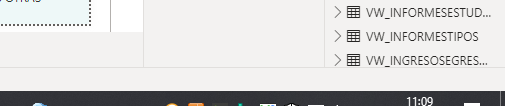
Could be a visual setting in Desktop?
Thanks for the help by the way..
- Mark as New
- Bookmark
- Subscribe
- Mute
- Subscribe to RSS Feed
- Permalink
- Report Inappropriate Content
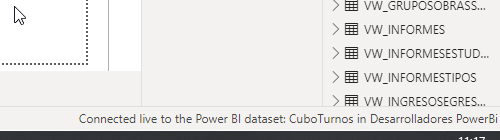
Seeing it now (new file) but theres no "change" option. Maybe i'm limited because the method we use to get the data.
Helpful resources

Power BI Monthly Update - May 2026
Check out the May 2026 Power BI update to learn about new features.

Data Days 2026 coming soon!
Sign up to receive a private message when registration opens and key events begin.

New to Fabric Survey
If you have recently started exploring Fabric, we'd love to hear how it's going. Your feedback can help with product improvements.

Power BI DataViz World Championships - June 2026
A new Power BI DataViz World Championship is coming this June! Don't miss out on submitting your entry.

| User | Count |
|---|---|
| 27 | |
| 25 | |
| 22 | |
| 20 | |
| 14 |


| User | Count |
|---|---|
| 50 | |
| 45 | |
| 20 | |
| 18 | |
| 18 |


