

cancel
Showing results for 
Search instead for 
Did you mean: 

The Power BI Data Visualization World Championships is back! Get ahead of the game and start preparing now! Learn more

Reply
Anonymous
Not applicable

Issues with last year revenue

Hello, 

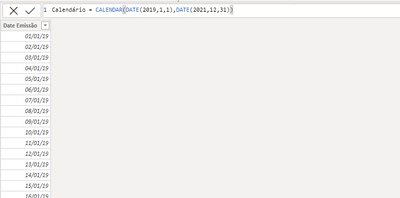
I created a Calendar table;

thatjoey20_0-1626102390076.png


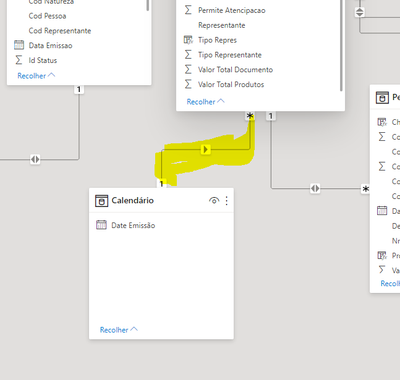
And relationed with the date column of my order table;

thatjoey20_1-1626102432200.png


Then I created a measure to sum the revenue of the last year


10M - Revenue LY = CALCULATE([01M -Total Revenue], SAMEPERIODLASTYEAR('Calendar'[Date Emissão]))
 
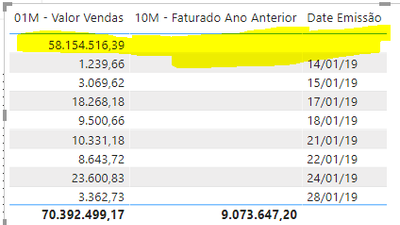
But when compared the values in a table graphic, something strange happens;

thatjoey20_2-1626102758784.png


It's just ignoring more than 50% of the value, its like it can't find a date to it, but if we check the date columns of both tables;

thatjoey20_3-1626102825995.png


Calendar has dates from 01/01/19 til 31/12/2021

And if we check date column from order table we see that;

thatjoey20_4-1626102923820.png


It has date from 04/01/2019 until 12/07/2021 (today)

Why this is happenig?


1 ACCEPTED SOLUTION
amitchandak
Super User
Super User

@Anonymous , check if the date of the table joining to join to the calendar is having a timestamp.

You need to make date as date time and choose a format with time to check.


If it has time create date without time and join with calendar


This should work

10M - Revenue LY = CALCULATE([01M -Total Revenue], SAMEPERIODLASTYEAR('Calendar'[Date Emissão]))

10M - Revenue LY = CALCULATE([01M -Total Revenue], dateadd('Calendar'[Date Emissão],-1,year))


also, make sure the Calendar is marked as a date table 

Why Time Intelligence Fails - Power bi 5 Savior Steps for TI: https://youtu.be/OBf0rjpp5Hw

Share with Power BI Enthusiasts: Full Power BI Video (20 Hours) YouTube
Microsoft Fabric Series 60+ Videos YouTube
Microsoft Fabric Hindi End to End YouTube

View solution in original post

2 REPLIES 2
amitchandak
Super User
Super User

@Anonymous , check if the date of the table joining to join to the calendar is having a timestamp.

You need to make date as date time and choose a format with time to check.


If it has time create date without time and join with calendar


This should work

10M - Revenue LY = CALCULATE([01M -Total Revenue], SAMEPERIODLASTYEAR('Calendar'[Date Emissão]))

10M - Revenue LY = CALCULATE([01M -Total Revenue], dateadd('Calendar'[Date Emissão],-1,year))


also, make sure the Calendar is marked as a date table 

Why Time Intelligence Fails - Power bi 5 Savior Steps for TI: https://youtu.be/OBf0rjpp5Hw

Share with Power BI Enthusiasts: Full Power BI Video (20 Hours) YouTube
Microsoft Fabric Series 60+ Videos YouTube
Microsoft Fabric Hindi End to End YouTube
Anonymous
Not applicable

Alright, but how do I create date column without timestamp?  I copy the former date column?

Helpful resources

Announcements
Power BI DataViz World Championships

Power BI Dataviz World Championships

The Power BI Data Visualization World Championships is back! Get ahead of the game and start preparing now!

November Power BI Update Carousel

Power BI Monthly Update - November 2025

Check out the November 2025 Power BI update to learn about new features.

FabCon Atlanta 2026 carousel

FabCon Atlanta 2026

Join us at FabCon Atlanta, March 16-20, for the ultimate Fabric, Power BI, AI and SQL community-led event. Save $200 with code FABCOMM.