Don't miss your chance to take the Fabric Data Engineer (DP-600) exam for FREE! Find out how by attending the DP-600 session on April 23rd (pacific time), live or on-demand.
Learn moreNext up in the FabCon + SQLCon recap series: The roadmap for Microsoft SQL and Maximizing Developer experiences in Fabric. All sessions are available on-demand after the live show. Register now
Hi Folks,
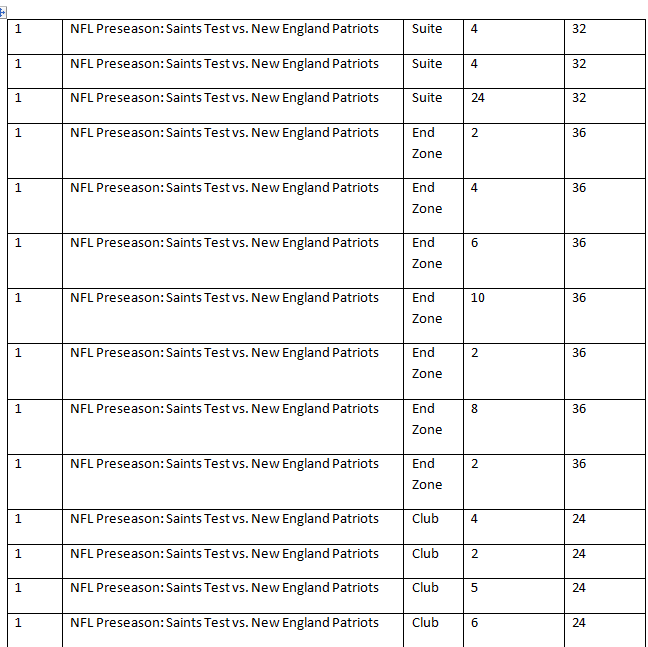
I need assistance with a set of data that I am trying to create a visual for and I am running into an issue where it is counting the total tickets every single time it is listed and I really only want it to count it once per event. Below is an example of the data and then I will tell you the results I am getting. Ideally what I want to see is that for event 1 we had a total of 32 tickets available for use and had total tickets ordered of 32... and for end zone we had 34 of 36 ordered... can anyone assist me with this... currently I am getting 96 total tickets available and 32 tickets ordered.... any help would be amazing! I tried to add the table names above the image for everyone to be able to reference. As you can see I want the Suite Section to only show 32 tickets available; however, for each field that count does show up each time. Is this a data issue or is it somethign that I can get around in Power BI?
Event ID Event Name Section Tickets Ordered Total Tickets
Solved! Go to Solution.
Hi @nmck86,
Have you resolved your problem? If it did, please mark the helpful reply as answer,so that more people can find workwroud form here. Thanks for understanding.
Best Regards,
Angelia
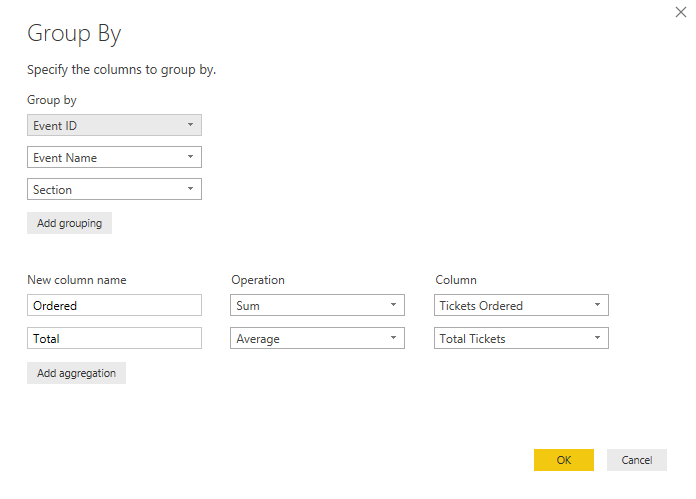
You can very easily do this in the Query Editor - Transform tab - Group By
You can also do this with DAX using SUMMARIZECOLUMNS
On the Modeling tab - click New Table...
Summary Table =
SUMMARIZECOLUMNS (
'Table'[Event ID],
'Table'[Event Name],
'Table'[Section],
"Ordered", SUM ( 'Table'[Tickets Ordered] ),
"Total", AVERAGE ( 'Table'[Total Tickets] )
)
Hope this helps! ![]()
Hi @nmck86,
Have you resolved your problem? If it did, please mark the helpful reply as answer,so that more people can find workwroud form here. Thanks for understanding.
Best Regards,
Angelia
If you have recently started exploring Fabric, we'd love to hear how it's going. Your feedback can help with product improvements.
A new Power BI DataViz World Championship is coming this June! Don't miss out on submitting your entry.
Share feedback directly with Fabric product managers, participate in targeted research studies and influence the Fabric roadmap.
| User | Count |
|---|---|
| 48 | |
| 45 | |
| 41 | |
| 20 | |
| 17 |
| User | Count |
|---|---|
| 69 | |
| 63 | |
| 32 | |
| 31 | |
| 23 |