cancel
Showing results for 
Search instead for 
Did you mean: 

The Power BI Data Visualization World Championships is back! Get ahead of the game and start preparing now! Learn more

Reply
ITManuel
Responsive Resident
Responsive Resident

Issue with transfering filter with TREATAS involving two columns

Hi,


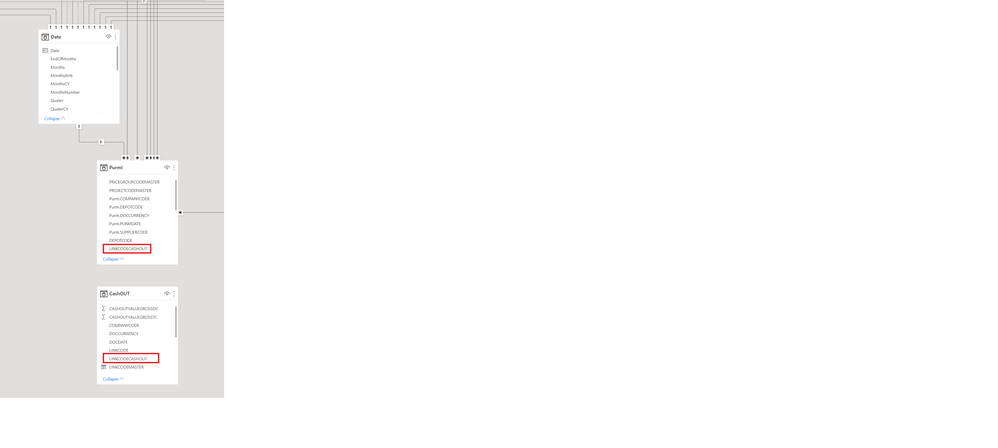
i have the following data model:
DataModel.png

PurmI is a table containing invoices. CashOUT the respective payments. The link between the two tables are the "LINKCODECASHOUT" columns in both tables. A physical relationship in the model would be a Many to Many relationship. 

I would like the CashOUT table to be filtered by the Date table & the PurmI table. PurmI is filtered by several others tables also, Projects, suppliers, etc.


I managed to filter the CashOUT table by the PurmI table with a virtual relationship, using the following measure. 

CashOUTGrossEUR = 
    CALCULATE (
        [CashOUTGrossEUR],
        TREATAS ( VALUES ( PurmI[LINKCODECASHOUT] ), CashOUT[LINKCODECASHOUT] )
    )

Filters from Projects, Suppliers etc. are consequently filtering also CashOUTGrossEUR.


When I filter by date, the payments are shown on the date of the invoice, not of the real payment from CashOUT which is understandable.


I tried the following measure with the intention to move the filter from 'Date'[Date] to CashOUT[BOOKINGDATE] and the filter from PurmI[LINKCODECASHOUT] to CashOUT[LINKCODECASHOUT) however the measure returns only blank and I don't understand why!?!

CashOUTGrossEUR = 
      CALCULATE (
            [CashOUTGrossEUR],
            TREATAS (
                SUMMARIZE ( PurmI, 'Date'[Date], PurmI[LINKCODECASHOUT] ),
                CashOUT[BOOKINGDATE],
                CashOUT[LINKCODECASHOUT]
            )
        )


Best regards


2 REPLIES 2
amitchandak
Super User
Super User

@ITManuel , Try like

CashOUTGrossEUR =
CALCULATE (
[CashOUTGrossEUR],
TREATAS ( VALUES ( PurmI[LINKCODECASHOUT] ), CashOUT[LINKCODECASHOUT] ),
TREATAS ( VALUES ( 'Date'[Date]), CashOUT[BOOKINGDATE] )

)

Share with Power BI Enthusiasts: Full Power BI Video (20 Hours) YouTube
Microsoft Fabric Series 60+ Videos YouTube
Microsoft Fabric Hindi End to End YouTube

Hi @amitchandak ,


i tried your proposed measure, but its still not working. The measure is filtered by PurmI[LINKCODECASHOUT], however when the filter is coming from  'Date'[Date], the measure returns blank.


Br

Helpful resources

Announcements
Power BI DataViz World Championships

Power BI Dataviz World Championships

The Power BI Data Visualization World Championships is back! Get ahead of the game and start preparing now!

December 2025 Power BI Update Carousel

Power BI Monthly Update - December 2025

Check out the December 2025 Power BI Holiday Recap!

FabCon Atlanta 2026 carousel

FabCon Atlanta 2026

Join us at FabCon Atlanta, March 16-20, for the ultimate Fabric, Power BI, AI and SQL community-led event. Save $200 with code FABCOMM.