Get Fabric or SQL Certified for Free.
Get certified for free when you join Fabric Data Days 2026 and dive into Fabric, Power BI, SQL, AI, and other essential data skills.
Join now- Power BI forums
- Get Help with Power BI
- Desktop
- Service
- Report Server
- Power Query
- Mobile Apps
- Developer
- DAX Commands and Tips
- Custom Visuals Development Discussion
- Health and Life Sciences
- Power BI Spanish forums
- Translated Spanish Desktop
- Training and Consulting
- Instructor Led Training
- Dashboard in a Day for Women, by Women
- Galleries
- Data Stories Gallery
- Themes Gallery
- Contests Gallery
- QuickViz Gallery
- Quick Measures Gallery
- Visual Calculations Gallery
- Notebook Gallery
- Translytical Task Flow Gallery
- TMDL Gallery
- R Script Showcase
- Webinars and Video Gallery
- Ideas
- Custom Visuals Ideas (read-only)
- Issues
- Issues
- Events
- Upcoming Events
July 7 - July 17 | Round 2 of the Power BI Dataviz World Championships. Don't miss your chance! Learn more
- Power BI forums
- Forums
- Get Help with Power BI
- Desktop
- Re: Problem with SUMX function
- Subscribe to RSS Feed
- Mark Topic as New
- Mark Topic as Read
- Float this Topic for Current User
- Bookmark
- Subscribe
- Printer Friendly Page


- Mark as New
- Bookmark
- Subscribe
- Mute
- Subscribe to RSS Feed
- Permalink
- Report Inappropriate Content
Issue with SUMX function
Hi,
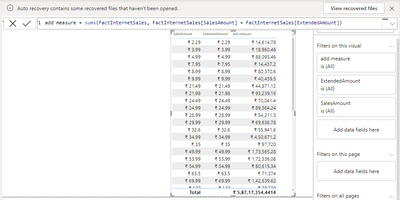
I used sumx, hence i supposed to get sum of sales and extended amounts in last coulmn. However, i seeing something else. Can someone help on it. Thanks.
Solved! Go to Solution.


- Mark as New
- Bookmark
- Subscribe
- Mute
- Subscribe to RSS Feed
- Permalink
- Report Inappropriate Content
Hello!
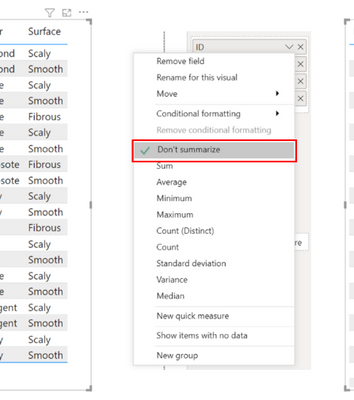
I see that you are adding the data using FactInternetSales as context, which means that it will go row by row in that table doing the operation you indicated, to see that result modifies the type of summarization that the columns of ImporteVentas and ExtendedAmount have
- Mark as New
- Bookmark
- Subscribe
- Mute
- Subscribe to RSS Feed
- Permalink
- Report Inappropriate Content
Hello, it is the same as I explain, everything depends on the filter context, when you remove the Sales order number everything is damaged because you removed the context from the matrix and therefore it is adding the data, basically it is adding all the 2.9 and it is adding them. This happens because you are directly using the columns with the measurements without a correct filter context.
If this post is helpful in helping you solve your problem, consider giving the post a thumbs up
and accept it as a solution!


- Mark as New
- Bookmark
- Subscribe
- Mute
- Subscribe to RSS Feed
- Permalink
- Report Inappropriate Content
Hi,
as you can see there is nothing wrong in your measure
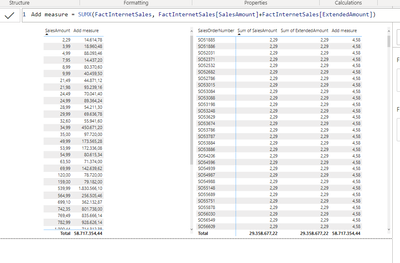
it is only grouping all sales with the same amount.
If this post is useful to help you to solve your issue consider giving the post a thumbs up
and accepting it as a solution !
- Mark as New
- Bookmark
- Subscribe
- Mute
- Subscribe to RSS Feed
- Permalink
- Report Inappropriate Content
Hey, if my query is correct. can you pls me understand why am i seeing huge values in add measure column, while you are getting the correct 4.58 values in add measure?
- Mark as New
- Bookmark
- Subscribe
- Mute
- Subscribe to RSS Feed
- Permalink
- Report Inappropriate Content
Hello, it is the same as I explain, everything depends on the filter context, when you remove the Sales order number everything is damaged because you removed the context from the matrix and therefore it is adding the data, basically it is adding all the 2.9 and it is adding them. This happens because you are directly using the columns with the measurements without a correct filter context.
If this post is helpful in helping you solve your problem, consider giving the post a thumbs up
and accept it as a solution!
- Mark as New
- Bookmark
- Subscribe
- Mute
- Subscribe to RSS Feed
- Permalink
- Report Inappropriate Content
Hi, Can you also help me understand in detailed steps, at least for the first row, how is it calculated as 14614??
- Mark as New
- Bookmark
- Subscribe
- Mute
- Subscribe to RSS Feed
- Permalink
- Report Inappropriate Content
Calculated correctly after adding salesordernumber column to the table. Thank you
- Mark as New
- Bookmark
- Subscribe
- Mute
- Subscribe to RSS Feed
- Permalink
- Report Inappropriate Content
Hello!
I see that you are adding the data using FactInternetSales as context, which means that it will go row by row in that table doing the operation you indicated, to see that result modifies the type of summarization that the columns of ImporteVentas and ExtendedAmount have
- Mark as New
- Bookmark
- Subscribe
- Mute
- Subscribe to RSS Feed
- Permalink
- Report Inappropriate Content
Hey,
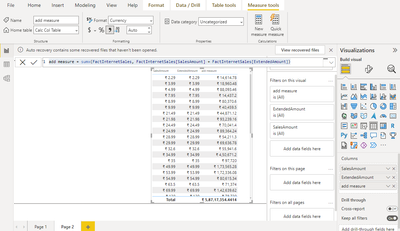
I already selected don't summarize only. yet i am still seeing incorrect values.

Helpful resources

FabCon & SQLCon – Barcelona 2026
Join us in Barcelona for FabCon and SQLCon, the Fabric, Power BI, SQL, and AI community event. Save €200 with code FABCMTY200.

Data Days 2026
Join Data Days 2026: 60 days of free live/on-demand sessions, challenges, study groups, and certification opportunities.

Power BI DataViz World Championships - June 2026
A new Power BI DataViz World Championship is coming this June! Don't miss out on submitting your entry.

| User | Count |
|---|---|
| 29 | |
| 27 | |
| 24 | |
| 24 | |
| 18 |


| User | Count |
|---|---|
| 54 | |
| 50 | |
| 41 | |
| 33 | |
| 23 |


