
Get certified for free when you join Fabric Data Days 2026 and dive into Fabric, Power BI, SQL, AI, and other essential data skills.
Join nowTry your skills in the Power BI Dataviz World Championship! Round one ends June 26. Join now
Hi Guys,
I've created 2 roles for my model. As seen below
[CompanyId]=
CALCULATE (
MAX ( Users[CompanyId] ),
FILTER ( Users, Users[Email] = USERPRINCIPALNAME() )
)
[Email] = USERPRINCIPALNAME()
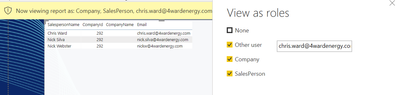
But below is the output I'm getting which is wrong. I'm getting 3 rows istead of 1.
So my imp question is, when we select 2 roles simultaneously does it work as AND condition or it works as OR condition in Power BI. As far as I can see it is working as OR condition which should not be the case ideally. If I'm giving an email ID then I should be the data for only that ID.
Desired Output with both the roles:
Can anyone please help me with this???
Regards,
Himanshu
Solved! Go to Solution.
Hi @Anonymous ,
the permissions are combined and the highest rights take effect.
Marcus Wegener works as Full Stack Power BI Engineer at BI or DIE.
His mission is clear: "Get the most out of data, with Power BI."
twitter - LinkedIn - YouTube - website - podcast - Power BI Tutorials
Hi @Anonymous ,
As the official document said, Multiple role mappings can result in unexpected outcomes.
Did I answer your question ? Please mark my reply as solution. Thank you very much.
If not, please upload some insensitive data samples and expected output.
Best Regards,
Eyelyn Qin
Hi @Anonymous ,
the permissions are combined and the highest rights take effect.
Marcus Wegener works as Full Stack Power BI Engineer at BI or DIE.
His mission is clear: "Get the most out of data, with Power BI."
twitter - LinkedIn - YouTube - website - podcast - Power BI Tutorials
| User | Count |
|---|---|
| 24 | |
| 22 | |
| 22 | |
| 21 | |
| 13 |
| User | Count |
|---|---|
| 66 | |
| 56 | |
| 45 | |
| 45 | |
| 30 |