I have this base table that gets change or Revised value on basis of what if parameters :-
| Financial Item | X | Account Mapping | Account |
| Results before Tax | -2.705454625 | Tax | Results before Tax |
| Tax | 10.39512275 | Tax | Tax |
| Tax Rate | -3.84228316 | Tax | Tax Rate |
| Results after Tax | -13.10057737 | Tax | Results after Tax |
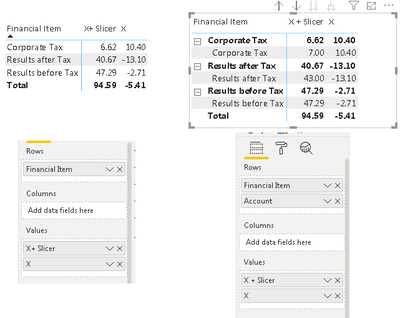
Why X + slicer measure changes its value on addition of field under rows :- JFYI 6.62 is correct version:- 1st version is correct.
Is the issue as we are trying to refer to value Results before tax causing all the circular reference causing the error
Measure :- X+ SLicer :- =
VAR Topup_NetInterest = 'Net Interest Parameter'[Net Interest Parameter Value]
VAR Topup_Fee = 'Fee Parameter'[Fee Parameter Value]
VAR Topup_Other = 'Other Income Parameter'[Other Income Parameter Value]
VAR Topup_OI = Topup_NetInterest + Topup_Fee + Topup_Other
VAR Topup_Exp = 'Total Expense Parameter'[Total Expense Parameter Value]
VAR Topup_RC = 'Risk Costs'[Risk Costs Value]
VAR Topup_RBT = Topup_OI - Topup_Exp - Topup_RC
VAR Topup_LA = 'Lending Assets Parameter'[Lending Assets Parameter Value]
VAR Topup_CRWA = 'CRWA Parameter'[CRWA Parameter Value]
VAR Assumed_TaxRate = 0.14
VAR CT = CALCULATE(SUM(T1[X])+ Topup_OI - Topup_Exp - Topup_RC,WB_APAC[Financial Item] = "Results before Tax")
VAR CT_C = ([RBT_Measure]+ Topup_OI - Topup_Exp - Topup_RC) * Assumed_TaxRate
RETURN
SUMX(
'T1',
IF('T1'[Financial Item] = "Results before Tax" , 'T1'[X] + Topup_OI - Topup_Exp - Topup_RC,
IF('T1'[Financial Item] = "Corporate Tax" , CT_C,
IF(T1[Financial Item] = "Tax Rate", Assumed_TaxRate,
IF('T1'[Financial Item] = "Results after Tax" ,CT - CT_C,
'T1'[X]
)
)
)
)
)


