cancel
Showing results for 
Search instead for 
Did you mean: 

July 7 - July 17 | Round 2 of the Power BI Dataviz World Championships. Don't miss your chance! Learn more

Reply
juanalvarado08
Frequent Visitor

Issue with Matrix visual and Conditional Formating (Icons)

Hi,  

I am having an issue with PBIDesktop with the Conditional Formating applied to the Matrix visual. 

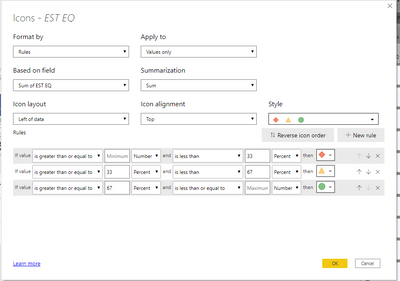
juanalvarado08_0-1599062882549.png


When I try to apply the Conditional Formating for Icon type, the data type of validation compares Number vs Percentage as shown in the image above, and it doesnt allow me to change either of them. The data i am trying to use are Number (Whole Number), is this a known bug?


Regards!  

1 ACCEPTED SOLUTION
juanalvarado08
Frequent Visitor

Hi everyone!,

   First, I wanted to thank you all for the replies. The issue is weird, because I change the type of icons and it changes everything to numbers (which solved my issue), but I still can't change to percentage (i don't need to). I tried to upload a video but I dont have permission to do it. 


  I guess is because the data is in Number. I appretiate your help!! 


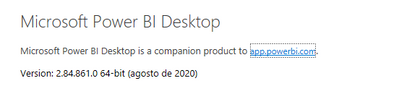
 This is my version.

juanalvarado08_1-1599066844022.png


View solution in original post

4 REPLIES 4
juanalvarado08
Frequent Visitor

Hi everyone!,

   First, I wanted to thank you all for the replies. The issue is weird, because I change the type of icons and it changes everything to numbers (which solved my issue), but I still can't change to percentage (i don't need to). I tried to upload a video but I dont have permission to do it. 


  I guess is because the data is in Number. I appretiate your help!! 


 This is my version.

juanalvarado08_1-1599066844022.png


negi007
Community Champion
Community Champion

@juanalvarado08  can you share your conditinal formating condition. Will then suggest solution accordinlgy. 


Alternatively, you can refer to below link for solution

https://docs.microsoft.com/en-us/power-bi/create-reports/desktop-conditional-table-formatting


Did I answer your question? Mark my post as a solution!
Appreciate your Kudos


Proud to be a Super User!


Follow me on linkedin

amitchandak
Super User
Super User

@juanalvarado08 , you should be able to change the first and last number as a percent . All should be % or number

Share with Power BI Enthusiasts: Full Power BI Video (20 Hours) YouTube
Microsoft Fabric Series 60+ Videos YouTube
Microsoft Fabric Hindi End to End YouTube
Pragati11
Super User
Super User

Hi @juanalvarado08 ,


I can't this happening at my end.

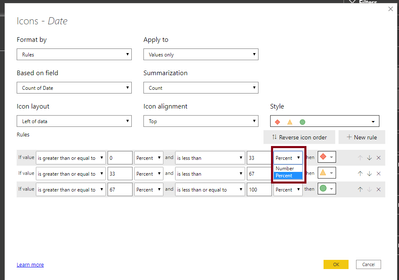
When I click on the dropdown against PERCENT, it gives me optio to choose NUMBER.

Pragati11_0-1599063582082.png


Can you add more details like what version of Power BI you are using?


Thanks,

Pragati

Best Regards,

Pragati Jain


MVP logo


LinkedIn | Twitter | Blog YouTube 

Did I answer your question? Mark my post as a solution! This will help others on the forum!

Appreciate your Kudos!!

Proud to be a Super User!!

Helpful resources

Announcements
FabCon and SQLCon Barcelona 2026

FabCon & SQLCon – Barcelona 2026

Join us in Barcelona for FabCon and SQLCon, the Fabric, Power BI, SQL, and AI community event. Save €200 with code FABCMTY200.

60 days of Data Days Carousel

Data Days 2026

Join Fabric Data Days 2026: 60 days of free live/on-demand sessions, challenges, study groups, and certification opportunities.

Power BI DataViz World Championships carousel

Power BI DataViz World Championships - June 2026

A new Power BI DataViz World Championship is coming this June! Don't miss out on submitting your entry.