cancel
Showing results for 
Search instead for 
Did you mean: 

The Power BI Data Visualization World Championships is back! Get ahead of the game and start preparing now! Learn more

Reply
Anonymous
Not applicable

Issue with Matrix header dates

Hi Everyone,


I was hoping someone could help me with a part of the formula to get me to my end goal.


Issue:- Im facing issue with Matrix header dates. FYI,Please find the below attached figure.  I selected exported date is 10/21/2022, my matrix header shows data starting from 10/17/2022. I dont want that.

yadhamurir_0-1668529933279.png

yadhamurir_1-1668530113213.png

* Requirement:- My requirement is, when im selecting exported date as 10/21/2022 then my matrix header dates started from 10/21/2022 onwards.FYI, Please find the below attached figure.

yadhamurir_2-1668530296782.png

Please find the below link for sample data.

Link :-  https://docs.google.com/spreadsheets/d/1tV1Hr__XsPWi-fi1Vfgi9SVfiE9HT3Td/edit?usp=share_lin... 


@PaulDBrown 

@amitchandak@Greg_Deckler , @Jihwan_Kim @lbendlin 

@johnt75 


1 ACCEPTED SOLUTION
amitchandak
Super User
Super User

@Anonymous , You can use after slicer


Or you can have date slicer of an independent date table and then have measure like


//Date1 is independent Date table, Date is joined with Table
new measure =
var _max = maxx(allselected(Date1),Date1[Date])
return
calculate( sum(Table[Value]), filter('Date', 'Date'[Date] > _max))


Need of an Independent Date Table:https://www.youtube.com/watch?v=44fGGmg9fHI

Share with Power BI Enthusiasts: Full Power BI Video (20 Hours) YouTube
Microsoft Fabric Series 60+ Videos YouTube
Microsoft Fabric Hindi End to End YouTube

View solution in original post

2 REPLIES 2
v-yueyunzh-msft
Community Support
Community Support

Hi, @Anonymous 

For your need , you can use measure to replace the value in your Matrix.

My test is the same as you provided.
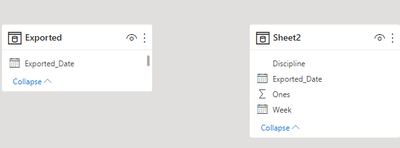
vyueyunzhmsft_0-1668566514422.png

We can create a measure :


Measure = var _slicer = MAX('Exported'[Exported_Date])
var _current_date = SELECTEDVALUE('Sheet2'[Exported_Date])
return
IF(HASONEVALUE('Sheet2'[Exported_Date]),IF(_current_date>= _slicer ,SUM('Sheet2'[Ones]),BLANK()),SUM('Sheet2'[Ones]))


Then we can put the measure the field we need on the visual and we will meet your need:
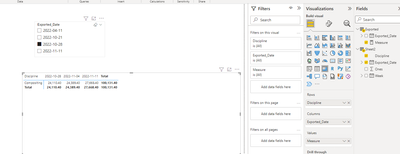
vyueyunzhmsft_1-1668566634533.png


Best Regards,

Aniya Zhang

If this post helps, then please consider Accept it as the solution to help the other members find it more quickly


amitchandak
Super User
Super User

@Anonymous , You can use after slicer


Or you can have date slicer of an independent date table and then have measure like


//Date1 is independent Date table, Date is joined with Table
new measure =
var _max = maxx(allselected(Date1),Date1[Date])
return
calculate( sum(Table[Value]), filter('Date', 'Date'[Date] > _max))


Need of an Independent Date Table:https://www.youtube.com/watch?v=44fGGmg9fHI

Share with Power BI Enthusiasts: Full Power BI Video (20 Hours) YouTube
Microsoft Fabric Series 60+ Videos YouTube
Microsoft Fabric Hindi End to End YouTube

Helpful resources

Announcements
Power BI DataViz World Championships

Power BI Dataviz World Championships

The Power BI Data Visualization World Championships is back! Get ahead of the game and start preparing now!

December 2025 Power BI Update Carousel

Power BI Monthly Update - December 2025

Check out the December 2025 Power BI Holiday Recap!

FabCon Atlanta 2026 carousel

FabCon Atlanta 2026

Join us at FabCon Atlanta, March 16-20, for the ultimate Fabric, Power BI, AI and SQL community-led event. Save $200 with code FABCOMM.

Top Solution Authors

