cancel
Showing results for 
Search instead for 
Did you mean: 

Vote for your favorite vizzies from the Power BI Dataviz World Championship submissions. Vote now!

Reply
Anonymous
Not applicable

Issue with Line chart

Hi All,


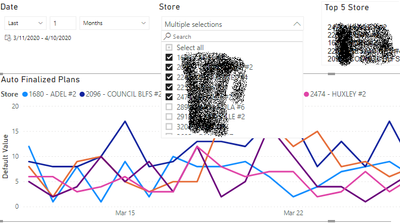
I have to use a Line chart to show the sales unit by the date and when we select multiple stores then every store shows by separate color(Legend) as shown below:

leg1.png

Expected Result: But When we select All Stores it needs to show only a single line, for this, I have used following measure

AllSelected =
IF(COUNTROWS(DISTINCT(ALLSELECTED(Sales[Store]))) < COUNTROWS(DISTINCT(ALL(Sales[Store]))),
SUM(Sales[Quantity]),
CALCULATE(SUM(Sales[Quantity]),ALL(Sales[Store]))
)
 
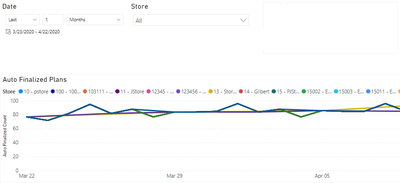
But it shows wrong Output as below:
leg3.png
 
Please help me out.
 
Thanks.
1 ACCEPTED SOLUTION

Hi,


Please check my attached pbix file.


Best Regards,

Giotto


View solution in original post

4 REPLIES 4
v-gizhi-msft
Community Support
Community Support

Hi,


Did my last reply solve your issue?

If my answer has solved your issue, please mark it as a solution for others to see.
Thanks!


Best Regards,

Giotto

v-gizhi-msft
Community Support
Community Support

Hi,


Please try this:

AllSelected =
IF (
    CALCULATE ( DISTINCTCOUNT ( Sales[Store] ), ALLSELECTED ( Sales[Store] ) )
        < CALCULATE ( DISTINCTCOUNT ( Sales[Store] ), ALL ( Sales[Store] ) ),
    SUM ( Sales[Quantity] ),
    CALCULATE ( SUM ( Sales[Quantity] ), ALL ( Sales[Store] ) )
)

Hope this helps.


Best Regards,

Giotto

Anonymous
Not applicable

No, It shows the same result as previous.


It is not working

Hi,


Please check my attached pbix file.


Best Regards,

Giotto


Helpful resources

Announcements
Power BI DataViz World Championships

Power BI Dataviz World Championships

Vote for your favorite vizzies from the Power BI World Championship submissions!

Sticker Challenge 2026 Carousel

Join our Community Sticker Challenge 2026

If you love stickers, then you will definitely want to check out our Community Sticker Challenge!

January Power BI Update Carousel

Power BI Monthly Update - January 2026

Check out the January 2026 Power BI update to learn about new features.

FabCon Atlanta 2026 carousel

FabCon Atlanta 2026

Join us at FabCon Atlanta, March 16-20, for the ultimate Fabric, Power BI, AI and SQL community-led event. Save $200 with code FABCOMM.