Join us at FabCon Atlanta from March 16 - 20, 2026, for the ultimate Fabric, Power BI, AI and SQL community-led event. Save $200 with code FABCOMM.
Register now!Learn from the best! Meet the four finalists headed to the FINALS of the Power BI Dataviz World Championships! Register now
Hi All,
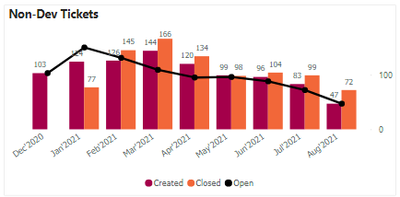
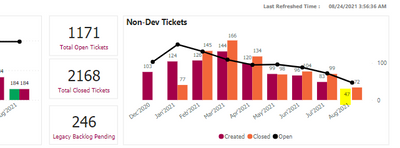
I have a strange issue where my graph is complete fine at desktop level and at service level my graph is not showing correctly after publishing.
See the below screenshots, My created bar is not showing up in the service. I have tried altering the inner padding and all but nothing changes, what is wrong here?
And it was working absolutely fine 1 week before when I checked.
Desktop Level:
Service Level:
Regards,
Himanshu
Solved! Go to Solution.
@Anonymous , Clear the cache of the browser and publish again, Clear cache, refresh and test once.
If, it does not work check if it is because of August 2021? check for any open issue https://community.powerbi.com/t5/Issues/idb-p/Issues
@Anonymous , Clear the cache of the browser and publish again, Clear cache, refresh and test once.
If, it does not work check if it is because of August 2021? check for any open issue https://community.powerbi.com/t5/Issues/idb-p/Issues
Share feedback directly with Fabric product managers, participate in targeted research studies and influence the Fabric roadmap.
Check out the February 2026 Power BI update to learn about new features.
| User | Count |
|---|---|
| 50 | |
| 49 | |
| 35 | |
| 15 | |
| 14 |
| User | Count |
|---|---|
| 91 | |
| 75 | |
| 41 | |
| 26 | |
| 25 |