cancel
Showing results for 
Search instead for 
Did you mean: 

July 7 - July 17 | Round 2 of the Power BI Dataviz World Championships. Don't miss your chance! Learn more

Reply
Anonymous
Not applicable

Issue with Dynamic Slicer and Dynamic Conditional chart format

Hi Experts,


I am using a Line and Clustered column chart to plot measures that can be below or above the line target. The challenge is to have a conditional format whenever the measure is up or down the target line. I managed that creating two extra columns (Above e Below the target) in order to have two series on the chart.


I am using a disconnected slicer to dynamically change the measures in the chart (below):


Value Selection =

  VAR Selection = SELECTEDVALUE(KPIs[KPI],"All")

  RETURN

  Switch(True(),

  Selection = "Case Fill Rate AT",[mCaseFillRateAT],

  Selection = "Case Fill Rate BT",[mCaseFillRateBT],

  Selection = "Supply Perfect Orders AT",[mSupplyPerfOrderAT],

  Selection = "Supply Perfect Orders BT",[mSupplyPerfOrderBT],

  Selection = "Perfect Orders AT",[mPerfOrderAT],

  Selection = "Perfect Orders BT",[mPerfOrderBT],

  [mCaseFillRateAT]).


Using Control key I can select more than one option, however I cannot see the different colours because the selector considers as one value (Value Selection).


Any suggestion how I can have conditional format in this chart still using my dynamic selection?


Cheers,


Gilly

1 ACCEPTED SOLUTION

hi, @Anonymous 

The forum is under maintenance, and I don't notice your reply.

If you want a line in the chart, just create a measure and drag it into Line value field, what is your difficult point of it.

Could you share a simple pbix file for us have a test?


Best Regards,

Lin

Community Support Team _ Lin
If this post helps, then please consider Accept it as the solution to help the other members find it more quickly.

View solution in original post

4 REPLIES 4
Anonymous
Not applicable

Hi @v-lili6-msft ,


This is the code I am using in the Valeu Selection in the slicer.

Value Selection =
VAR Selection = SELECTEDVALUE(KPIs[KPI],"All")
RETURN
Switch(True(),
Selection = "Case Fill Rate",[mCaseFillRate],
Selection = "Supply Perfect Orders",[mSupplyPerfOrder],
Selection = "Perfect Orders",[mPerfOrder],
[mCaseFillRate])

hi, @Anonymous 

The forum is under maintenance, and I don't notice your reply.

If you want a line in the chart, just create a measure and drag it into Line value field, what is your difficult point of it.

Could you share a simple pbix file for us have a test?


Best Regards,

Lin

Community Support Team _ Lin
If this post helps, then please consider Accept it as the solution to help the other members find it more quickly.
v-lili6-msft
Community Support
Community Support

hi, @Anonymous 

Sample data and expected output would help tremendously.
Please see this post regarding How to Get Your Question Answered Quickly:
https://community.powerbi.com/t5/Community-Blog/How-to-Get-Your-Question-Answered-Quickly/ba-p/38490


Could you please share a simple sample pbix file and your expected output?


Best Regards,

Lin


Community Support Team _ Lin
If this post helps, then please consider Accept it as the solution to help the other members find it more quickly.
Anonymous
Not applicable

Hi @v-lili6-msft ,


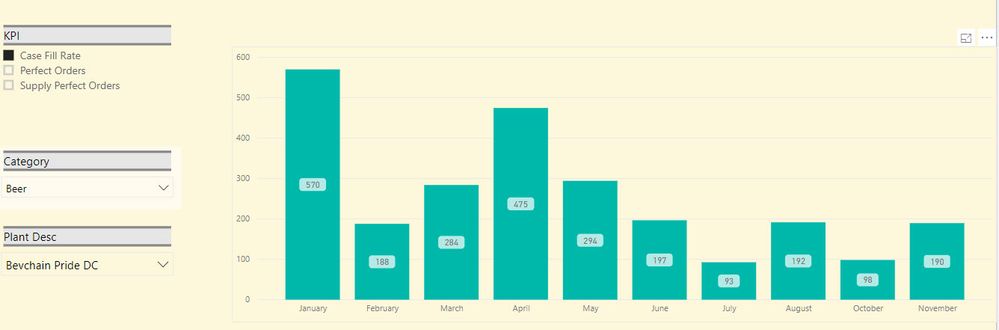
I am uploading the current chart that I have (pic 1) and the one that I would like to have (pic 2). Not sure whether using this logic is possible to have this done.


Pic 1:

Pic 1.jpgPic 2.jpg

Helpful resources

Announcements
FabCon and SQLCon Barcelona 2026

FabCon & SQLCon – Barcelona 2026

Join us in Barcelona for FabCon and SQLCon, the Fabric, Power BI, SQL, and AI community event. Save €200 with code FABCMTY200.

60 days of Data Days Carousel

Data Days 2026

Join Fabric Data Days 2026: 60 days of free live/on-demand sessions, challenges, study groups, and certification opportunities.

Power BI DataViz World Championships carousel

Power BI DataViz World Championships - June 2026

A new Power BI DataViz World Championship is coming this June! Don't miss out on submitting your entry.