Join us at FabCon Atlanta from March 16 - 20, 2026, for the ultimate Fabric, Power BI, AI and SQL community-led event. Save $200 with code FABCOMM.
Register now!The Power BI Data Visualization World Championships is back! Get ahead of the game and start preparing now! Learn more
Hi all,
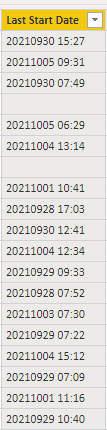
As per the below screenshot, when I import a JSON file into Power BI, there is an issue with the formatting of the date.
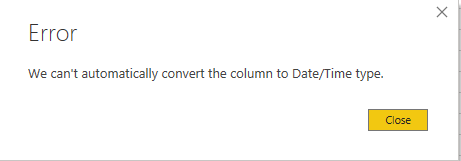
When I try and change the column to Date/Time using the 'Date Type' option in the column tools, I get the following erorr - 'We can't automatically convert the column to Date/Time type'.
Please can anyone advise on the best way to achieve the date format of dd/mm/yyyy hh/mm. Any help is greatly appreciated!
Solved! Go to Solution.
Hi @Anonymous
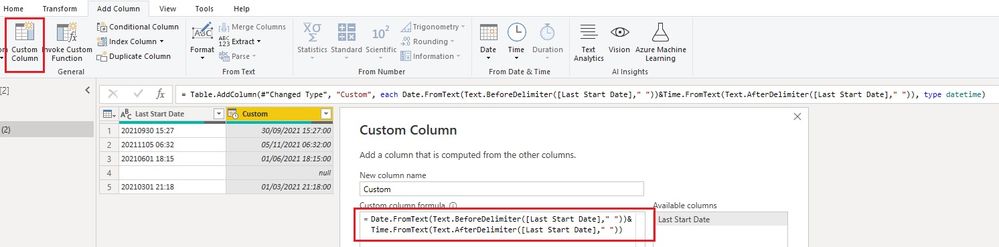
You can add a custom column with below code in Power Query editor and use it to replace the original column.
Date.FromText(Text.BeforeDelimiter([Last Start Date]," "))&Time.FromText(Text.AfterDelimiter([Last Start Date]," "))
Or if you want to transform the original column directly, it would be:
= Table.TransformColumns(#"Changed Type", {{"Last Start Date", each Date.FromText(Text.BeforeDelimiter(_," "))&Time.FromText(Text.AfterDelimiter(_," ")), type datetime}})
Best Regards,
Community Support Team _ Jing
If this post helps, please Accept it as Solution to help other members find it.
Hi @Anonymous
You can add a custom column with below code in Power Query editor and use it to replace the original column.
Date.FromText(Text.BeforeDelimiter([Last Start Date]," "))&Time.FromText(Text.AfterDelimiter([Last Start Date]," "))
Or if you want to transform the original column directly, it would be:
= Table.TransformColumns(#"Changed Type", {{"Last Start Date", each Date.FromText(Text.BeforeDelimiter(_," "))&Time.FromText(Text.AfterDelimiter(_," ")), type datetime}})
Best Regards,
Community Support Team _ Jing
If this post helps, please Accept it as Solution to help other members find it.
Hi, thank you for this! The top method works although ideally I would need to transform the original column. I can see the code pasted but how do I transform the column?
@Anonymous
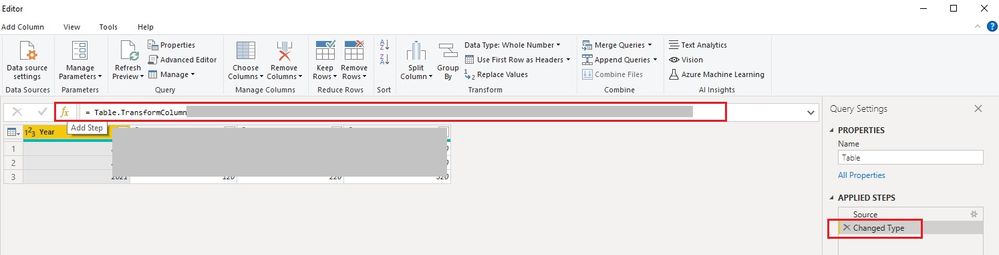
See the formula bar above the table? You can click on "fx" to add a step and paste the code there. My previous step is "Changed Type", so I have it as the first variable in Table.TransformColumns() function. Replace it with your previous step name and don't forget the "#". You will see its previous step in the formula bar after clicking "fx".
BR,
Jing
Here's one way to do it with a custom column. Or you could adapt this formula into a custom transform column step.
= DateTime.From(Date.FromText(Text.BeforeDelimiter([DateTime], " "))) + Duration.FromText(Text.AfterDelimiter([DateTime], " "))
Pat
To learn more about Power BI, follow me on Twitter or subscribe on YouTube.
@Anonymous , In power query try a new column
= Date.FromText([Date])
//Change data type to date
https://docs.microsoft.com/en-us/powerquery-m/date-fromtext
In column format choose the format you want(Column tools)
The Power BI Data Visualization World Championships is back! Get ahead of the game and start preparing now!
Check out the November 2025 Power BI update to learn about new features.
| User | Count |
|---|---|
| 66 | |
| 44 | |
| 40 | |
| 29 | |
| 19 |
| User | Count |
|---|---|
| 200 | |
| 126 | |
| 103 | |
| 70 | |
| 53 |