Join us at FabCon Atlanta from March 16 - 20, 2026, for the ultimate Fabric, Power BI, AI and SQL community-led event. Save $200 with code FABCOMM.
Register now!The Power BI Data Visualization World Championships is back! Get ahead of the game and start preparing now! Learn more
I have 15 pyaments and 10 are non-zero payments. I need calculate average for non-zero payments
Actul average = 45895.35/10 = 4589.535.
But when I used DAX formula as below. It counts 22 rows and gives me average for non-zero payment is 2086.15.
Please help. Thanks
Avg_NonZero_Payment_Amt = CALCULATE(AVERAGE(Measure]),FILTER(Measure,Measure[Payment_Amt]<>0))
CountRows = Calculate(countrows(Measure), FILTER (Measure,Measure[Payment_Amt]<>0))
Solved! Go to Solution.
I guess your Payment_Amt may have multiple entries for same date. That's the reason why it will count 22 rows for dates.
In this scenario, you should build a "Total Payment_Amt" measure, then write your CountRows measure like:
CountRows =
CALCULATE (
COUNTROWS ( VALUES ( Measure[Date] ) ),
FILTER ( VALUES ( Measure[Date] ), [Total Payment_Amt] <> 0 )
)
And you need to use Total Payment_Amt divided by CountRows.
Or you can try to replace those 0s with BLANK(). Average() function will ignore empty cells automatically.
Regards,
Thank you v-sihou-msft! I was having this same issue and this solution was exactly what I was looking for!
I guess your Payment_Amt may have multiple entries for same date. That's the reason why it will count 22 rows for dates.
In this scenario, you should build a "Total Payment_Amt" measure, then write your CountRows measure like:
CountRows =
CALCULATE (
COUNTROWS ( VALUES ( Measure[Date] ) ),
FILTER ( VALUES ( Measure[Date] ), [Total Payment_Amt] <> 0 )
)
And you need to use Total Payment_Amt divided by CountRows.
Or you can try to replace those 0s with BLANK(). Average() function will ignore empty cells automatically.
Regards,
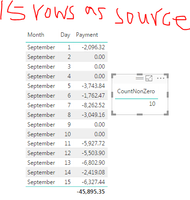
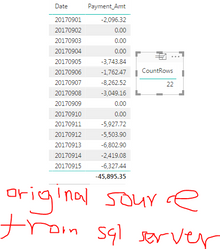
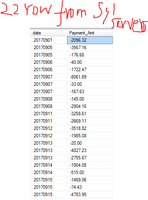
When I just use 15 rows as data source and rowcount=10. (1st screenshot) But with my original data source, the rowcount =22 (2nd screenshot). I checked orignal data in sql server and indeed they are 22 rows (3rd screenshot)
Here is my two questions.
1) Does powerbi sum the payment based on each day already? I think it does
2) I do need sum them based on each day, then filter based on sum(payment_Amt)<>0. Which DAX formula should I use? Thanks.
You can't really do it that way. Your measure is 0 in the context of the row of your table visualization but not in just any context. You will need to probably do a SUMMARIZE and then take the average. See this design pattern here:
https://community.powerbi.com/t5/Community-Blog/Design-Pattern-Groups-and-Super-Groups/ba-p/138149
The Power BI Data Visualization World Championships is back! Get ahead of the game and start preparing now!
| User | Count |
|---|---|
| 63 | |
| 55 | |
| 42 | |
| 41 | |
| 23 |
| User | Count |
|---|---|
| 167 | |
| 135 | |
| 120 | |
| 79 | |
| 53 |