cancel
Showing results for 
Search instead for 
Did you mean: 

The Power BI Data Visualization World Championships is back! Get ahead of the game and start preparing now! Learn more

Reply
EaglesFly123
New Member

Issue Calculating Count when using Measure to Filter Data

I am having issue crafting a measure to display the total number of records based on a measure displayed in a Table.  I would have thought this was easy, especially after seeing This Thread.  However, my calculation is not coming out with the correct value.

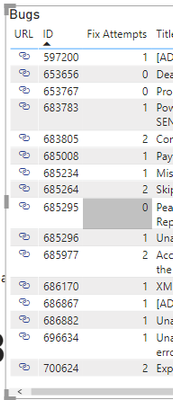
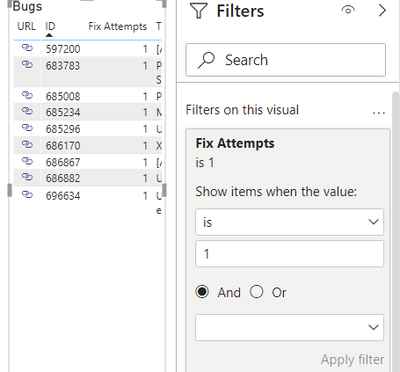
Below is the data being displayed based on selected filters and relationships.  It is properly displaying the expected ID's and it has the proper results for the Fix Attempts Measure.  I am trying to get the total number of records that had Fix Attempts = 1.  As you can see my calculation is not giving the correct result.  If I set a visual Level filter for Fix Attempts =1, the rows that should make up the calculation are properly displayed.

Here is my measure 


With 1 Fix = 
CALCULATE(
    DISTINCTCOUNT(Bugs[WorkItemId]),
    FILTER(Bugs,Bugs[Fix Attempts]=1))


 Here is the measure total, for the below data, which is off.

Measure Result.png

Data Table (all coming from table - Bugs)

Displayed Data.png

Data filtered with Visual level filter, that shows my measure result should be 9, for the data displayed

Data with Visual Level Filter.png

1 ACCEPTED SOLUTION

Hi,

Try this measure

With 1 Fix = CALCULATE(DISTINCTCOUNT(Bugs[WorkItemId]),FILTER(values(bugs[id]),[Fix Attempts]=1))

Regards,
Ashish Mathur
http://www.ashishmathur.com
https://www.linkedin.com/in/excelenthusiasts/

View solution in original post

4 REPLIES 4
selimovd
Super User
Super User

Hey @EaglesFly123 ,


try the following measure:

With 1 Fix =
CALCULATE(
    DISTINCTCOUNT( Bugs[WorkItemId] ),
    Bugs[Fix Attempts] = 1
)


If you need any help please let me know.
If I answered your question I would be happy if you could mark my post as a solution ✔️ and give it a thumbs up 👍
 
Best regards
Denis
 

HI @selimovd 


When I do that, I get an error - A function 'CALCULATE' has been involved in a True/False expression that is used as a filter expression.  This is not allowed.

Hey @EaglesFly123 ,


what is Bugs[Fix Attempts]?

Is that a column or a measure?


Best regards

Denis


Hi,

Try this measure

With 1 Fix = CALCULATE(DISTINCTCOUNT(Bugs[WorkItemId]),FILTER(values(bugs[id]),[Fix Attempts]=1))

Regards,
Ashish Mathur
http://www.ashishmathur.com
https://www.linkedin.com/in/excelenthusiasts/

Helpful resources

Announcements
Power BI DataViz World Championships

Power BI Dataviz World Championships

The Power BI Data Visualization World Championships is back! Get ahead of the game and start preparing now!

December 2025 Power BI Update Carousel

Power BI Monthly Update - December 2025

Check out the December 2025 Power BI Holiday Recap!

FabCon Atlanta 2026 carousel

FabCon Atlanta 2026

Join us at FabCon Atlanta, March 16-20, for the ultimate Fabric, Power BI, AI and SQL community-led event. Save $200 with code FABCOMM.